所有作品均暂无更新
基于 PHP + MongoDB 构建的网络小说网站管理系统,为骏九文化传媒提供小说发布、内容管理、用户管理及服务器运维等一站式解决方案。
| 层级 | 技术 |
|---|---|
| 后端语言 | PHP 7.4+ |
| 数据库 | MongoDB 4.0+ |
| PHP MongoDB 驱动 | mongodb/mongodb (PHP Library) + 原生 Driver |
| 前端框架 | Bootstrap 3 / Tailwind CSS (CDN) |
| JavaScript | jQuery, Chart.js, Resumable.js, WebSocket |
| 依赖管理 | Composer |
| 其他库 | SimplePie (RSS 解析), Parsedown (Markdown), TCPDF (PDF 生成) |
batata/
├── api/                     # API 接口层
│   ├── header.php           # 全局配置、工具函数库
│   ├── bookinfo.php         # 书籍详情 API
│   ├── chapter.php          # 章节内容 API
│   ├── feed.php             # RSS Feed 生成
│   ├── download/            # 小说 TXT 文件存储目录
│   ├── images/              # 书籍封面图
│   ├── tomato_*.php         # 番茄小说平台 API 适配
│   └── list.php             # 书籍列表 API
│
├── blog/                    # 管理后台模块
│   ├── sign_in.php          # 登录
│   ├── sign_up.php          # 注册
│   ├── UserManager.php      # 用户管理类(MongoDB 操作)
│   ├── article.php          # 文章详情页
│   ├── article_admin.php    # 文章管理(CRUD)
│   ├── novel_admin.php      # 小说管理(含七猫+番茄书籍信息头)
│   ├── chapter_admin.php    # 章节管理
│   ├── user_admin.php       # 用户管理
│   └── vendor/              # blog 模块 Composer 依赖
│
├── mongo/                   # MongoDB 可视化管理工具
│   ├── index.php            # 数据库浏览器
│   ├── view.php             # 集合/文档查看器
│   └── server.php           # 服务器状态
│
├── mongodb/                 # MongoDB 集合 Schema 定义
│   ├── article_db/          # 文章/小说/章节/评论集合
│   ├── images_db/           # 图片集合
│   ├── rss_feed/            # RSS 订阅集合
│   ├── user_management/     # 用户集合
│   └── test/                # 测试数据集合
│
├── websocket/               # WebSocket 实时通信
│   ├── api.php              # WebSocket 服务端逻辑
│   └── index.php            # WebSocket 客户端页面
│
├── filetransfer/            # 局域网文件传输(PairDrop 风格)
├── vendor/                  # 项目级 Composer 依赖(SimplePie)
│
├── css/                     # 样式文件(Bootstrap, Font Awesome, 自定义)
├── js/                      # JavaScript 库
├── images/ / fonts/ / icons/# 静态资源
├── backups/ / restores/     # 备份与恢复目录
├── upload/ / temp/          # 上传与临时文件
│
├── index.php                # 首页(新闻资讯/企业文化/服务展示)
├── read.php                 # 小说阅读器
├── flashx.php               # 快传(文件分享)
├── filemanager.php          # 服务器文件管理器
├── works_admin.php          # 作品管理(TXT 文件编辑)
├── image_admin.php          # 图片管理
├── backup.php               # 全站备份(文件 + MongoDB)
├── migrate.php              # 数据导入/迁移
├── openapi.php              # 开放 API 调试台
├── resumable_upload.php     # 断点续传后端(Resumable.js 协议)
├── rss.php                  # RSS 订阅管理
├── products.php             # 作品展示页
├── markdown.php             # Markdown 编辑器
├── mdreader.php             # Markdown 阅读器
├── status.php               # 服务器监控仪表盘
├── monitor.php              # 服务器指标 API
├── mongo.php                # MongoDB 状态监控
├── system.php               # 系统信息
├── player.php / play.php    # 媒体播放器
├── download.php             # 下载管理
├── cloudclip.php            # 云剪贴板
├── joinus.php               # 招聘页面
├── aboutus.php              # 关于我们
└── sample.php # 文章详情/模板页getVolumeByChapterID)filemanager.php)mongodump 集成)status.phpmongo.phpflashx.php / filetransfer/)manifest.json)| 数据库 | 集合 | 说明 |
|---|---|---|
article_db |
articles |
网站文章/页面内容 |
article_db |
chapters |
小说章节正文 |
article_db |
tomato_books |
番茄小说元数据 |
article_db |
qimao_books |
七猫小说元数据 |
article_db |
comments |
评论 |
article_db |
messages / replys |
留言与回复 |
article_db |
clipboard |
云剪贴板数据 |
images_db |
images |
图片资源 |
rss_feed |
letters / articles |
RSS 订阅与文章 |
user_management |
users |
用户账户信息 |
mongodb、zip、mbstring、dom、gd# 1. 克隆项目
git clone <your-repo-url> batata
cd batata
# 2. 安装 PHP 依赖
composer install
cd blog && composer install && cd ..
# 3. 确保以下目录存在且 Web 用户可写
mkdir -p backups backups/books restores upload temp api/download
chmod -R 755 backups restores upload temp api/download
chown -R www-data:www-data backups restores upload temp api/download # 按实际环境调整
# 4. 确保 MongoDB 运行在 localhost:27017
# 5. 配置 Web 服务器将网站根目录指向 batata/
# 6. 访问网站首页,通过 /blog/sign_up.php 注册管理员账号client_max_body_size 10G),以支持断点续传upload_max_filesize 和 post_max_size 在 php.ini 中满足上传需求核心配置位于 api/header.php:
| 配置项 | 说明 |
|---|---|
$webName |
系统名称,当前为 Batata |
$webTitle |
网站标题(骏九文化) |
$webDescription |
网站描述 |
date_default_timezone_set |
时区(Asia/Shanghai) |
| MongoDB 连接 | 分散在各文件中,默认 mongodb://localhost:27017 |
系统对外提供 RESTful 风格的 API:
GET /api/list.php — 小说列表GET /api/bookinfo.php?book_id=xxx — 小说详情GET /api/chapter.php?book_id=xxx&chapter_id=xxx — 章节内容GET /api/tomato_chapter_list.php?book_id=xxx — 番茄小说章节列表GET /api/tomato_list.php — 番茄小说列表GET /api/feed.php — RSS FeedGET /monitor.php?action=metrics — 服务器实时指标(JSON)POST /resumable_upload.php — 断点续传qimao_createSign)tomato_createSign)本项目为骏九文化内部管理系统,保留所有权利。
Built with PHP + MongoDB · Batata
../ 写出站外的路径穿越问题.agileits-single-img 全局增加 padding: 0 15px,形象宣传图片与内容区宽度对齐padding: 20px 24px; margin: 0 15px#2a2a2a:photo、signature、textart、text2image、text2video、ipgeo、utils、status.style-switcher、.filter-bar、.book-grid、.batata-card-grid、.partner-grid 等共享类补充 15px 水平内边距;.article-body、.markdown-body、.masonry-grid、.timeline-wrap、.agileits_three_comments、.w3_leave_comment、.callbacks_container、.agileinfo-single-icons、.article-rss、.cta-section 新增间距规则;.row.product-grid 抵消负 marginpadding: 0 15px 或等量 margin/images + /upload/videos,音频扫描 /upload/audios<span> 包装器 + ::before 伪元素叠加内白边 + 投影&reading=1 参数,翻页自动保持阅读状态.batata pre 暗色模式统一:边框 #777 灰白,背景 #2d2d2d.single / .gallery / .agileits-about-top 三个 section wrapper 为统一的 .batata 类,集中管理 padding(桌面 40px / 移动 30px)和深色模式背景batata.css 控制,移除 16 个页面中独立的 <style> 覆盖块video.php、podcast.php、latest.php 三页 <style> 开标签丢失导致 CSS 泄露为页面文本aboutus.php 去掉多余 <div class="about"> 外层包裹,修复形象图与 banner 间距异常status.php、ipgeo.php 补充移动端 padding:30px 覆盖,对齐 joins.php 间距rss.php 增加形象宣传图片支持monitor/status.php 移至根目录 status.php,从 Tailwind CSS 独立布局重写为 Batata 站点统一风格(banner + 卡片 + footer)ipgeo.php:box-shadow 白卡、品牌绿标题下划线、浅灰网格卡片agileits-single-img),后台可控显示/隐藏index.php 首页 slider 因摘要/正文长度差异导致切换时高度跳动.rslides 容器 min-height,杜绝跳动partner.php 接口开发文章标题颜色改为品牌绿 #8eb446CLAUDE.md 同步工作流加防护:清理前验证生产文件存在性,操作远程前必须先 git fetchcode_formatter.php 更名为 utils.php,菜单名称改为「实用工具」,系统管理中置于管理后台与 IP 归属地之间hdr-full 同步)ipgeo.php 底部新增基于 Leaflet + OpenStreetMap 的 RIR 分区可视化地图$in 批量查询,消除 N+1(Mongo 连接改为有音频时才建立)JSON_HEX_TAG | JSON_HEX_AMP,防止文件名中 </script> 截断内联脚本will-change: transform,导致 position: fixed 元素相对 body 而非视口定位(移动端底部播放条失效的根因)js/pull-refresh.jswindow.onPullRefresh 自定义刷新动作(flashx.php 以 loadUploadedFiles() 替代整页刷新)fonts/ 目录css/fonts.css,所有 @font-face 指向本地 woff2 文件/css/fonts.cssbatata.css 和 style.css 所有 font-family 统一为 'Raleway', sans-seriffixReadmeImages() 同时处理 Markdown ![]() 和 HTML <img src> 两种相对路径rawBase 根据实际分支名(main/master)动态拼接,兼容不同项目position: sticky; top: 0 替代 fixed; bottom: 0,移动端滚动吸顶更可靠ipgeo.php:IP归属地查询,左侧信息卡片 + 右侧 Leaflet 地图?cat= 参数指定展开的分类#a3d055(原黑色与暗背景融合)<style> 块style.css(2222行)并入 batata.css,36 个页面移除 style.css 引用,统一为单一主样式文件media="print" onload + display=swap),慢网不卡页面渲染news.php / guide.php 移除独立主题/宽度切换,统一由 header 控制rss.php 暗模式完整适配(订阅栏/面板/文章卡片/标题/表单)restfull.php 暗模式适配(API 请求卡片/方法标签/JSON 区/输入框)api/header.php 加载顺序,解决站点名不一致问题documents.php 保留 FA6(工具栏图标需要)header_nav.php 新增暗/亮模式 + 全宽/标准切换图标,localStorage 持久化,所有页面共享状态batata.css 集中管理暗模式样式:body/footer/banner/标题/卡片/表单/表格/markdown/article-body 等通用元素index.php(AI卡片/播报/服务)、aboutus.php(团队/大事记/合作伙伴)、joinus.php(表单/联系信息/反馈)、software.php(产品卡片/按钮)、latest.php(novel-card/section-card)、video.php/podcast.php(媒体卡片)、openapi.php(书籍封面3D效果)、online-works.php(书籍卡片/套餐卡)、third-party-works.php(按钮/产品卡片)news.php / guide.php 工具栏移除独立的主题/宽度切换,统一由 header 控制joinus.php 全面重设计:卡片式布局、圆角表单、用户反馈列表美化index.php 内联样式清理:通知条/播报区/Welcome 图片均改用 CSS 类aboutus.php 大事记重写:硬编码内联样式 → CSS 类 .timeline-*,居中布局<video> 包裹进 broadcast-video-wrap 容器,补齐属性<img> width/height 自动剔除,禁止 URL 相对路径转换podcast.php:AI 播客音频展示/播放/下载,支持封面、连播color.php:在线取色器、配色方案、Pantone 色卡、颜色代码大全media_admin.php:支持 /upload/audios 目录、封面图片选择、标签改名article_admin.php / chapter_admin.php / novel_admin.php:保存时自动将未包裹的 <video> 放入 broadcast-video-wrap 容器,补齐 id/style/preload/controls 属性,<source> 添加 data-mce-fragmentmarkdown.php 工具栏新增「插入音频」「插入视频」按钮,点击插入 HTML5 <audio> / <video> 模板代码flashnote 同步新增音频/视频插入按钮,与 markdown.php 保持一致<video poster="" controls="controls" width="" height=""><source src="" type="video/mp4">article_admin.php / chapter_admin.php / novel_admin.php:新增 relative_urls: false,禁止 TinyMCE 将绝对路径转为相对路径,解决封面图片地址被截断的问题manual/Sys/音频说明.md,介绍两类音频来源(第三方音频 + AI TTS 合成)及制作流程podcast.php 引用更新为音频说明.mdpodcast.php:扫描 /upload/audios 音频文件,卡片式展示,底部播放条(上/下一首、进度条、时间),播完自动连播,有封面显示封面header_nav.php / footer_nav.php:文创商店新增「AI + 播客」菜单;「AI + 文创」→「文创商店」admin/media_admin.php 上传媒体文件支持 /upload/audios 目录,音频格式扩展至 m4a/aac/wma/opus/oga/webaadmin/images/covers/ 下的图片作为音视频封面,网格弹窗展示article_admin.php / chapter_admin.php / novel_admin.php:GetContent 事件中剔除 <img> 的 width/height 属性,图片尺寸由 CSS 统一控制header_nav.php / footer_nav.php:「网页颜色」→「网站配色」;footer 新增网站配色、代码格式化链接restfull.php?url= 打开color.php:在线取色(取色器 + 色相环排序 40 色色盘,HEX/RGB/HSL 实时转换,点击复制)header_nav.php 系统管理新增「网站配色」子菜单footer_nav.php 系统管理新增「网站配色」「代码格式化」链接restfull.php?url= 打开,支持 JSON 格式化/语法高亮css/batata.css:.markdown-body / .article-body 内图片未指定宽度时默认 60% 容器宽并居中(对齐类 .img-left/.img-right/.img-center 不受影响)documents.php / markdown.php / guide.php:样式切换(GitHub ↔ Batata)时重调 Prism.highlightAll(),防止类名变更导致高亮丢失.token-line { display:block } 等),解决 Docusaurus 等文档站代码行挤在一起<pre> 处理增加 .token-line 行识别——逐行提取 textContent 以 \n 拼接,保留换行缩进<article> / <main>,回退到文本最多的 div/section,自动移除脚本/样式/导航/页脚等干扰元素,图片链接相对路径补全code_formatter.php):支持 自动识别 / JSON / JavaScript / TypeScript / CSS / SCSS / LESS / HTML / XML,可选缩进(2/4/Tab),格式化 + 复制 + 示例 + 清空,Ctrl+Enter 快捷键js/beautify/),国内可达、不依赖 CDNdocuments.php「复制Markdown」转换器整体重写:正确还原数学公式(KaTeX→原始 TeX)、脚注、GFM 提示框、[TOC]、<details>、嵌套列表/列表内代码块、无 thead 表格、含反引号的行内/围栏代码等markdown.php、documents.php 文档样式切换器右侧的转换按钮改为仅图标(保留悬停提示)markdown.php:文档样式切换器右侧新增「转换成PDF」「输出Word」按钮@media print 打印样式,只输出正文、保留当前 GitHub/Batata 样式、优化页边距与分页;点击触发浏览器打印,另存为 PDF.doc 一键下载,图片/链接相对路径转绝对,内联表格/代码/引用/CJK 字体样式documents.php:右侧内容区样式切换器同样新增「转换成PDF」「输出Word」按钮,内容取 #content-area,文件名取当前选中导航项;加载外部 iframe 时随切换器隐藏Parsedown.php:新增 normalizeTables() 预处理——为「紧贴上一段落、中间无空行」的表格自动补一个空行,修复表头被并入上一段落、整张表当作纯文本渲染的问题(AI 生成文档常见:表格紧贴冒号行)。带围栏代码保护,只插空行不删内容;回归覆盖正常表/紧贴表/水平线/代码块内竖线/含竖线段落rgba(255,255,255,0.22)online-works.php:带魔法参数 ?need_sub=33333 访问时,页面顶部提示条列出所有需要订阅(VIP)的作品书名;普通访问无变化openapi.php:收费(VIP,vip==1)作品在封面右上角叠加金色锁形「VIP」角标admin/novel_admin.php:保存七猫/番茄书籍信息头时写入 update='header' 标记;加载书籍列表时清空更新时间超过 24h 的头标记,使标记自动过期admin/books_admin.php:已上架书籍操作列的「查看更新」改为按更新状态显示——仅当头 update=header 或章节 update=new/modify 且更新时间在 24h 内时才出现latest.php:书籍信息头 update=header(24h 内)时,卡片显示「《书名》书籍信息有更新」;仅改头、无新章节的书也进入最新列表admin/chapter_admin.php:书籍信息头 24h 内有更新时,章节表格底部显示橙色重要提醒「即使章节未更新也要点击『发布』」,24h 自动过期flashnote/public/app.js:标准预览表格行尾 | 改为可选(兼容 GFM)——| | - … 这类留空首格、行尾无 | 的续行不再掉出表格被当作段落渲染admin/media_admin.php:修复「上传媒体文件」tab 页脚与内容区间距过小——平衡两个 tab 的 <div> 嵌套(媒体 tab 原先漏闭合 .container),使间距与「上传图片」tab 一致guide.php 暗主题优化#1a1a2e/#252540…)统一替换为中性灰(页面 #1e1e1e、面板 #2a2a2a、激活 #323232、边框 #3a3a3c 等);品牌绿与蓝色链接保留#e0e0e0)、表格配色不协调(两种样式统一暗色交替行)var() 元素Parsedown.php<details> 折叠块 + 围栏代码块)渲染为空:normalizeDetailsBlocks 中保护围栏的正则存在灾难性回溯,大文档下击中 PCRE 回溯上限使 preg_replace_callback 返回 null → 整篇为空;改为无 dotall 的 tempered greedy 写法documents.phpmanual/pblog 更正为实际的 manual/Pblog(Linux 大小写敏感,原路径 is_dir 匹配不上导致日记列表读不到文件)documents.phpaction 的 AJAX 请求会话过期时返回 401(不再把登录页 HTML 塞进右侧面板),前端整页跳转到登录流程;登录后自动回到本页并打开当初点击的那篇文档manual/ 全部子目录,默认 /manual),仅管理员可见;服务端加管理员校验、目标目录 manual/ 范围校验、同名拒绝header_nav.php — 顶部右侧图标.flashnote-icon 死样式admin/maintenance.php 系统设置「哲学链接地址」选择器默认列出 /manual/Philosophy 下的 md 文档mdreader.php 返回按钮后新增「关闭页面」按钮6.0.0/6.4.0/6.5.0 三个版本;现统一为自托管单一版本 6.5.0(6.x 内向后兼容,是三者的安全超集)css/fontawesome6/(all.min.css + 8 个 webfont:brands/regular/solid/v4compat 各 woff2+ttf),36 个 PHP 文件的 FA6 <link> 统一改为本地绝对路径 /css/fontawesome6/css/all.min.cssheader_nav.phpcurrentColor 随字号缩放并支持 hover 变色,不再依赖栅格图片)index.php 顶部通知条改用 sessionStorage:本次浏览会话内关闭后不再弹出,关闭浏览器(新会话)后重新出现.callbacks_tabs 由 left:48% 改为 left:50% + transform:translateX(-50%) 真正水平居中,媒体查询同步guide.php 移动端下拉导航菜单被吸顶工具栏遮挡修复:给 banner 加更高层级(z-index:101),使菜单显示在工具栏之上markdown.phpfavicon.ico 图标(server.js 增加 .ico MIME、favicon 复制到 public/)FlashNote 改为「闪电笔记」index.php 顶部新增可开关的横幅(喇叭图标 + 文案 + 可选链接 + 关闭按钮),关闭状态用 localStorage 记忆,文案/链接变化后重新出现index.php/guide.php 的通知框在 banner 之后、不加负边距(避免覆盖 banner)sys_db.site,在 admin/maintenance.php「系统设置」卡片中统一编辑noticeBoxPages 从 MongoDB 读出为 BSONArray 对象导致 is_array/in_array 判断失效、通知框始终不显示的问题markdown.php — 文件管理增强guide.phpsoftware.php、online-works.php、video.php、gallery.php、third-party-works.php 介绍文档路径从 ./manual/ 迁至 ./manual/Sys/guide.php — 左侧导航重构为递归树/manual/documents/,递归扫描目录和文件生成多级导航树1-快速入门 → 快速入门)global $guideDir 导致文件路径为空的 bugguide.php 暗模式下 GitHub 文档样式的代码块背景与代码文字背景统一,修复工具栏暗色切换细节documents.php 的「Markdown文档」导航递归解析 manual/ 子目录,支持任意层级目录展开;站长日记目录保持独立markdown.php 新建目录时可从下拉框选择 /manual 或任意层级子目录,默认 /manual/manual 的任意层级子目录,默认 /manualmanual/ 范围内Pblogguide.php — 用户指南工具栏与布局修复.container 的 ::before/::after 清除浮动伪元素在 display:flex 下被当作 flex 项目,配合 justify-content:space-between 占据两端把真实内容挤向中间;禁用这两个伪元素后标题贴左、图标组贴右batata.css 的 body{height:100%} 把 body 盒子锁死为一屏高,position:sticky 的工具栏只能在此范围内吸顶;本页改为 body{height:auto;min-height:100vh} 让 body 随内容增长,工具栏全程吸顶sticky 的 top 由 20px 调整为 60px(与右侧目录一致),停在工具栏下方markdown.php — 导航与文档管理增强manual/ 子目录将文件移入,仅管理员可用manual/ 下子目录,每个目录可展开查看内含文件manual/ 下创建,仅管理员可见guide.phpmanual/guide/ → manual/Guide/guide.php — 用户指南全面升级/manual/guide/ 目录下 .md 文件,自动生成导航项books_admin.php — 书籍下载/upload/books/_book_ 前缀文件article_admin.phpfilemanager.phpadmin/qimao_admin.phpupdate=new|modify 筛选admin/novel_publish_1.phpadmin/chapter_admin.php — 发布链路多项修复location.reload() 会重放这份保存 POST,把刚发布的状态又写回。改用 PRG(Post/Redirect/Get) 彻底根治chapter_id 去重不彻底导致的循环复制问题chapter_id/index 类型不统一(字符串 vs 整数)导致与历史章节混排时排序错乱;已批量清洗历史数据\r\n,与 </p>→\n 转换叠加)<p> 标签开头补全角空格缩进,不再 strip 后用不同函数重建(避免破坏对齐/加粗等格式)upgrade==0)改名为「导入」admin_nav.php,与 novel_admin 保持一致;操作列「预览」改名「查阅」;新建/编辑表单字段布局改为 label:input 同一行admin/works_admin.phpbasename() 防路径穿越,目标文件名已存在则拒绝admin/novel_admin.phpqimao_admin.phpimg_00000.png + 选择封面),响应式网格布局?edit)latest.phpCargo.toml)重新发起实时请求,21 个软件仓库累积后长达十余秒;改为无论成功/失败都写入缓存,缓存过期时先用旧数据渲染,实际刷新通过 fastcgi_finish_request() 推迟到响应发送之后的后台执行。实测由约 12.5s 降至 0.2~0.3sbook_id 与不指定时,章节筛选统一为「updated_at 24 小时内 且 update 为 new/modify」;指定 book_id 时按章节顺序排列,不指定时按发布时间倒序展示全部小说img_{book_id}.jpg 不存在时回退显示默认封面 api/images/img_00000.pngread.phprefresh 处理分支一并下线documents.php — 技术博客manual/ upload/(含子目录)的递归目录树,可逐级折叠展开admin/filemanager.phpREADME.md CHANGELOG.md CLAUDE.md LICENSE,文件名可点击在预览窗口查看内容;预览窗口去掉人为 500ms 延时,点击立即弹出.env(曾 HTTP 200,属密钥泄露风险);.env/.gitignore 从 filemanager 白名单移除;二者不再部署到生产batata.css(统一以 css/batata.css 为准)shellexec.php(错误日志外泄)、tailwind_icon.php、testlogging.php、testphp.php、zip.php、docreader.php、collections_stats.php,以及遗留的 download.php、backup.php、migrate.php、viewer.php、view_collections.php、admin_nav.php、bootstrap.php、copy2clip.php、.DS_Store 等admin/filemanager.php — 文件保存位置动态化upload/ manual/ backups/ restores/ api/download/ 及其子目录(最多 2 层)admin/media_admin.php 实现admin/article_admin.php — 搜索跨越全部版块与专题location/subject 改为固定 all,点击搜索不再受当前下拉筛选影响,始终跨全部版块和全部专题搜索header_nav.php「加入我们」由直链改为下拉:首项「联系我们」关联 joinus.php,并把原「AI + 文创」下的分隔线与实用网址(iHover/AweSome/BootStrap/ModelRank)移入其中admin/media_admin.php — 上传位置与目录管理images/ api/images/ admin/images/ 及其子目录、子目录的子目录;媒体 tab 以 upload/videos/ 为根递归video.php — 今日视频/upload/videos 子目录视频,按目录分组展示admin/article_admin.php — TinyMCE 本地文件选择器file_picker_callback):弹出选择器可切换目录、点选本地图片/媒体文件回填地址picker_action(dirs/files) AJAX(仅 admin,目录白名单 + 禁 .. 越级)/upload/ai_news → /upload/videos/ai_news;/upload 根下散落视频 → /upload/videos/(要闻播报类归入 /upload/videos/broadcast/),同步更新文章正文与 ai_news_videos.videos 路径引用ai-news-video 技能header_nav.php / footer_nav.php):文创商店 → AI + 文创,定制开发 → AI + 开发,在线网文 → AI + 网文,今日视频 → AI + 视频,摄影欣赏 → AI + 美图;「文创商品」移至「AI + 美图」之后manual/软件作品介绍.md / 在线作品介绍.md / 摄影作品介绍.md / 第三方作品介绍.md,分别由对应栏目页加载;正文统一用 <details><summary>这里有什么</summary> 折叠(与 视频说明.md 一致)video.php 今日视频页manual/视频说明.md,参照 software.php)position:fixed 被 body transform/will-change 破坏导致的非全屏定位gallery.php 灯箱移动端全屏居中(同源问题:打开时清除 body 的 transform/will-change)video.php + admin/media_admin.php + 新技能)video.php「今日视频」页:参照 latest.php 骨架 + media_admin 卡片样式,扫描 /upload/videos 按时间倒序卡片展示,用 ai_news_videos.videos 元数据丰富;文创商店菜单(header/footer)在「在线网文」与「文创商品」间新增「今日视频」入口media_admin.php 媒体 tab 增强:article_db 选书 tomato_books → 选章节 chapters)与「视频脚本」(textarea + 编辑/锁定切换)skill_action、material_action AJAX 端点(仅 admin);skill_path / material_* / video_script 随保存持久化ai-video-script:据视频记录素材(章节正文)按剧透口吻生成 <60 秒视频脚本,写入 video_script;配套 edge-tts + 书封背景 + 字幕的竖屏 mp4 合成流水线latest.php — 软件版本汇总表与版本检测ai-software-input:新增 detectRepoVersion(),按 release/tag → package.json/pyproject.toml/pubspec.yaml/Cargo.toml/tauri.conf.json → CHANGELOG 兜底的优先级解析仓库真实最新版,修复 Python 等非 Node 项目(如 Vibe-Trading)汇总表「当前版本号 > 最新版本号」倒挂问题id=sw-card-N,汇总表名称点击跳转到对应卡片localeCompare)表头支持点击升/降序,两列互斥、仅重排行不影响锚点nowrap,表格外层加横向滚动容器,窄屏可横向滑动ai-software-input<GitHub仓库URL> 软件的基本信息〔,价格XXXX〕」,自动抓取仓库 README/元信息,生成中文软件基本信息并 upsert 到 software_db.products仓库名(首字母大写) - README大标题软件名;价格未给默认 9.9;自动带 github_repo(关键字)与 skill_path(默认本技能路径)admin/software_admin.php — 软件管理增强skills/技能名/SKILL.md,支持新建/选取)+ 「下载」另存 SKILL.mdgithub_repo / skill_path 字段;技能读写 AJAX 限定 skills/ 下且文件名 SKILL.mdadmin/article_admin.phpai-news-update(AI 要闻自动录入)技能使用备忘admin/maintenance.php — 系统维护页面(原 migrate.php 改名)migrate.php → maintenance.php,涵盖 MongoDB 迁移 + 系统设置 + 维护模式/tmp/batata_maintenance.lock 文件锁控制sys_db.site/images/ 目录选图;哲学文件选择器:浏览 manual/ 目录选 mdsys_db.site 统一控制api/version.php — 站点设置加载loadSiteSettings() 从 MongoDB sys_db.site 读取,失败回退默认值admin/user_admin.php 风格对齐 software_admin,按钮卡片化joinus.php 标题 → Contact us + 形象图片 + 白色背景容器guide.php / latest.php 新增形象宣传图片Parsedown.php — 表格解析增强| 自动区分有边框/无边框表格,输出 <table class="table-bordered"> 或 table-borderlessmarkdown.php — 表格分模式渲染github-markdown.css 默认样式admin/backup.php — 备份功能修复backupAPP 重命名backupAPP/backupWebsite 增加 is_readable() 防御检查,跳过不可读文件ZipArchive::close() 权限拒绝的问题documents.php — 内嵌窗口布局优化openInContent 增加 keepPadding 参数api/version.php:V1.8.5 → V1.8.7admin/uploads/、images/assets/,加入 .gitignoremarkdown.php — 顶部图标优化icons/icon_32x32.png(30px 高度,比标题文字略高),添加 display:inline 防止全局 img { display:block } 导致换行documents.php — 内嵌窗口布局优化height: 100vh)height: calc(100vh - 70px))openInContent 函数增加 keepPadding 参数区分两种行为.doc-main 默认 paddingopenapi.php / read.php — 布局优化latest.php — 更新监控全面升级package.json / CHANGELOG);支持 master 分支仓库guide.php — 两栏文档导航filemanager.phpsoftware.php:软件产品→软件开发;third-party-works.php:外部商品→文创商品online-works.php:网络小说→网文订阅api/version.php:$siteName 调整为「穷鬼悟道」news.phpbanner + header_nav 风格,左侧按 article_db.articles(location='新闻资讯')的 subject 分类导航,右侧经典阅读区history.pushState 同步地址栏,支持刷新直达、前进/后退)http→https 及 ../ 路径规范化;面包屑加大加粗;响应式布局subject 由「AI要闻」改为「要闻播报」article_admin 文章列表支持按作者/创建时间/更新时间排序;标题超 30 字截短显示(悬停看完整标题)novel_admin 作品列表支持按 Book_ID/书名/作者/创建时间/更新时间/状态排序novel_publish 章节列表支持按卷号/书号/章节号/标题/更新时间/状态排序;卷号移到书号之后media_admin 表单标题改为「输入图片/媒体信息」,编辑载入显示「编辑图片/媒体信息」user_admin 测试数据种子抽取到 admin/seed_users.php,「生成测试数据」加强风险确认提示migrate.php 的头像路径修复卡片footer_nav.php 统一版 + index.php 内联版)admin/media_admin.php)tab-panel/tab-btn 卡片式设计,替代旧版蓝色按钮)</div>,两个 Tab 底部间距统一api/version.php:集中管理 $Version、$softWareName、$siteName 及 toHttps/extractFirstImage 共享函数api/header.php 改为 require_once 'version.php' 获取版本号api/extract_helpers.php(合并至 version.php),10 个引用页面同步更新admin/media_admin.php):修复编辑按钮无反应的 bug —— editMediaFile 的参数名 location 遮蔽了全局 window.location,导致内联编辑跳转静默失败(既不跳转也不报错),改用 window.location.hrefadmin/media_admin.php 纳入版本控制footer_nav.php、admin/admin_footer.php、markdown.php、flashx.php 统一改用 pulltorefreshjs 的 UMD 浏览器构建(dist/index.umd.min.js)并加 typeof 守卫,消除 PullToRefresh is not definedhttp://fonts.googleapis.com 字体表改为 https://,修复 HTTPS 下被浏览器硬拦截、字体不加载的问题js/tailwindcss-3.4.js 的生产环境弃用 console.warn;article.php 改用本地文件替代 cdn.tailwindcss.comimage_admin.php → media_admin.php/upload 及子目录,自动扫描子目录选项images_db.images,媒体 → ai_news_videos.videosaudio/*,video/*move-top.js/easing.js/UItoTop 重复代码,统一由 footer_nav.php 提供move-top.js 改用浏览器原生 scrollTo({behavior:'smooth'})[^id] 引用 + [^id]: 定义,按引用顺序编号,文末汇总带回链;代码块保护[^id] 按首次出现顺序自动编号,渲染为上标链接[^id]: 内容 从正文移除,汇总到文末(带回链 ↩),定义内容支持行内 Markdown/~~~)内容不受脚注影响;缩进代码块(4 空格/Tab)内的[^id]:不被误提取为定义,[^id]` 不被替换为引用batata.css 新增脚注样式(.footnotes-sep、ol.footnotes、sup.fn-ref、a.fn-back)move-top.js/easing.js/UItoTop 重复代码footer_nav.php 提供,scrollSpeed 调整为 400msmove-top.js 改用浏览器原生 scrollTo({behavior:'smooth'}),GPU 合成线程执行$ 被数学公式吞掉$...$ / <div class="math math-block">...</div>)前,先保护行内反引号代码,避免其中的 $ 被当成公式`$`、`$a^2+b^2=c^2$` 等同行多处含 $ 的行内代码渲染错乱、文字重复的问题$E=mc^2$)仍正常渲染$...$(行内)、<div class="math math-block">...</div> / \[...\](块级),按需加载 KaTeX 渲染{width=640px} 扩展语法,标准与 GFM 预览均支持[TOC] 目录:自动扫描全文档标题生成嵌套目录(仅标准预览)col1 | col2 语法(行首尾无 |)渲染为 GFM 风格仅水平线setBreaksEnabled(true),单换行自动渲染 <br>:--- / :---: / ---:,渲染 text-align:left/center/right;表头行渲染为 <thead><th>col1 | col2 无首尾 |),自动检测并渲染为 .table-borderless(仅水平线);有边框表格保持四边网格<user@example.com> → mailto:、<https://url> 及裸 URL 自动转为可点击链接| 不被误解析);分隔行检查防止纯文本误触.table-bordered 四边网格 / .table-borderless GFM 水平线,raw HTML <table> 默认按有边框处理^...$ + gm),段落中 ``` 不再误触发生成代码块$latestVideo 查询(ai_news_videos.videos 最新一条),修复播报视频区缺少数据源、始终显示占位图的问题==高亮== → <mark>、脚注引用 [^id] → 上标(按引用顺序编号)[^id]: …(保护围栏代码块),解析后追加文末脚注区(带回链)==x==、[^id] 由 marked 分词器自动保持字面,不被解析css/style.css:.rslides li 第二条规则补回 :first-child(原误删),使 JS 初始化前仅显示第一张幻灯片[^id] 渲染为上标(按引用顺序编号),定义 [^id]: … 汇总到文末并带回链--- / *** / ___ 及带空格变体 - - - / * * *,统一渲染为 <hr>> / >> / >>>(及 > > 空格式)嵌套 blockquote==文本== 渲染为 <mark>(黄色背景)`* * *` 等代码内容被斜体/粗体污染的问题`x`、``code 、 npm start `` 等)<details> 折叠块修复normalizeDetails(),为 <details> 折叠块补空行<details> 不被改动,行为与标准预览一致| … | 等被误解析marked@12)渲染 GitHub 扩展语法index.php 及 18 个 .php 页面)中引入的 js/SmoothScroll.min.jsanimationTime≈400ms),导致滚轮垂直滚动明显迟滞;移除后恢复浏览器原生即时滚动.scroll 处理 + CSS scroll-behavior: smooth 提供)<div>/<table>)整块原样透传,消除被解析器切成残留 <p> 导致的大空白间隔<PROVIDER>/<id> 等尖括号占位符时块不闭合、吞掉后续 ## 标题 与 <details> 的问题`...` 内容做 HTML 转义,修复 <PROVIDER>_API_KEY、run_id=<id> 等占位符被当作 HTML 标签解析而消失<details> 折叠块修复normalizeDetailsBlocks() 预处理:自动为 <details> 折叠块补齐空行(块前、<summary> 后、</details> 前后)<details> 折叠正常工作<details> 不受影响新建笔记_2026-06-20_09-21)公元2026年6月20日)和地理位置(浏览器定位 + 逆地理编码)markdown.php:锚点平滑滚动 + scroll-margin-top 防止页面上移batata.css:全局 scroll-behavior: smooth,标题 scroll-margin-top 偏移Ctrl+P)app.jsflashnote/notes/ 迁移至根目录 manual/ 文件夹==高亮文本== 语法支持,渲染为 <mark> 标签(浏览器默认黄色背景)admin/access_denied.php 统一访问拒绝页面(锁图标 + 友好提示)admin/sign_up.php:非管理员注册/编辑时,部门仅可选「其他成员」或自己所在部门,工号/职务只读admin/UserManager.php:头像上传支持格式扩展至 JPEG/PNG/GIF/WebP/BMP/SVG/ICO/AVIF/TIFFadmin/sign_up.php:非管理员角色受限制documents.php:去掉不可靠的文件创建时间,仅显示修改时间;标题改 h1header_nav.php:技术博客图标 hover 变蓝,导航链接调整batata.css:GitHub 样式 h4-h6 标题调整,移动端代码块不换行[TOC] / [toc] 标记:md 文档中独立一行写入,解析后自动替换为目录(<h1>目录</h1> + 嵌套列表)id 锚点(中文/英文/数字),目录链接可跳转,同名标题自动去重<div class="math math-block">...</div> → <div class="math math-block">,行内 $...$ → <span class="math math-inline">github-markdown.css,GitHub 样式与 download.php 完全一致(标题大小、代码块、行高等).markdown-body 亮色代码高亮主题(背景 #f6f8fa,不影响 .article-body 暗色主题)overflow:hidden)js/prism-go.min.js)#content-area .markdown-content 全部规则,消除样式冲突batata.css:新增 .toc 目录边框样式,.markdown-body 完整 Prism token 配色markdown.php:修复 NOWDOC 字符串包裹问题ai_news_videos.videos 记录视频元信息ai-news-video skill:一键生成今日 AI 要闻播报视频category 字段,各分部按工号升序排列upload/ 子目录,自动生成可折叠分组upload / 标签batata.css 引用,右上角 M 图标字体统一#slider4>li 样式移至 <head>,首条预显ai-news-update skill:搜索当日新闻 → 提取配图 → 写入 MongoDBai-news-video skill:取最新 3 条要闻 → TTS 语音合成 → ffmpeg 编码 mp4a:hover 去除下划线(batata.css)/manual 目录属主保持 www-data:www-data--no-owner --no-group 保护服务器文件权限<style> 块清理,统一引用 batata.css.img-left / .img-center / .img-right,替代旧的内联 float 和内嵌 div 方案.image-style、.imgcontainer*、.imgbox-* 等历史方案全部移除batata-card:横版 16:10(软件作品)book-card:竖版 3:4(在线作品/书籍)product-card:横版商品(第三方代卖)&/& URL 编码链、游标耗尽等关键 bug$...$ 行内公式、<div class="math math-block">...</div> 块级公式、\(...\) 分界符.math 元素(markdown.php、download.php).timeline-*、团队成员职务显示、合作伙伴卡片deleteMany([]) 每次清空文章、游标耗尽、URL 双编码$_SESSION['user']['id'] 加 isset 保护</div>-->、空注释、空 @media<font> 标签替换为 <strong style="...">weichat → wechat 拼写修正$Version

IINA is the modern video player for macOS.
Website · Releases · Telegram Group

You can get IINA through several sources. For the latest stable and beta releases, visit the GitHub release page or the IINA official website. If you want to try out the latest features and improvements before they are officially released, you can download the nightly builds from our Nightly Download Page.
Nightly builds are generated by GitHub automatically for every commits, which might be buggy and unusable. If you find a bug, please follow the contributing section and file an issue.
IINA uses mpv for media playback. To build IINA, you can either fetch copies of these libraries we have already built (using the instructions below) or build them yourself by skipping to these instructions.
./other/download_libs.shTip
--arch <ARCH> (universal, arm64 or x86_64)--parallel <N> (from 1 to...)DYLIBS_DOWNLOAD_PATH in the script to download the corresponding dylibs. For example, https://iina.io/dylibs/1.2.0/universal/fileList.txt.Open iina.xcodeproj in the latest public version of Xcode. IINA may not build if you use any other version.
Build the project.
Build your own copy of mpv. If you're using a package manager to manage dependencies, the steps below outline the process.
Use our tap as it passes in the correct flags to mpv's configure script:
 brew tap iina/homebrew-mpv-iina
brew install --HEAD mpv-iinaPass in these flags when installing:
port install mpv +uchardet -bundle -rubberband configure.args="--enable-libmpv-shared --enable-lua --enable-libarchive --enable-libbluray --disable-swift --disable-rubberband"Copy the corresponding mpv and FFmpeg header files into deps/include/, replacing the current ones. You can find them on GitHub (e.g. mpv), but it's recommended to copy them from the Homebrew or MacPorts installation. Always make sure the header files have the same version of the dylibs.
Run other/parse_doc.rb. This script will fetch the latest mpv documentation and generate MPVOption.swift, MPVCommand.swift and MPVProperty.swift. Copy them from other/ to iina/, replacing the current files. This is only needed when updating libmpv. Note that if the API changes, the player source code may also need to be changed.
Run other/change_lib_dependencies.rb. This script will deploy the dependent libraries into deps/lib. If you're using a package manager to manage dependencies, invoke it like so:
other/change_lib_dependencies.rb "$(brew --prefix)" "$(brew --prefix mpv-iina)/lib/libmpv.dylib" port contents mpv | grep '\.dylib$' | xargs other/change_lib_dependencies.rb /opt/localLink the yt-dlp dependency to deps/executable
mkdir -p deps/executable
ln -s $(which yt-dlp) deps/executable/youtube-dl
Open iina.xcodeproj in the latest public version of Xcode. IINA may not build if you use any other version.
Remove all references to .dylib files from the Frameworks group in the sidebar and add all the .dylib files in deps/lib to that group by clicking "Add Files to iina..." in the context menu.
Add all the imported .dylib files into the "Copy Dylibs" phase under "Build Phases" tab of the iina target.
Make sure the necessary .dylib files are present in the "Link Binary With Libraries" phase under "Build Phases". Xcode should have already added all dylibs under this section.
Build the project.
IINA is always looking for contributions, whether it's through bug reports, code, or new translations.
If you find a bug in IINA, or would like to suggest a new feature or enhancement, it'd be nice if you could search your problem first; while we don't mind duplicates, keeping issues unique helps us save time and consolidates effort. If you can't find your issue, feel free to file a new one.
If you're looking to contribute code, please read CONTRIBUTING.md — it has information on IINA's process for handling contributions, and tips on how the code is structured to make your work easier.
If you'd like to translate IINA to your language, please visit IINA's instance of Crowdin. You can create an account for free and start translating. Please do not send a pull request to this repo directly, Crowdin will automatically sync new translations with our repo. If you want to translate IINA into a new language that is currently not on the list, feel free to open an issue.
iina/plugin-online-media) - Enhances online streaming and downloading.iina/plugin-opensub) - Search and download subtitles.iina/plugin-userscript) - Run custom JavaScript snippets.yorkyang2333/iina-anime4k) - Apply Anime4K shaders for real-time anime upscaling.glechic/iina-bilingual-audio) - Play two audio tracks with left/right channel separation for bilingual viewing.wyattowalsh/iina-plugin-bookmarks) - Save and manage video timestamps.kerim/iina-clickable-subtitles) - Click subtitles to define words (macOS Look Up).xjbeta/iina-plugin-danmaku) - Overlay comments/danmaku on video.karappo-yu/iina-plugin-danmaku-cosmos) - Niconico/Bilibili danmaku with CSS/Canvas dual rendering, Comment Art support.Zain-Imam/iina-episode-info) - TMDB episode/movie info overlay on pause, with built-in subtitle search.qktechies/iina-plugin-file-viewer) - bookmark folders, browse directory contents, and play video files directly within IINA.mhajder/iina-jellyfin) - Browse and play media from Jellyfin servers.bbeny123/iina-jump-to-frame) - Navigate video by specific frame number.Tommy12356F/iina-hold-to-speed) - Hold Space to play at 2× speed, just like YouTube.karthisnk/multi-cutter-iina) - multiple clip of a video using ffmpeg, with Batch Clipping, Vertical Clip, Format Selection, Preview Clip.nastarandarjani/iina-pip-toggle) - Simple plugin to toggle Picture-in-Picture (PiP) to fullscreen.CatCodeDanix/iina-playlist-pro) - Seamless management of local and online playlists.SammoMichael/polyplugin-release) - Dual subtitles, hover dictionary, and AI-assisted translation for language learning.5thDimensionalVader/recorder-iina) - to clip a video using ffmpeg.pparanoiidd/iina-skip-intro) - Detect and skip intros, recaps and credits.i3p9/iina-trakt-scrobbler) - Trakt.tv scrobbler plugin for IINA.💡 Want to build your own plugin?
Explore the existing plugins listed here to learn how they work. If you create a new plugin or improve an existing one, feel free to contribute back by adding it to this list via a pull request.
暂无更新记录
跨平台局域网文件传输工具 — Tauri v2 版。
支持多种协议,自动发现局域网设备,拖拽传输,深色/浅色主题,macOS 系统级右键菜单集成。
在任何应用中右键选择文本或文件,选择 服务 → "传输到文件传输":
在 Finder 中右键点击任意文件 → 打开方式 → 文件传输
objc2 crate 实现纯 Rust 的 ObjC 服务处理器NSApplication.servicesProvider 注册服务public.utf8-plain-text、public.plain-text、public.file-url 等类型| 方式 | 操作 |
|---|---|
| 拖拽到窗口 | 将文件拖拽到应用窗口的拖放区域 |
| 按钮添加 | 点击 "添加文件" 或 "添加文件夹" 按钮 |
| 服务菜单 (macOS) | 任何应用中右键 → 服务 → 传输到文件传输 |
| 打开方式 (macOS) | Finder 中右键文件 → 打开方式 → 文件传输 |
| 拖拽到 Dock (macOS) | 将文件拖到 Dock 上的应用图标 |
点击齿轮图标打开目标管理窗口,支持添加:
前往 Releases 下载对应平台的安装包。
| 平台 | 安装包 |
|---|---|
| macOS (Apple Silicon) | 文件传输-2.0.0-arm64.dmg |
| macOS (Intel) | 文件传输-2.0.0.dmg |
| Windows (x64) | 文件传输_2.0.0_x64.msi / 文件传输_2.0.0_x64_zh-CN.msi |
| Linux (deb) | 文件传输_2.0.0_amd64.deb |
| Linux (AppImage) | 文件传输_2.0.0_amd64.AppImage |
# 启动前端开发服务器 (http://localhost:1420)
bun run dev

# 启动 Tauri 开发模式
bunx tauri dev

# 构建生产版本
bunx tauri build
macOS 版本包含系统级右键菜单集成,需要执行后处理脚本:
# 1. 构建应用
bunx tauri build

# 2. 注入 NSServices 和 CFBundleDocumentTypes 到 Info.plist
bash scripts/patch-info-plist.sh "src-tauri/target/release/bundle/macos/文件传输.app"

# 3. 重新签名并注册到 Launch Services
bash scripts/refresh-launch-services.sh "src-tauri/target/release/bundle/macos/文件传输.app"
构建完成后,服务菜单和"打开方式"功能将自动可用,无需额外配置。
| 层 | 技术 |
|---|---|
| 桌面框架 | Tauri v2 |
| 后端语言 | Rust |
| 前端 | 原生 HTML / CSS / JavaScript (Win11 风格) |
| 开发服务器 | Bun |
| macOS 集成 | objc2 (纯 Rust ObjC 绑定) |
| 网络传输 | TCP (自定义协议) + UDP (设备发现) |
| 远程协议 | FTP、SFTP (ssh2)、WebDAV、SMB |
| 端口 | 用途 |
|---|---|
| 34567 | TCP 文件传输 |
| 34568 | UDP 设备发现 (广播) |
| 34570 | TCP 设备发现 |
├── src/                    # 前端文件
│   ├── index.html          # 主窗口
│   ├── destinations.html   # 目标管理窗口
│   ├── styles.css          # 全局样式 (Win11 风格,含主题)
│   ├── renderer.js         # 渲染进程逻辑
│   └── destinations.js     # 目标管理逻辑
├── src-tauri/              # Tauri Rust 后端
│   ├── src/
│   │   ├── main.rs         # 入口
│   │   ├── lib.rs          # 应用初始化
│   │   ├── commands.rs     # IPC 命令处理
│   │   ├── macos_bridge.rs # macOS 系统集成 (objc2)
│   │   ├── tcp_server.rs   # TCP 接收服务器
│   │   ├── discovery.rs    # UDP 设备发现
│   │   ├── transfer.rs     # 文件传输核心
│   │   ├── protocols/      # 协议实现 (FTP/SFTP/WebDAV/SMB)
│   │   ├── destinations.rs # 目标存储管理
│   │   ├── security.rs     # 安全工具
│   │   └── logger.rs       # 日志
│   └── entitlements.plist  # macOS 权限配置
├── scripts/                # 构建脚本
│   ├── patch-info-plist.sh # 注入 NSServices 到 Info.plist
│   └── refresh-launch-services.sh # 重新签名并注册
├── test/                   # 测试脚本
└── dev-server.js # Bun 开发服务器MIT License
NSServices NSMessage selector 不完整导致服务无法触发unknownReference agents, skills, and data connectors for the financial-services workflows we see most — investment banking, equity research, private equity, and wealth management.
Everything here is available two ways from one source: install it as a Claude Cowork plugin, or deploy it through the Claude Managed Agents API behind your own workflow engine. Same system prompt, same skills — you choose where it runs.
Nothing in this repository constitutes investment, legal, tax, or accounting advice. These agents draft analyst work product — models, memos, research notes, reconciliations — for review by a qualified professional. They do not make investment recommendations, execute transactions, bind risk, post to a ledger, or approve onboarding; every output is staged for human sign-off. You are responsible for verifying outputs and for compliance with the laws and regulations that apply to your firm.
What's in the repo:
/v1/agents./comps, /dcf, /earnings and the connectors without a full agent.Each agent is named for the workflow it runs. They're starting points: install the ones that match your work, then tune the prompts, skills, and connectors to how your firm does it.
Each agent plugin is self-contained — it bundles the skills it uses, so installing the agent is all you need.
| Function | Agent | What it does |
|---|---|---|
| Coverage & advisory | Pitch Agent | Comps, precedents, LBO → branded pitch deck, end to end |
| Meeting Prep Agent | Briefing pack before every client meeting | |
| Research & modeling | Market Researcher | Sector or theme → industry overview, competitive landscape, peer comps, ideas shortlist |
| Earnings Reviewer | Earnings call + filings → model update → note draft | |
| Model Builder | DCF, LBO, 3-statement, comps — live in Excel | |
| Fund admin & finance ops | Valuation Reviewer | Ingests GP packages, runs valuation template, stages LP reporting |
| GL Reconciler | Finds breaks, traces root cause, routes for sign-off | |
| Month-End Closer | Accruals, roll-forwards, variance commentary | |
| Statement Auditor | Audits LP statements before distribution | |
| Operations & onboarding | KYC Screener | Parses onboarding docs, runs the rules engine, flags gaps |
For Managed Agent deployment — agent.yaml, leaf-worker subagents, steering-event examples, and per-agent security notes — see managed-agent-cookbooks/.
plugins/
  agent-plugins/               # Named agents — one self-contained plugin each
  vertical-plugins/            # Skill + command bundles by FSI vertical, plus MCP connectors
  partner-built/               # Partner-authored plugins (LSEG, S&P Global)
managed-agent-cookbooks/       # Claude Managed Agent cookbooks — one dir per agent
claude-for-msft-365-install/   # Admin tooling to provision the Claude Microsoft 365 add-in
scripts/ # deploy-managed-agent.sh · check.py · validate.py · orchestrate.py · sync-agent-skills.pyIn Cowork, open Settings → Plugins → Add plugin and either:
https://github.com/anthropics/financial-services — then pick the agents and verticals you want from the marketplace list, orplugins/ (e.g. plugins/agent-plugins/pitch-agent/) and drop it in.# Add the marketplace
claude plugin marketplace add anthropics/financial-services
# Core skills + connectors (install first)
claude plugin install financial-analysis@claude-for-financial-services
# Named agents — pick the ones you want
claude plugin install pitch-agent@claude-for-financial-services
claude plugin install gl-reconciler@claude-for-financial-services
claude plugin install market-researcher@claude-for-financial-services
# Vertical skill bundles
claude plugin install investment-banking@claude-for-financial-services
claude plugin install equity-research@claude-for-financial-servicesOnce installed, agents appear in Cowork dispatch, skills fire automatically when relevant, and slash commands are available in your session (/comps, /dcf, /earnings, /ic-memo, …).
export ANTHROPIC_API_KEY=sk-ant-...
scripts/deploy-managed-agent.sh gl-reconciler
Each template under managed-agent-cookbooks/ references the same system prompt and skills as its plugin counterpart. The deploy script resolves file references, uploads skills, creates leaf-worker subagents, and POSTs the orchestrator to /v1/agents. See scripts/orchestrate.py for a reference event loop that routes handoff_request events between agents via your own orchestration layer.
Research Preview: subagent delegation (
callable_agents) is a preview capability. See per-agent READMEs for security and handoff guidance.
| What it is | Where it lives | |
|---|---|---|
| Agents | Self-contained plugins that own a workflow end to end — system prompt plus the skills it uses. Cowork and the Managed Agent wrapper both reference the same directory. | plugins/agent-plugins/<slug>/ |
| Skills | Domain expertise, conventions, and step-by-step methods Claude draws on automatically when relevant. Authored once in the verticals; each agent bundles a synced copy of the ones it needs. | plugins/vertical-plugins/<vertical>/skills/ (source) · plugins/agent-plugins/<slug>/skills/ (bundled) |
| Commands | Slash actions you trigger explicitly (/comps, /earnings, /ic-memo). |
plugins/vertical-plugins/<vertical>/commands/ |
| Connectors | MCP servers that wire Claude to your data — terminals, research platforms, document stores. | plugins/vertical-plugins/financial-analysis/.mcp.json |
| Managed-agent wrappers | agent.yaml + depth-1 subagents + steering examples for headless deployment. |
managed-agent-cookbooks/<slug>/ |
Everything is file-based — markdown and JSON, no build step.
Start with financial-analysis — it carries the shared modeling skills and all data connectors. Add verticals for the workflows you need.
| Plugin | What it adds |
|---|---|
| financial-analysis (core) | Comps, DCF, LBO, 3-statement, deck QC, Excel audit. All 11 data connectors. |
| investment-banking | CIMs, teasers, process letters, buyer lists, merger models, deal tracking. |
| equity-research | Earnings notes, initiations, model updates, thesis and catalyst tracking. |
| private-equity | Sourcing, screening, diligence checklists, IC memos, portfolio monitoring. |
| wealth-management | Client reviews, financial plans, rebalancing, reporting, TLH. |
| fund-admin | GL recon, break tracing, accruals, roll-forwards, variance commentary, NAV tie-out. |
| operations | KYC document parsing and rules-grid evaluation. |
| lseg (partner) | Bond RV, swap curves, FX carry, options vol, macro-rates monitoring on LSEG data. |
| sp-global (partner) | Tear sheets, earnings previews, funding digests on S&P Capital IQ. |
All connectors are centralized in the financial-analysis core plugin and shared across the rest.
| Provider | URL |
|---|---|
| Daloopa | https://mcp.daloopa.com/server/mcp |
| Morningstar | https://mcp.morningstar.com/mcp |
| S&P Global | https://kfinance.kensho.com/integrations/mcp |
| FactSet | https://mcp.factset.com/mcp |
| Moody's | https://api.moodys.com/genai-ready-data/m1/mcp |
| MT Newswires | https://vast-mcp.blueskyapi.com/mtnewswires |
| Aiera | https://mcp-pub.aiera.com |
| LSEG | https://api.analytics.lseg.com/lfa/mcp |
| PitchBook | https://premium.mcp.pitchbook.com/mcp |
| Chronograph | https://ai.chronograph.pe/mcp |
| Egnyte | https://mcp-server.egnyte.com/mcp |
| Box | https://mcp.box.com |
MCP access may require a subscription or API key from the provider.
If your firm runs Claude inside Excel, PowerPoint, Word, and Outlook via the Microsoft 365 add-in, claude-for-msft-365-install/ is the admin tooling to provision it against your own cloud — Vertex AI, Bedrock, or an internal LLM gateway — instead of Anthropic's API.
It's a Claude Code plugin (not a Cowork plugin) that walks an IT admin through generating the customized add-in manifest, granting Azure admin consent, and writing per-user routing config via Microsoft Graph. Install with:
claude plugin install claude-for-msft-365-install@claude-for-financial-services
/claude-for-msft-365-install:setup
This is separate from the agents and vertical plugins above — it's the on-ramp that gets the add-in deployed in a tenant, after which the agents and skills here are what runs inside it.
These are reference templates — they get better when you tune them to how your firm works.
.mcp.json at your data providers and internal systems./ppt-template teaches Claude your branded PowerPoint layouts.agents/<slug>.md to match how your team actually runs the workflow.| Skill | Command | Description |
|---|---|---|
| comps-analysis | /comps |
Comparable company analysis with trading multiples |
| dcf-model | /dcf |
DCF valuation with WACC and sensitivity analysis |
| lbo-model | /lbo |
Leveraged buyout model |
| 3-statement-model | /3-statement-model |
Populate 3-statement financial model templates |
| audit-xls | /debug-model |
Excel model audit — formula tracing, hardcode detection, balance checks |
| clean-data-xls | — | Normalize and clean tabular data in Excel |
| deck-refresh | — | Re-link and refresh embedded charts/tables across a deck |
| competitive-analysis | /competitive-analysis |
Competitive landscape and market positioning |
| ib-check-deck | — | QC presentations for errors and consistency |
| pptx-author | — | Produce a .pptx file headlessly (Managed Agent mode) |
| xlsx-author | — | Produce a .xlsx file headlessly (Managed Agent mode) |
| ppt-template-creator | /ppt-template |
Create reusable PPT template skills |
| skill-creator | — | Guide for creating new skills |
| Skill | Command | Description |
|---|---|---|
| strip-profile | /one-pager |
One-page company profiles for pitch books |
| pitch-deck | — | Populate pitch deck templates with data |
| datapack-builder | — | Build data packs from CIMs and filings |
| cim-builder | /cim |
Draft Confidential Information Memorandums |
| teaser | /teaser |
Anonymous one-page company teasers |
| buyer-list | /buyer-list |
Strategic and financial buyer universe |
| merger-model | /merger-model |
Accretion/dilution M&A analysis |
| process-letter | /process-letter |
Bid instructions and process correspondence |
| deal-tracker | /deal-tracker |
Track live deals, milestones, and action items |
| Skill | Command | Description |
|---|---|---|
| earnings-analysis | /earnings |
Post-earnings quarterly update reports |
| earnings-preview | /earnings-preview |
Pre-earnings scenario analysis and key metrics |
| initiating-coverage | /initiate |
Institutional-quality initiation reports |
| model-update | /model-update |
Update financial models with new data |
| morning-note | /morning-note |
Morning meeting notes and trade ideas |
| sector-overview | /sector |
Industry landscape and thematic reports |
| thesis-tracker | /thesis |
Maintain and update investment theses |
| catalyst-calendar | /catalysts |
Track upcoming catalysts across coverage |
| idea-generation | /screen |
Stock screening and idea sourcing |
| Skill | Command | Description |
|---|---|---|
| deal-sourcing | /source |
Discover companies, check CRM, draft founder outreach |
| deal-screening | /screen-deal |
Quick pass/fail on inbound CIMs and teasers |
| dd-checklist | /dd-checklist |
Diligence checklists by workstream |
| dd-meeting-prep | /dd-prep |
Prep for management presentations and expert calls |
| unit-economics | /unit-economics |
ARR cohorts, LTV/CAC, net retention, revenue quality |
| returns-analysis | /returns |
IRR/MOIC sensitivity tables |
| ic-memo | /ic-memo |
Investment committee memo drafting |
| portfolio-monitoring | /portfolio |
Track portfolio company KPIs and variances |
| value-creation-plan | /value-creation |
Post-close 100-day plans and EBITDA bridges |
| ai-readiness | /ai-readiness |
Assess a portfolio company's AI readiness |
| Skill | Command | Description |
|---|---|---|
| client-review | /client-review |
Prep for client meetings with performance and talking points |
| financial-plan | /financial-plan |
Retirement, education, estate, and cash-flow projections |
| portfolio-rebalance | /rebalance |
Allocation drift analysis and tax-aware rebalancing |
| client-report | /client-report |
Client-facing performance reports |
| investment-proposal | /proposal |
Proposals for prospective clients |
| tax-loss-harvesting | /tlh |
Identify TLH opportunities and manage wash sales |
Everything here is markdown and YAML. Fork, edit, PR. For new content:
plugins/vertical-plugins/<vertical>/skills/, then run python3 scripts/sync-agent-skills.py to propagate to any agent that bundles it.plugins/agent-plugins/<slug>/ (with agents/<slug>.md + skills/) and a matching managed-agent-cookbooks/<slug>/.python3 scripts/check.py before pushing — it lints every manifest, verifies all cross-file references resolve, and fails if any bundled skill has drifted from its vertical source.暂无更新记录



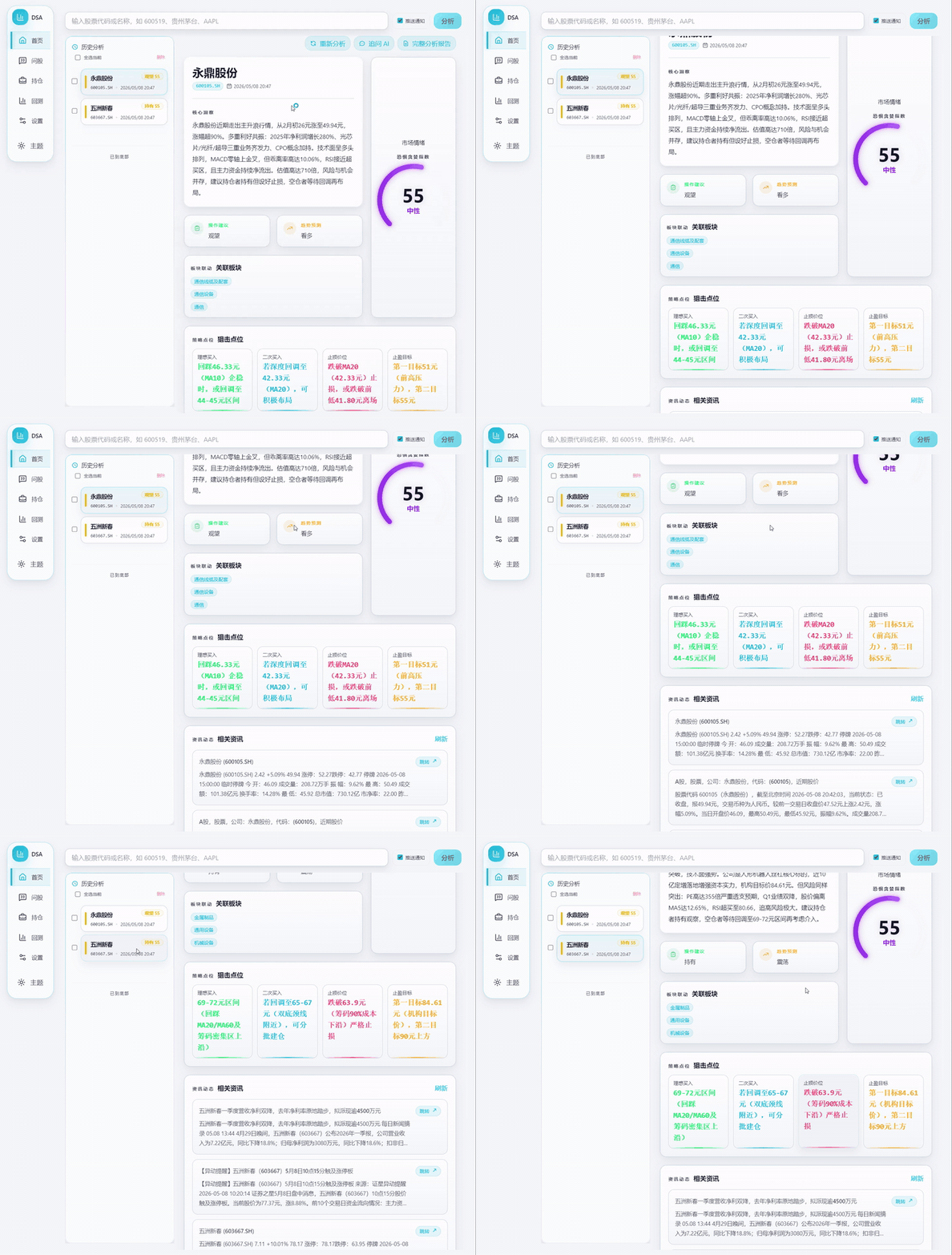
🤖 基于 AI 大模型的 A股/港股/美股自选股智能分析系统,每日自动分析并推送「决策仪表盘」到企业微信/飞书/Telegram/Discord/Slack/邮箱
| 能力 | 覆盖内容 |
|---|---|
| AI 决策报告 | 核心结论、评分、趋势、买卖点位、风险警报、催化因素、操作检查清单 |
| 多市场数据聚合 | A股、港股、美股、ETF;行情、K 线、技术指标、资金流、筹码、新闻、公告和基本面 |
| Web / 桌面工作台 | 手动分析、任务进度、历史报告、完整 Markdown、回测、持仓、配置管理、浅色 / 深色主题 |
| Agent 策略问股 | 多轮追问,支持均线、缠论、波浪、趋势、热点、事件、成长、预期等 15 种内置策略,覆盖 Web/Bot/API |
| 智能导入与补全 | 图片、CSV/Excel、剪贴板导入;股票代码/名称/拼音/别名补全 |
| 自动化与推送 | GitHub Actions、Docker、本地定时任务、FastAPI 服务和企业微信/飞书/Telegram/Discord/Slack/邮件推送 |
功能细节、字段契约、基本面 P0 超时语义、交易纪律、数据源优先级、Web/API 行为请看 完整配置与部署指南。
| 类型 | 支持 |
|---|---|
| AI 模型 | Anspire、AIHubMix、Gemini、OpenAI 兼容、DeepSeek、通义千问、Claude、Ollama 本地模型等 |
| 行情数据 | TickFlow、AkShare、Tushare、Pytdx、Baostock、YFinance、Longbridge |
| 新闻搜索 | Anspire、SerpAPI、Tavily、Bocha、Brave、MiniMax、SearXNG |
| 社交舆情 | Stock Sentiment API(Reddit / X / Polymarket,仅美股,可选) |
完整规则见 数据源配置。
5 分钟完成部署,零成本,无需服务器。
点击右上角 Fork 按钮(顺便点个 Star⭐ 支持一下)
Settings → Secrets and variables → Actions → New repository secret
AI 模型配置(至少配置一个)
默认先选一个模型服务商并填写 API Key;需要多模型、图片识别、本地模型或高级路由时,再参考 LLM 配置指南。
| Secret 名称 | 说明 | 必填 |
|---|---|---|
ANSPIRE_API_KEYS |
Anspire API Key,一Key同时启用全球热门大模型和联网搜索,无需科学上网,含免费额度 | 推荐 |
AIHUBMIX_KEY |
AIHubMix API Key,一Key切换使用全系模型,无需科学上网,本项目可享 10% 优惠 | 推荐 |
GEMINI_API_KEY |
Google Gemini API Key | 可选 |
ANTHROPIC_API_KEY |
Anthropic Claude API Key | 可选 |
OPENAI_API_KEY |
OpenAI 兼容 API Key(支持 DeepSeek、通义千问等) | 可选 |
OPENAI_BASE_URL / OPENAI_MODEL |
使用 OpenAI 兼容服务时填写 | 可选 |
Ollama 更适合本地 / Docker 部署,GitHub Actions 推荐使用云端 API。
通知渠道配置(至少配置一个)
| Secret 名称 | 说明 |
|---|---|
WECHAT_WEBHOOK_URL |
企业微信机器人 |
FEISHU_WEBHOOK_URL |
飞书机器人 |
TELEGRAM_BOT_TOKEN + TELEGRAM_CHAT_ID |
Telegram |
DISCORD_WEBHOOK_URL |
Discord Webhook |
SLACK_BOT_TOKEN + SLACK_CHANNEL_ID |
Slack Bot |
EMAIL_SENDER + EMAIL_PASSWORD |
邮件推送 |
更多渠道、签名校验、分组邮件、Markdown 转图片等配置见 通知渠道详细配置。
自选股配置(必填)
| Secret 名称 | 说明 | 必填 |
|---|---|---|
STOCK_LIST |
自选股代码,如 600519,hk00700,AAPL,TSLA |
✅ |
新闻源配置(推荐)
新闻源会显著影响舆情、公告、事件和催化因素质量,建议至少配置一个搜索服务。
| Secret 名称 | 说明 | 必填 |
|---|---|---|
ANSPIRE_API_KEYS |
Anspire AI Search:中文内容特别优化,适合 A 股新闻和舆情检索;同一 Key 可复用为 Anspire 大模型 | 推荐 |
SERPAPI_API_KEYS |
SerpAPI:搜索引擎结果补强,适合实时金融新闻 | 推荐 |
TAVILY_API_KEYS |
Tavily:通用新闻搜索 API | 可选 |
BOCHA_API_KEYS |
博查搜索:中文搜索优化,支持 AI 摘要 | 可选 |
BRAVE_API_KEYS |
Brave Search:隐私优先,美股资讯补强 | 可选 |
MINIMAX_API_KEYS |
MiniMax:结构化搜索结果 | 可选 |
SEARXNG_BASE_URLS |
SearXNG 自建实例:无配额兜底,适合私有部署 | 可选 |
更多搜索源、社交舆情和降级规则见 搜索服务配置。
Actions 标签 → I understand my workflows, go ahead and enable them
Actions → 每日股票分析 → Run workflow → Run workflow
默认每个工作日 18:00(北京时间)自动执行,也可手动触发。默认非交易日(含 A/H/US 节假日)不执行;强制运行、交易日检查、断点续传等规则见 完整指南。
# 克隆项目
git clone https://github.com/ZhuLinsen/daily_stock_analysis.git && cd daily_stock_analysis

# 安装依赖
pip install -r requirements.txt

# 配置环境变量
cp .env.example .env && vim .env

# 运行分析
python main.py
常用命令:
python main.py --debug
python main.py --dry-run
python main.py --stocks 600519,hk00700,AAPL
python main.py --market-review
python main.py --schedule
python main.py --serve-only🎯 2026-02-08 决策仪表盘
共分析3只股票 | 🟢买入:0 🟡观望:2 🔴卖出:1
📊 分析结果摘要
⚪ 中钨高新(000657): 观望 | 评分 65 | 看多
⚪ 永鼎股份(600105): 观望 | 评分 48 | 震荡
🟡 新莱应材(300260): 卖出 | 评分 35 | 看空
⚪ 中钨高新 (000657)
📰 重要信息速览
💭 舆情情绪: 市场关注其AI属性与业绩高增长,情绪偏积极,但需消化短期获利盘和主力流出压力。
📊 业绩预期: 基于舆情信息,公司2025年前三季度业绩同比大幅增长,基本面强劲,为股价提供支撑。
🚨 风险警报:
风险点1:2月5日主力资金大幅净卖出3.63亿元,需警惕短期抛压。
风险点2:筹码集中度高达35.15%,表明筹码分散,拉升阻力可能较大。
风险点3:舆情中提及公司历史违规记录及重组相关风险提示,需保持关注。
✨ 利好催化:
利好1:公司被市场定位为AI服务器HDI核心供应商,受益于AI产业发展。
利好2:2025年前三季度扣非净利润同比暴涨407.52%,业绩表现强劲。
📢 最新动态: 【最新消息】舆情显示公司是AI PCB微钻领域龙头,深度绑定全球头部PCB/载板厂。2月5日主力资金净卖出3.63亿元,需关注后续资金流向。
---
生成时间: 18:00🎯 2026-01-10 大盘复盘
📊 主要指数
- 上证指数: 3250.12 (🟢+0.85%)
- 深证成指: 10521.36 (🟢+1.02%)
- 创业板指: 2156.78 (🟢+1.35%)
📈 市场概况
上涨: 3920 | 下跌: 1349 | 涨停: 155 | 跌停: 3
🔥 板块表现
领涨: 互联网服务、文化传媒、小金属
领跌: 保险、航空机场、光伏设备完整环境变量、模型渠道、通知渠道、数据源优先级、交易纪律、基本面 P0 语义和部署说明请参考 完整配置指南。
Web 工作台提供配置管理、任务监控、手动分析、历史报告、完整 Markdown 报告、Agent 问股、回测、持仓管理、智能导入和浅色 / 深色主题。启动方式:
python main.py --webui
python main.py --webui-only
访问 http://127.0.0.1:8000 即可使用。认证、智能导入、搜索补全、历史报告复制、云服务器访问等细节见 本地 WebUI 管理界面。
配置任意可用 AI API Key 后,Web /chat 页面即可使用策略问股;如需显式关闭可设置 AGENT_MODE=false。
DSA 聚焦日常分析报告;下面两个同系列项目分别覆盖选股、策略验证与策略进化,适合按需延伸使用。它们当前独立维护,后续会优先探索与 DSA 的候选股导入、回测验证和报告联动。
| 项目 | 定位 |
|---|---|
| AlphaSift | 多因子选股与全市场扫描,用于从股票池中提取候选标的 |
| AlphaEvo | 策略回测与自我进化,用于验证策略规则,并通过迭代探索策略参数与组合 |
| 合作邮箱 |
zhuls345@gmail.com 项目咨询、部署支持与功能扩展 |
 扫码关注小红书 |
| 小红书 | 欢迎关注小红书 | |
| 问题反馈 | 提交 Issue |
MIT License © 2026 ZhuLinsen
欢迎在二次开发或引用时注明本仓库来源,感谢支持项目持续维护。
本项目仅供学习和研究使用,不构成任何投资建议。股市有风险,投资需谨慎。作者不对使用本项目产生的任何损失负责。
暂无更新记录
iTransfer 是一款 iOS 无线文件传输应用,通过在 iPhone 上启动内嵌的 HTTP/FTP 服务器,让同一局域网内的其他设备通过浏览器或 FTP 客户端直接访问和管理手机文件。


| 模块 | 方案 |
|---|---|
| UI | SwiftUI |
| 架构 | MVVM + Singleton Services |
| HTTP 服务 | Network.framework (NWListener) |
| FTP 服务 | Network.framework (NWListener) |
| 文件管理 | FileManager |
| 最低系统 | iOS 17.0 |
| 依赖 | 无第三方依赖 |
# 1. 安装 XcodeGen
brew install xcodegen

# 2. 生成 Xcode 项目
xcodegen generate

# 3. 打开项目
open iTransfer.xcodeproj

# 4. 在 Xcode 中按 Cmd+R 运行
选择 iPhone 模拟器或真机,点击运行即可。
iTransfer/
├── project.yml                        # XcodeGen 配置
├── iTransfer/
│   ├── App/
│   │   └── iTransferApp.swift         # 应用入口
│   ├── Models/
│   │   ├── FileItem.swift             # 文件/目录模型
│   │   ├── ServerConfig.swift         # 服务器配置模型
│   │   └── AppSettings.swift          # 用户偏好设置
│   ├── ViewModels/
│   │   ├── FileBrowserViewModel.swift # 文件浏览逻辑
│   │   ├── ServerViewModel.swift      # 服务器启停控制
│   │   └── SettingsViewModel.swift    # 账号/黑白名单管理
│   ├── Views/
│   │   ├── MainTabView.swift          # 三 Tab 容器
│   │   ├── Common/DeviceInfoBar.swift # 设备信息栏
│   │   ├── FileBrowser/               # 文件浏览页面组件
│   │   ├── Transfer/TransferView.swift # 传输页面
│   │   └── Settings/                  # 设置 & 关于页面
│   ├── Services/
│   │   ├── FileManagerService.swift   # 文件系统操作
│   │   ├── HTTPServerService.swift    # HTTP 服务器
│   │   ├── FTPServerService.swift     # FTP 服务器
│   │   └── DeviceInfoService.swift    # 设备信息
│   └── Utils/
│       ├── Extensions.swift           # SwiftUI 扩展
│ └── Constants.swift # 全局常量http://192.168.1.100:2121)MIT License. 详见 LICENSE 文件。
Made with ❤️ for iOS



Homepage • Discord • GitHub • Codeberg
English (Default) • Español • فارسی • Filipino • Français • Indonesia • Italiano • 日本語 • ភាសាខ្មែរ • 한국어 • Polski • Português Brasil • Русский • ภาษาไทย • Türkçe • Українська • Tiếng Việt • 中文
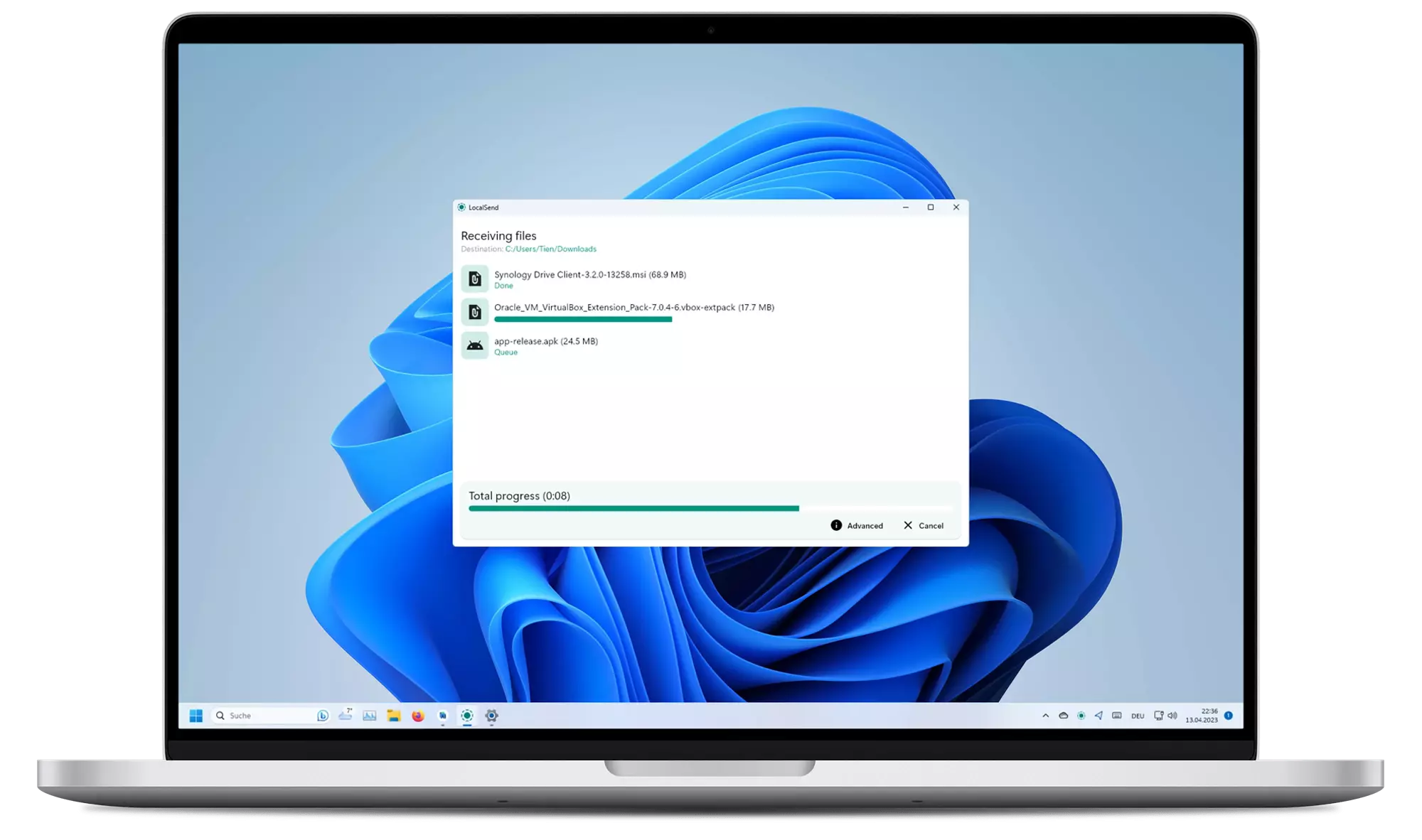
LocalSend is a free, open-source app that allows you to securely share files and messages with nearby devices over your local network without needing an internet connection.
LocalSend is a cross-platform app that enables secure communication between devices using a REST API and HTTPS encryption. Unlike other messaging apps that rely on external servers, LocalSend doesn't require an internet connection or third-party servers, making it a fast and reliable solution for local communication.
Browser testing via

It is recommended to download the app either from an app store or from a package manager because the app does not have an auto-update.
| Windows | macOS | Linux | Android | iOS | Fire OS |
|---|---|---|---|---|---|
| Winget | App Store | Flathub | Play Store | App Store | Amazon |
| Scoop | Homebrew | Nixpkgs | F-Droid | ||
| Chocolatey | DMG Installer | Snap | APK | ||
| EXE Installer | AUR | ||||
| Portable ZIP | TAR | ||||
| DEB | |||||
| AppImage |
Read more about distribution channels.
Unofficial MSIX preview: you can try builds from the latest commits at localsend.ob-buff.dev. Stability is not guaranteed and all custom code tweaks are listed on that site.
Compatibility
| Platform | Minimum Version | Note |
|---|---|---|
| Android | 5.0 | - |
| iOS | 12.0 | - |
| macOS | 11 Big Sur | Use OpenCore Legacy Patcher 2.0.2 (See #1005) |
| Windows | 10 | The last version to support Windows 7 is v1.15.4. There might be backports of newer versions for Windows 7 in the future. |
| Linux | N.A. | Deps: Gnome: xdg-desktop-portal and xdg-desktop-portal-gtk, KDE: xdg-desktop-portal and xdg-desktop-portal-kde |
In most cases, LocalSend should work out of the box. However, if you are having trouble sending or receiving files, you may need to configure your firewall to allow LocalSend to communicate over your local network.
| Traffic Type | Protocol | Port | Action |
|---|---|---|---|
| Incoming | TCP, UDP | 53317 | Allow |
| Outgoing | TCP, UDP | Any | Allow |
Also make sure to disable AP isolation on your router. It should be usually disabled by default but some routers may have it enabled (especially guest networks).
See troubleshooting for more information.
Portable Mode
(Introduced in v1.13.0)
Create a file named settings.json located in the same directory as the executable.
This file can be empty.
The app will use this file to store settings instead of the default location.
Start hidden
(Updated in v1.15.0)
To start the app hidden (only in tray), use the --hidden flag (example: localsend_app.exe --hidden).
On v1.14.0 and earlier, the app starts hidden if autostart flag is set, and the hidden setting is enabled.
LocalSend uses a secure communication protocol that allows devices to communicate with each other using a REST API. All data is sent securely over HTTPS, and the TLS/SSL certificate is generated on the fly on each device, ensuring maximum security.
For more information on the LocalSend Protocol, see the documentation.
To compile LocalSend from the source code, follow these steps:
LocalSend repositorycd app to enter the app directoryflutter pub get to download dependenciesflutter run to start the appLocalSend requires Flutter 3.41.x (specified in .fvmrc). Build issues may be caused by a mismatch between the required and the (system-wide) installed Flutter version. To make development more consistent, LocalSend uses fvm to manage the project Flutter version. After installing fvm, run fvm flutter instead of flutter.
We welcome contributions from anyone interested in helping improve LocalSend. If you'd like to contribute, there are a few ways to get involved:
You can help translate LocalSend into other languages. We use the Weblate platform to manage translations.
Alternatively, you can also contribute by forking this repository and adding translations manually.
The translations are located in the app/assets/i18n directory. Edit the _missing_translations_<locale>.json or strings_<locale>.i18n.json file to add or update translations.
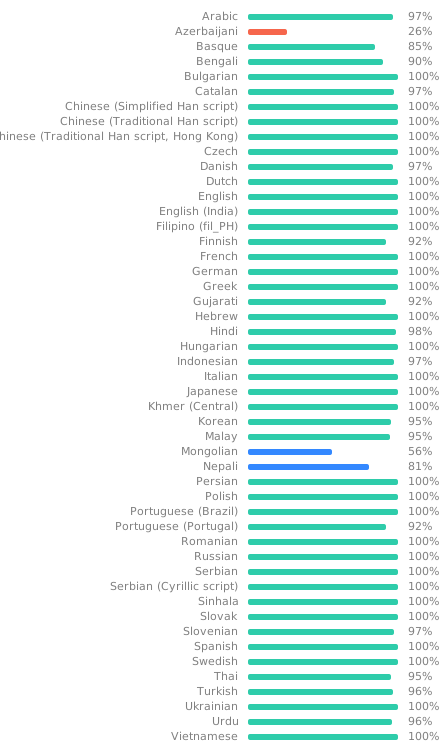
Take note: Fields decorated with @ are not meant to be translated; they are not used in the app in any way, being merely informative text about the file or to give context to the translator.
For more information, see the contributing guide.
| Issue | Platform (Sending) | Platform (Receiving) | Solution |
|---|---|---|---|
| Device not visible | Any | Any | Make sure to disable AP-Isolation on your router. If it is enabled, connections between devices are forbidden. |
| Device not visible | Any | Windows | Make sure to configure your network as a "private" network. Windows might be more restrictive when the network is configured as public. |
| Device not visible | macOS, iOS | Any | You can try to toggle the "Local Network" permission under "Privacy" in the OS settings. |
| Speed too slow | Any | Any | Use 5 Ghz; Disable encryption on both devices |
| Speed too slow | Any | Android | Known issue. https://github.com/flutter-cavalry/saf_stream/issues/4 |
These commands are intended for maintainers only. Make sure to run them from the app directory.
Traditional APK
flutter build apkAppBundle for Google Play
flutter build appbundleflutter build ipaflutter build macosTraditional
flutter build windowsLocal MSIX App
flutter pub run msix:createStore ready
flutter pub run msix:create --storeTraditional
flutter build linuxAppImage
appimage-builder --recipe AppImageBuilder.ymlSnap
Instructions in localsend/snap/README.md
暂无更新记录
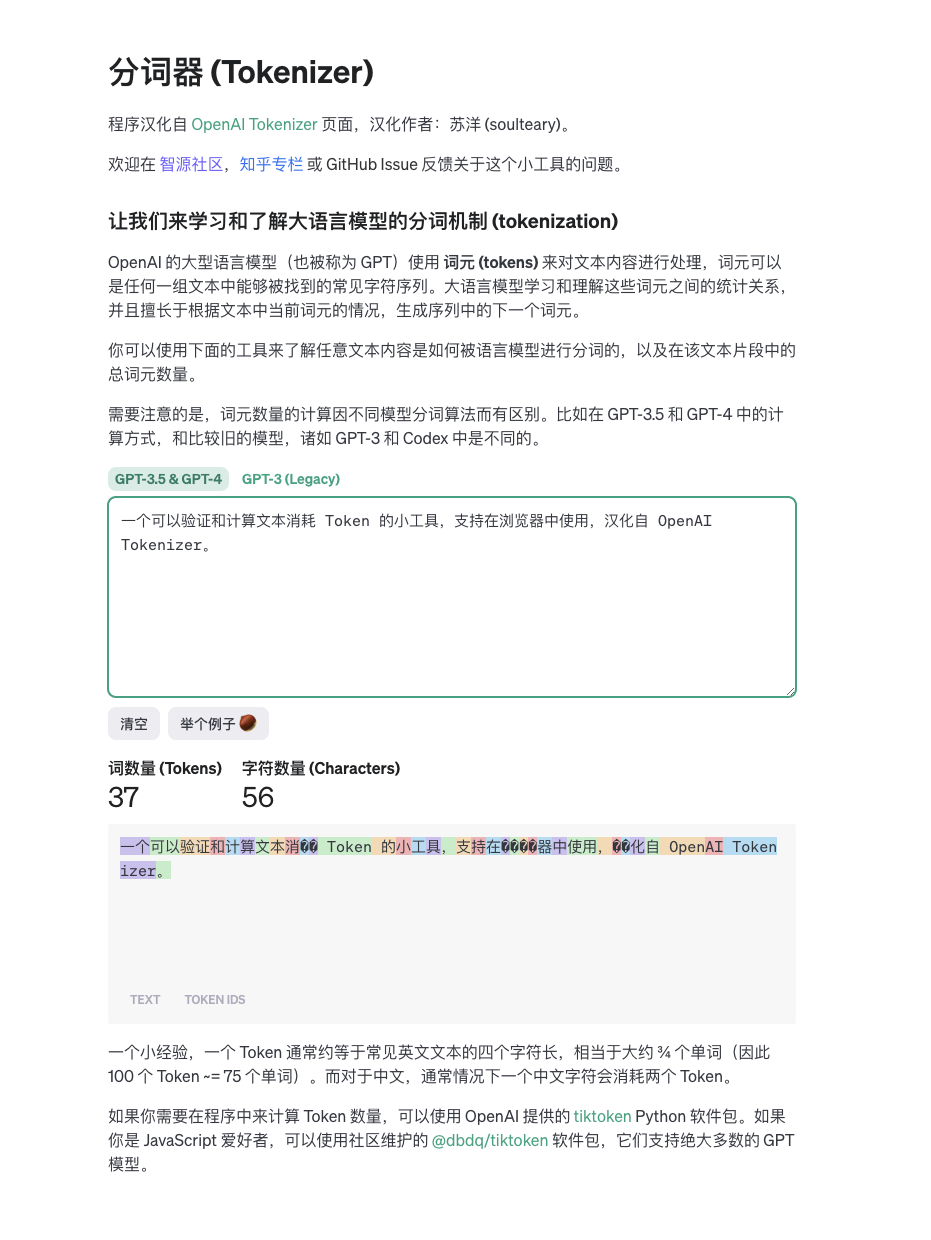
一个可以验证和计算文本消耗 Token 的小工具,支持在浏览器中使用,汉化自 OpenAI Tokenizer。

方式一:
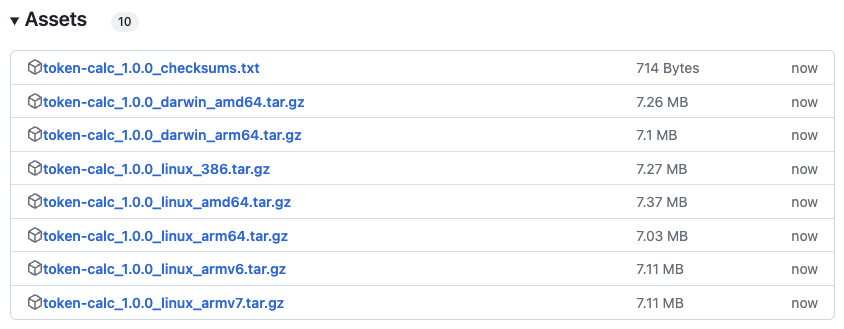
在 GitHub Release 下载页面,找到适合你的操作系统的执行程序即可。
方式二:
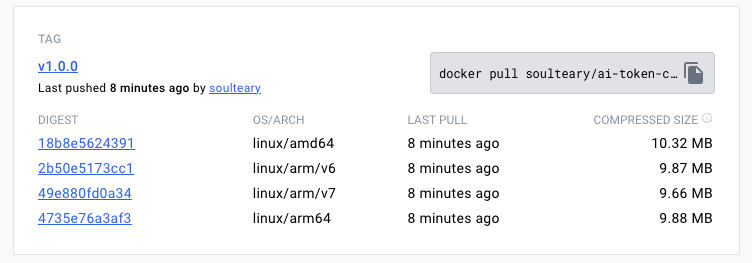
docker pull soulteary/ai-token-calculator:v1.0.0使用 Docker 下载 GitHub 自动构建好的镜像。
使用方式有很多种。
git clone https://github.com/soulteary/ai-token-calculator.git
cd ai-token-calculator

# 编译
go build -ldflags "-w -s"

# 运行(默认端口 8080)
./ai-token-calculator

# 指定端口
PORT=3000 ./ai-token-calculator

# 调试模式(从本地 ./public/ 目录提供服务,方便前端开发调试)
DEBUG=on ./ai-token-calculator
然后打开浏览器访问 localhost:8080 就好啦。
# 下载
docker pull soulteary/ai-token-calculator:v1.0.0
# 运行
docker run -p 8080:8080 soulteary/ai-token-calculator:v1.0.0
你也可以使用下面的 Compose 文件,来启动容器。
services:
  web:
    image: soulteary/ai-token-calculator:v1.0.0
    ports:
- "8080:8080"如果你更倾向使用 Nginx,你可以将项目下载到本地。
git clone https://github.com/soulteary/ai-token-calculator.git
cd ai-token-calculator
然后使用 Nginx 来快速使用这个项目,如果你使用 Docker,可以使用类似 ./docker-compose.nginx.yml 中的方式:
services:
  web:
    image: nginx:1.25.3-alpine
    volumes:
      - ./public:/usr/share/nginx/html
    ports:
      - "8080:80"
启动 Nginx 之后,访问浏览器即可。
暂无更新记录
Ghostty
Fast, native, feature-rich terminal emulator pushing modern features.
A native GUI or embeddable library via libghostty.
About
·
Download
·
Documentation
·
Contributing
·
Developing
Ghostty is a terminal emulator that differentiates itself by being
fast, feature-rich, and native. While there are many excellent terminal
emulators available, they all force you to choose between speed,
features, or native UIs. Ghostty provides all three.
libghostty is a cross-platform, zero-dependency C and Zig library
for building terminal emulators or utilizing terminal functionality
(such as style parsing). Anyone can use libghostty to build a terminal
emulator or embed a terminal into their own applications. See
Ghostling for a minimal complete project
example or the examples directory
for smaller examples of using libghostty in C and Zig.
For more details, see About Ghostty.
See the download page on the Ghostty website.
See the documentation on the Ghostty website.
If you have any ideas, issues, etc. regarding Ghostty, or would like to
contribute to Ghostty through pull requests, please check out our
"Contributing to Ghostty" document. Those who would like
to get involved with Ghostty's development as well should also read the
"Developing Ghostty" document for more technical details.
Ghostty is stable and in use by millions of people and machines daily.
The high-level ambitious plan for the project, in order:
| # | Step | Status |
|---|---|---|
| 1 | Standards-compliant terminal emulation | ✅ |
| 2 | Competitive performance | ✅ |
| 3 | Rich windowing features -- multi-window, tabbing, panes | ✅ |
| 4 | Native Platform Experiences | ✅ |
| 5 | Cross-platform libghostty for Embeddable Terminals |
✅ |
| 6 | Ghostty-only Terminal Control Sequences | ❌ |
Additional details for each step in the big roadmap below:
Ghostty implements all of the regularly used control sequences and
can run every mainstream terminal program without issue. For legacy sequences,
we've done a comprehensive xterm audit
comparing Ghostty's behavior to xterm and building a set of conformance
test cases.
In addition to legacy sequences (what you'd call real "terminal" emulation),
Ghostty also supports more modern sequences than almost any other terminal
emulator. These features include things like the Kitty graphics protocol,
Kitty image protocol, clipboard sequences, synchronized rendering,
light/dark mode notifications, and many, many more.
We believe Ghostty is one of the most compliant and feature-rich terminal
emulators available.
Terminal behavior is partially a de jure standard
(i.e. ECMA-48)
but mostly a de facto standard as defined by popular terminal emulators
worldwide. Ghostty takes the approach that our behavior is defined by
(1) standards, if available, (2) xterm, if the feature exists, (3)
other popular terminals, in that order. This defines what the Ghostty project
views as a "standard."
Ghostty is generally in the same performance category as the other highest
performing terminal emulators.
"The same performance category" means that Ghostty is much faster than
traditional or "slow" terminals and is within an unnoticeable margin of the
well-known "fast" terminals. For example, Ghostty and Alacritty are usually within
a few percentage points of each other on various benchmarks, but are both
something like 100x faster than Terminal.app and iTerm. However, Ghostty
is much more feature rich than Alacritty and has a much more native app
experience.
This performance is achieved through high-level architectural decisions and
low-level optimizations. At a high-level, Ghostty has a multi-threaded
architecture with a dedicated read thread, write thread, and render thread
per terminal. Our renderer uses OpenGL on Linux and Metal on macOS.
Our read thread has a heavily optimized terminal parser that leverages
CPU-specific SIMD instructions. Etc.
The Mac and Linux (build with GTK) apps support multi-window, tabbing, and
splits with additional features such as tab renaming, coloring, etc. These
features allow for a higher degree of organization and customization than
single-window terminals.
Ghostty is a cross-platform terminal emulator but we don't aim for a
least-common-denominator experience. There is a large, shared core written
in Zig but we do a lot of platform-native things:
The macOS app is a true SwiftUI-based application with all the things you
would expect such as real windowing, menu bars, a settings GUI, etc.
macOS uses a true Metal renderer with CoreText for font discovery.
macOS supports AppleScript, Apple Shortcuts (AppIntents), etc.
The Linux app is built with GTK.
The Linux app integrates deeply with systemd if available for things
like always-on, new windows in a single instance, cgroup isolation, etc.
The macOS app supports runtime language switching through the Help menu's
Language submenu. Supported languages include Simplified Chinese,
Traditional Chinese, French, German, Japanese, Korean, Spanish, Brazilian
Portuguese, and Russian. Language changes are applied instantly without
requiring a restart, thanks to GNU gettext domain-based architecture.
Both macOS and Linux apps support runtime language switching via a
Language submenu. Supported languages include English, Simplified Chinese,
Traditional Chinese, French, German, Japanese, Korean, Spanish,
Brazilian Portuguese, and Russian. The UI translates instantly without
requiring a restart.
The language switching uses GNU gettext with language-specific
gettext domains, allowing different catalogs to be loaded at runtime
without restarting the application.
Our goal with Ghostty is for users of whatever platform they run Ghostty
on to think that Ghostty was built for their platform first and maybe even
exclusively. We want Ghostty to feel like a native app on every platform,
for the best definition of "native" on each platform.
Ghostty supports runtime language switching through a Language submenu
in the macOS Help menu and GTK main menu. The UI translates instantly
without requiring a restart, using GNU gettext with language-specific
domains to bypass gettext's per-domain catalog caching.
Supported languages: English, Simplified Chinese, Traditional Chinese,
French, German, Japanese, Korean, Spanish, Brazilian Portuguese, and
Russian.
libghostty for Embeddable TerminalsIn addition to being a standalone terminal emulator, Ghostty is a
C-compatible library for embedding a fast, feature-rich terminal emulator
in any 3rd party project. This library is called libghostty.
Due to the scope of this project, we're breaking libghostty down into
separate libraries, starting with libghostty-vt. The goal of
this project is to focus on parsing terminal sequences and maintaining
terminal state. This is covered in more detail in this
blog post.
libghostty-vt is already available and usable today for Zig and C and
is compatible for macOS, Linux, Windows, and WebAssembly. The functionality
is extremely stable (since its been proven in Ghostty GUI for a long time),
but the API signatures are still in flux.
libghostty is already heavily in use. See examples
for small examples of using libghostty in C and Zig or the
Ghostling project for a
complete example. See awesome-libghostty
for a list of projects and resources related to libghostty.
We haven't tagged libghostty with a version yet and we're still working
on a better docs experience, but our Doxygen website
is a good resource for the C API.
We want and believe that terminal applications can and should be able
to do so much more. We've worked hard to support a wide variety of modern
sequences created by other terminal emulators towards this end, but we also
want to fill the gaps by creating our own sequences.
We've been hesitant to do this up until now because we don't want to create
more fragmentation in the terminal ecosystem by creating sequences that only
work in Ghostty. But, we do want to balance that with the desire to push the
terminal forward with stagnant standards and the slow pace of change in the
terminal ecosystem.
We haven't done any of this yet.
Ghostty has a built-in crash reporter that will generate and save crash
reports to disk. The crash reports are saved to the $XDG_STATE_HOME/ghostty/crash
directory. If $XDG_STATE_HOME is not set, the default is ~/.local/state.
Crash reports are not automatically sent anywhere off your machine.
Crash reports are only generated the next time Ghostty is started after a
crash. If Ghostty crashes and you want to generate a crash report, you must
restart Ghostty at least once. You should see a message in the log that a
crash report was generated.
Note
Use the ghostty +crash-report CLI command to get a list of available crash
reports. A future version of Ghostty will make the contents of the crash
reports more easily viewable through the CLI and GUI.
Crash reports end in the .ghosttycrash extension. The crash reports are in
Sentry envelope format. You can
upload these to your own Sentry account to view their contents, but the format
is also publicly documented so any other available tools can also be used.
The ghostty +crash-report CLI command can be used to list any crash reports.
A future version of Ghostty will show you the contents of the crash report
directly in the terminal.
To send the crash report to the Ghostty project, you can use the following
CLI command using the Sentry CLI:
SENTRY_DSN=https://e914ee84fd895c4fe324afa3e53dac76@o4507352570920960.ingest.us.sentry.io/4507850923638784 sentry-cli send-envelope --raw <path to ghostty crash>Warning
The crash report can contain sensitive information. The report doesn't
purposely contain sensitive information, but it does contain the full
stack memory of each thread at the time of the crash. This information
is used to rebuild the stack trace but can also contain sensitive data
depending on when the crash occurred.
暂无更新记录

|
🧑💼 Your colleague quit, your mentor graduated, your teammate transferred — taking their whole playbook and context with them? |
Upgraded from colleague.skill to dot-skill — not just colleagues, anyone can be distilled into a Skill
Colleagues · partners · family · old friends · idols · public figures · fictional characters — even yourself
Source material + your description → an AI Skill that genuinely thinks like them
Thinks in their frame, speaks in their voice
🆕 What's new · 📦 Data Sources · ⚡ Install · 🚀 Usage · ✨ Demo · 📝 Citation · 💬 Discord
Massive thanks to everyone who starred — we'll keep shipping, keep distilling.
📢 2026.05.11 Update — WeChat group 12 is live! Come hang out with the dot-skill community — share skills, discuss features, trade tips.

QR refreshes every 7 days (expires 2026-05-18) — if expired, ping me on Discord.
🗺️ 2026.04.13 — dot-skill Roadmap is live! colleague.skill is evolving into dot-skill — distill anyone, not just colleagues. 👉 Full Roadmap · 💬 Discord
🌐 2026.04.07 — Community gallery is live! Any skill / meta-skill can drive traffic directly to your own GitHub repo. No middleman. 👉 titanwings.github.io/colleague-skill-site
Created by @titanwings · Powered by Shanghai AI Lab · AI Safety Center
No longer only built around the "colleague" scenario. A unified /dot-skill entrypoint sits on a general-purpose skill engine — one engine distills anyone, instead of being a colleague-specific script.
| 🧑💼 colleague | 💞 relationship | 🌟 celebrity |
|---|---|---|
| Coworkers · mentors · teammates · up/downstream partners | Exes · partners · parents · friends · close family | Public figures · creators · public voices · fictional characters |
| Work Skill + Persona two-layer architecture — learns both their technical standards and workflows, and their manner of speaking and workplace posture. Supports Feishu / DingTalk / Slack auto-collection. | 🆕 Photo-sharing feature coming soon — your distilled relationship won't just reply to messages; it'll send photos and share slices of its day, the way a real person would. | Ships with a complete six-dimension research toolchain (subtitles → transcript cleanup → research merge → quality check). Not mimicking tone — reproducing their mental models and decision frameworks. |
Each family has its own prompt pipeline, source-collection strategy, and generation template.
The old version only ran in Claude Code. Now it's cross-host across four:
| Host | Description |
|---|---|
| 🟣 Claude Code | Native slash-command support |
| 🟠 Hermes Agent | One-command install, /dot-skill works directly |
| 🔵 OpenClaw | Fully compatible |
| ⚫ Codex | Invoke by skill name |
Generated character Skills can also be one-command installed into any host.
| Source | Messages | Docs / Wiki | Spreadsheets | Notes |
|---|---|---|---|---|
| 🟢 Feishu (auto) | ✅ API | ✅ | ✅ | Just enter a name, fully automatic |
| 🟡 DingTalk (auto) | ⚠️ Browser | ✅ | ✅ | DingTalk API doesn't support message history |
| 🟣 Slack (auto) | ✅ API | — | — | Requires admin to install Bot; free plan limited to 90 days |
| 💬 WeChat chat history | ✅ SQLite | — | — | Export first with WeChatMsg / PyWxDump / 留痕 |
| 📄 PDF / Images / Screenshots | — | ✅ | — | Manual upload |
| 📦 Feishu JSON export | ✅ | ✅ | — | Manual upload |
✉️ Email .eml / .mbox |
✅ | — | — | Manual upload |
| 📝 Markdown / direct paste | ✅ | ✅ | — | Manual input |
It's 2026 — you have an Agent, let it install itself. Open your Claude Code / Hermes / OpenClaw / Codex and hand it this line:
Install the dot-skill skill for me:
https://github.com/titanwings/colleague-skill
The Agent will detect the current host's skills directory, clone the repo, and register the entrypoint. Once done, type /dot-skill in any host to launch.
git clone https://github.com/titanwings/colleague-skill <TARGET>| Host | <TARGET> path |
|---|---|
| Claude Code | ~/.claude/skills/dot-skill |
| OpenClaw | ~/.openclaw/workspace/skills/dot-skill |
| Codex | ~/.codex/skills/dot-skill |
| Hermes | After clone, run python3 tools/install_hermes_skill.py --force |
For Feishu/DingTalk auto-collection credentials, publishing a generated character Skill to any host, Windows-specific handling, etc., see Detailed Install Guide (INSTALL.md)
In the host where dot-skill is installed, launch it — type /dot-skill, or just tell your Agent "start dot-skill".
It first asks which family you want to distill: colleague · relationship · celebrity.
Then enter alias, basic profile, personality tags, and pick a data source. All fields can be skipped — even a description alone can generate a Skill.
Once created, invoke the generated Skill with /{character}-{slug}.
| Command | Description |
|---|---|
/dot-skill |
Canonical unified entrypoint |
/{character}-{slug} |
Invoke full Skill (Persona + Work) |
/{character}-{slug}-work |
Work capabilities only |
/{character}-{slug}-persona |
Persona only |
python3 tools/skill_writer.py --action list ... |
List generated Skills across all three families |
python3 tools/version_manager.py --action rollback ... |
Roll back a Skill version |
The celebrity family ships with an end-to-end research toolchain, from subtitles to a finished draft:
# Download video subtitles
bash tools/research/download_subtitles.sh "<video-url>" "./tmp/subtitles"

# Subtitles → transcript
python3 tools/research/srt_to_transcript.py "./tmp/subtitles/example.srt"

# Merge research notes
python3 tools/research/merge_research.py "./skills/celebrity/<slug>"

# Quality check
python3 tools/research/quality_check.py "./skills/celebrity/<slug>/SKILL.md"One from each family.
Six-dimension research: works · interviews · decisions · expression DNA · external evaluations · timeline
Case adapted from community work alchaincyf/karpathy-skill
User            ❯ Everyone's talking about Agents now — what do you think the 2026 AI Agent looks like?

celebrity.skill ❯ Everyone's doing demos, nobody's doing eval.
                  The Agent bottleneck was never model intelligence — it's scaffolding:
                  a strict evaluation harness, fine-grained error replay,
                  controllable tool-calling budgets, clean failure-mode analysis.
                  Most products are still stuck at "wrap an API + a few tools + a system prompt."
                  That's a demo, not an agent.
                  In 2026 I'm not betting on the strongest model — I'm betting on the best
scaffolding and the strictest eval.Input:
ByteDance L2-1 backend engineer, INTJ, blame-shifter, ByteDance-style
User            ❯ Can you review this API design?

colleague.skill ❯ Hold on — what's the impact? You haven't explained the context.
                  (after reading) N+1 query, fix it. Use the standard
                  {code, message, data} response format. That's the spec,
                  don't ask why.

User            ❯ This bug was introduced by you, right?

colleague.skill ❯ Does the timeline match? That feature touched multiple places,
there were other changes too.Upload half a year of chat logs + "sensitive, quiet but stubborn, will actually reply seriously when it matters"
User               ❯ Did you think about me today?

relationship.skill ❯ ...I did, a little bit. Why are you asking?
📚 More real-world cases in the community gallery — 100+ skills and counting
dot-skill uses Persona as the universal base, with family-specific modules layered on top:
| Family | Persona Content | Additional Modules |
|---|---|---|
| 🧑💼 colleague | 6-layer personality: hard rules → identity → expression → decisions → interpersonal → Correction | ➕ Work Skill: scope, workflow, output preferences, experience knowledge base |
| 💞 relationship | Expression DNA · emotional triggers · conflict pattern · repair pattern | — |
| 🌟 celebrity | Mental models · decision heuristics · expression DNA · external-evaluation contrast | ➕ Six-dimension research dossier (works / interviews / decisions / timeline...) |
Execution: Receive task → Persona decides attitude & tone → Additional modules fill in execution detail → Output in their voice
This project follows the AgentSkills open standard. The entire repo is a skill directory:
dot-skill/
├── SKILL.md                        # skill entry point (official frontmatter)
├── prompts/                        # prompt system across three families
│   ├── intake.md                   #   [colleague] info intake
│   ├── work_analyzer.md            #   [colleague] work capability extraction
│   ├── persona_analyzer.md         #   [colleague] personality extraction
│   ├── work_builder.md             #   [colleague] work.md generation
│   ├── persona_builder.md          #   [colleague] persona.md 6-layer structure
│   ├── merger.md                   #   [shared] incremental merge logic
│   ├── correction_handler.md       #   [shared] conversation correction
│   ├── relationship/               #   [relationship] emotion/conflict/repair prompts
│   └── celebrity/                  #   [celebrity] six-dimension research + mental-model prompts
├── tools/                          # Python tools
│   ├── feishu_auto_collector.py    #   [colleague] Feishu auto-collector
│   ├── dingtalk_auto_collector.py  #   [colleague] DingTalk auto-collector
│   ├── slack_auto_collector.py     #   [colleague] Slack auto-collector
│   ├── email_parser.py             #   [shared] email parser
│   ├── research/                   #   [celebrity] celebrity research toolchain
│   │   ├── download_subtitles.sh   #     subtitle download
│   │   ├── transcribe_audio.py     #     audio → text
│   │   ├── srt_to_transcript.py    #     subtitles → transcript
│   │   ├── merge_research.py       #     six-dimension research merge
│   │   └── quality_check.py        #     quality check
│   ├── install_*_skill.py          #   [shared] multi-host one-shot installers
│   ├── skill_writer.py             #   [shared] skill file management
│   └── version_manager.py          #   [shared] version archive & rollback
├── skills/                         # generated Skills (gitignored)
│   ├── colleague/                  #   colleagues
│   ├── relationship/               #   close relationships
│   └── celebrity/                  #   public figures
├── docs/PRD.md
├── requirements.txt
└── LICENSESource material quality = Skill quality — and quality sources differ across families:
| Family | Source priority (high → low) |
|---|---|
| 🧑💼 colleague | Their own long-form writing (design docs / review comments) › decision-making replies › casual group chat |
| 💞 relationship | Complete chat history › letters / social posts / diaries › third-party descriptions |
| 🌟 celebrity | First-person books / blogs / long interviews › decision records (launches, commits, Q&A) › third-party commentary |
Colleague.Skill: Automated AI Skill Generation via Expert Knowledge Distillation
This is the paper for colleague.skill, dot-skill's predecessor. It covers the Work Skill + Persona two-layer architecture, multi-source data collection, and Skill generation mechanics — the theoretical foundation for today's
colleaguefamily. Separate papers on the relationship / celebrity family extensions are planned.
If you use dot-skill or colleague.skill in your research or applications, please cite the technical report:
@misc{zhou2026colleagueskill,
  title        = {Colleague.Skill: Automated AI Skill Generation via Expert Knowledge Distillation},
  author       = {Tianyi Zhou and Dongrui Liu and Leitao Yuan and Jing Shao and Xia Hu},
  year         = {2026},
  url          = {https://github.com/titanwings/colleague-skill/blob/dot-skill/colleague_skill.pdf}
}
You can also use the machine-readable citation metadata in CITATION.cff.
MIT License © titanwings
暂无更新记录
rogsoft软件中心基于kollshare开发的1.5代软件中心,适用于
koolshare 梅林改/官改 hnd/axhnd/axhnd.675x固件平台,其与梅林arm380/arm384 一代软件中心不兼容!
koolshare官改固件是从华硕对应机型的源代码修改而来,目的是为了在尽量保持ASUS官方固件原汁原味的基础上,增加软件中心及对应插件的支持。目前koolshare 官改固件支持以下机型:
| 机型/固件下载 | CPU/SOC | 平台 | 架构 | 内核 | 皮肤 |
|---|---|---|---|---|---|
| RT-AC86U | BCM4906 | hnd | ARMV8 | 4.1.27 | rog/asuswrt [1] |
| GT-AC5300 | BCM4908 | hnd | ARMV8 | 4.1.27 | rog (红色) |
| GT-AX11000/GT-AX11000_BO4 | BCM4908 | axhnd | ARMV8 | 4.1.51 | rog (红色) |
| RT-AX92U | BCM4906 | axhnd | ARMV8 | 4.1.51 | asuswrt |
| TUF-AX3000/TUF-AX3000刺客信条版 | BCM6750 | axhnd.675x | ARMV7 | 4.1.52 | tuf(橙色) |
| RT-AX82U/RT-AX82U高达版 | BCM6750 | axhnd.675x | ARMV7 | 4.1.52 | asuswrt |
| ZenWiFi AX6600/灵耀 AX6600M | BCM6755 | axhnd.675x | ARMV7 | 4.1.52 | asuswrt |
| ZenWiFi_XD4/灵耀AX魔方 | BCM6755 | axhnd.675x | ARMV7 | 4.1.52 | asuswrt |
| RT-AX56U青春/热血/刺客信条版 | BCM6755 | axhnd.675x | ARMV7 | 4.1.52 | asuswrt |
| RT-AX68U | BCM4906 | p1axhnd.675x | ARMV8 | 4.1.52 | asuswrt |
| RT-AX86U/RT-AX86U高达版 | BCM4908 | p1axhnd.675x | ARMV8 | 4.1.52 | asuswrt |
koolshare梅林改版固件是基于加拿大独立开发者Eric Sauvageau的华硕路由器
| 机型/固件下载 | CPU/SOC | 平台 | 架构 | 内核 | 皮肤 |
|---|---|---|---|---|---|
| RT-AC86U | BCM4906 | hnd | ARMV8 | 4.1.27 | asuswrt |
| GT-AC2900 | BCM4906 | hnd | ARMV8 | 4.1.27 | asuswrt |
| RT-AX88U | BCM4908 | axhnd | ARMV8 | 4.1.51 | asuswrt |
| NETGEAR RAX80 | BCM4908 | axhnd | ARMV8 | 4.1.51 | asuswrt |
| GT-AX11000/GT-AX11000_BO4 | BCM4908 | axhnd | ARMV8 | 4.1.51 | asuswrt |
| RT-AX68U | BCM4906 | p1axhnd.675x | ARMV8 | 4.1.52 | asuswrt |
| RT-AX86U/RT-AX86U高达版 | BCM4908 | p1axhnd.675x | ARMV8 | 4.1.52 | asuswrt |
| RT-AX56U | BCM6755 | axhnd.675x | ARMV7 | 4.1.52 | asuswrt |
| RT-AX58U | BCM6755 | axhnd.675x | ARMV7 | 4.1.52 | asuswrt |
如果你是开发者,想要为rogsoft开发新的插件,并用离线包的方式进行传播,请了解rogsoft是基于koolshare 1.5代软件中心api开发,其和前代梅林380软件中心不同,并且不兼容(因为web api)!:
/* W3C rogcss */):https://github.com/koolshare/rogsoft/blob/master/aliddns/aliddns/webs/Module_aliddns.asp#L37-L38。tuf橙色皮肤采用rog皮肤为基础,通过颜色替换而来,所以在写rog UI的时候,请保证能将红色替换为橙色,以保证tuf皮肤正常。.valid文件,且文件内含有hnd字符串。.valid检查,因此本项目中所有的安装包内的install.sh都需要进对安装的固件/平台进行检测:https://github.com/koolshare/rogsoft/blob/master/aliddns/aliddns/install.sh#L42-L49。| 软件中心 | arm380软件中心 | arm384/386软件中心 | hnd软件中心(本项目) | qca软件中心 | 软路由-酷软 |
|---|---|---|---|---|---|
| 项目名称 | koolshare.github.io | armsoft | rogsoft | qcasoft | ledesoft |
| 适用架构 | armv7l | armv7l | armv7l/armv8 | armv7l | x64 |
| 平台 | arm | arm | hnd/axhnd | qca-ipq806x | by fw867 |
| linux内核 | 2.6.36.4 | 2.6.36.4 | 4.1.xx | 4.4.60 | 很新 |
| CPU | bcm4708/9 | bcm4708/9 | bcm490x/bcm67xx | IPQ807x | intel/AMD |
| 固件版本 | ks梅林380 | ks梅林384/386 | koolshare 梅林/官改 | koolshare 官改 | OpenWRT/LEDE |
| 软件中心api | 1.0 代 | 1.5 代 | 1.5 代 | 1.5 代 | 1.5 代 |
| 代表机型-1 | RT-AC68U 改版梅林380 | RT-AC88U 改版梅林384 | RT-AC86U 改版梅林 | RT-AX89X 官改固件 | \ |
| 代表机型-2 | RT-AC88U 改版梅林380 | RT-AC5300 改版梅林384 | GT-AC5300 华硕官改 | \ | |
| 代表机型-3 | R7000 改版梅林380 | RT-AX88U 改版梅林 | \ |
暂无更新记录
美股港股全栈数据工具包 — 8 层架构 · 18 个端点 · 5 个数据源 · 全部零鉴权 · 仅依赖 requests
一个自包含的 Skill 文件,把分散在 5 个数据源里的美股/港股原始数据整合成 AI 编程助手直接能用的工具集。你不用再背东财 secid 前缀、Yahoo crumb 鉴权流程、SEC EDGAR 的 CIK 映射——全部封装好了。
兼容 Claude Code · Codex · OpenClaw
Skill 文件本质是结构化 Markdown + 内嵌 Python,任何支持上下文注入的 AI 编程助手都能用。
美股港股全栈数据 · 八层架构 · V1.0
│
├── 行情层      新浪(gb_/rt_hk) + 腾讯(us/r_hk) + 东财push2        实时报价 25-78 字段
├── K线层      新浪(回溯至1984) + Yahoo chart                       日/周/月/分钟 K线
├── 技术指标    MA/EMA + MACD + RSI + KDJ + 布林带                  纯Python计算,零额外依赖
├── 基本面      东财datacenter三表+GMAININDICATOR + Yahoo + SEC XBRL 财报+关键指标+估值+机构持仓
├── 资金面      东财push2his                                        日级主力/大单/中单/小单资金流
├── 期权层      Yahoo crumb                                         期权链 calls+puts (仅美股)
├── SEC Filing  EDGAR submissions + XBRL                            10-K/10-Q/8-K + 503个GAAP指标 (仅美股)
└── 工具层 东财search+push2列表 + Yahoo search + SEC CIK映射 搜索+全市场列表+新闻+ticker↔CIK3 步,2 分钟。
# 1. 创建 skill 目录
mkdir -p ~/.claude/skills/global-stock-data

# 2. 把 SKILL.md 放进去
curl -o ~/.claude/skills/global-stock-data/SKILL.md \
  https://raw.githubusercontent.com/simonlin1212/global-stock-data/main/SKILL.md

# 3. 安装依赖
pip install requests
启动 Claude Code,说一句「帮我看看 AAPL 的财报」,自动激活。
Codex / OpenClaw 用户: 把 SKILL.md 的内容贴入你的系统 prompt 或项目上下文文件即可,内嵌的 Python 代码可直接执行。
| 端点 | 数据 |
|---|---|
| 新浪财经 | 美股 36 字段(含中文名/EPS/PE)/ 港股 25 字段 |
| 腾讯财经 | 美股 71 字段 / 港股 78 字段(含 PE/PB/市值/换手率) |
| 东财 push2 | 美股/港股 secid 统一查询,含中文名/涨跌幅/换手率 |
| 端点 | 数据 |
|---|---|
| 新浪 | 美股日K线,回溯至 1984 年 |
| Yahoo chart | 美股 + 港股,v8 API 零 crumb,支持日/周/月/分钟 |
| 端点 | 数据 |
|---|---|
| 技术指标计算 | MA/EMA + MACD(DIF/DEA/柱状图) + RSI(6/12/24) + KDJ(K/D/J) + 布林带(上/中/下轨),基于K线纯Python计算 |
| 端点 | 数据 |
|---|---|
| 东财 datacenter 三表 | 美股/港股三表(资产负债 + 利润 + 现金流),中文科目名 |
| 东财 GMAININDICATOR | 关键财务指标概览(美股49字段/港股75字段:ROE/ROA/EPS/毛利率/资产负债率) |
| Yahoo quoteSummary | 23 个模块(财务数据 + 关键指标 + 分析师 + 机构持仓) |
| SEC EDGAR XBRL | 美股 503 个 GAAP 指标(仅美股) |
| 端点 | 数据 |
|---|---|
| 东财 push2his | 日级主力/大单/中单/小单净流入,美股 + 港股 |
| 端点 | 数据 |
|---|---|
| Yahoo options | 期权链 calls + puts,所有到期日,含 Greeks |
| 端点 | 数据 |
|---|---|
| EDGAR submissions | 10-K/10-Q/8-K 完整 Filing 列表 |
| EDGAR XBRL | 结构化财务指标(营收/净利/EPS 等) |
| 端点 | 数据 |
|---|---|
| 东财 search | 股票搜索(中英文,含市场代码映射) |
| 东财 push2 列表 | 全市场股票列表(涨跌幅/成交量排名,美股5925+/港股18000+) |
| Yahoo search | 新闻资讯(按股票代码) |
| SEC CIK mapping | ticker ↔ CIK 映射(仅美股) |
全部 5 个数据源完全免费无 Key。Yahoo crumb 由代码自动获取,SEC EDGAR 仅需标准 User-Agent。
跟你的 AI 助手说这些话就能激活:
| 场景 | 说什么 |
|---|---|
| 美股行情 | 「AAPL 现在什么价,PE 多少」 |
| 港股行情 | 「腾讯 00700 今天行情怎么样」 |
| K线分析 | 「拉一下 TSLA 最近半年日K线」 |
| 财报解读 | 「看看苹果最新一季的利润表」 |
| 估值分析 | 「BABA 的 PE/PB/ROE 和分析师目标价」 |
| 机构持仓 | 「哪些机构持有 NVDA,持股比例多少」 |
| 资金流向 | 「AAPL 最近资金是流入还是流出」 |
| 期权策略 | 「TSLA 下个月到期的期权链,看看 call 和 put」 |
| SEC Filing | 「苹果最近的 10-K 年报什么时候发的」 |
| 量化分析 | 「从 SEC XBRL 拉 MSFT 近 5 年营收和净利趋势」 |
| 搜索股票 | 「搜一下阿里巴巴的股票代码」 |
| 新闻 | 「NVDA 最近有什么新闻」 |
| 涨幅排名 | 「今天美股涨幅最大的 20 只股票」 |
| 全市场筛选 | 「遍历港股全市场,找出换手率最高的」 |
| 关键指标(中文) | 「看看苹果最近几季的 ROE、EPS 和资产负债率」 |
| 技术分析 | 「AAPL 的 MACD 和 RSI 怎么样,有没有金叉」 |
| 批量对比 | 「帮我对比 AAPL MSFT GOOGL 三家的估值」 |
| 特性 | 说明 |
|---|---|
| 全部零鉴权 | 5 个数据源全部免费无 Key,Yahoo crumb 自动管理 |
| 极简依赖 | 仅需 requests,零第三方数据封装 |
| 美股 + 港股双覆盖 | 行情/K线/财报/资金流均支持双市场 |
| 技术指标内置 | MA/EMA/MACD/RSI/KDJ/布林带,纯 Python 计算,拉完 K 线直接算,零额外依赖 |
| 全市场列表 | 东财 push2 一键获取美股 5925+/港股 18000+ 只股票,按涨跌幅/成交量排序 |
| 关键指标中英双版 | 东财 GMAININDICATOR(中文 49/75 字段)+ Yahoo quoteSummary(英文全品类) |
| SEC 深度集成 | EDGAR Filing 列表 + XBRL 503 个 GAAP 指标,量化分析利器 |
| 期权链 | Yahoo 期权数据,含所有到期日和 Greeks |
| 智能代码映射 | 东财 secid 前缀自动判断(105/106/107/116),Yahoo .HK 后缀自动处理 |
| 场景 | 第一优先 | 备选 | 说明 |
|---|---|---|---|
| 美股行情 | 新浪 gb_XXXX |
腾讯 / 东财 push2 | 新浪有中文名+EPS+PE |
| 港股行情 | 腾讯 r_hkXXXXX |
新浪 / 东财 push2 | 腾讯字段最全(78个) |
| 美股K线 | 新浪 | Yahoo chart | 新浪回溯至1984年;Yahoo支持多周期 |
| 港股K线 | Yahoo chart | — | 新浪港股K线已失效 |
| 财报三表(中文) | 东财 datacenter | — | 中文科目名,按行展开 |
| 财报三表(结构化) | Yahoo quoteSummary | — | 英文,完整报表结构 |
| 关键指标(中文) | 东财 GMAININDICATOR | — | ROE/ROA/EPS/毛利率/资产负债率 |
| 关键指标(英文) | Yahoo quoteSummary | — | PE/PB/EV/利润率/目标价 |
| 分析师预期 | Yahoo quoteSummary | — | EPS预测+评级+升降级 |
| 机构持仓 | Yahoo quoteSummary | — | 前10大机构+内部人 |
| 资金流 | 东财 push2his | — | 日级主力/大单/中单/小单 |
| 期权链 | Yahoo options | — | 仅美股 |
| SEC Filing | EDGAR | — | 官方数据,仅美股 |
| 搜索 | 东财 search | Yahoo search | 东财有 secid 映射 |
| 新闻 | Yahoo search | — | 唯一稳定的新闻源 |
| 全市场列表 | 东财 push2 clist | — | 涨跌幅/成交量排名 |
| 数据源 | 协议 | 鉴权 | 覆盖 |
|---|---|---|---|
| 东财 push2 | HTTPS | 零 | 美股+港股 实时行情+全市场列表 |
| 东财 push2his | HTTPS | 零 | 美股+港股 资金流 |
| 东财 datacenter | HTTPS | 零 | 美股+港股 财报三表+GMAININDICATOR关键指标 |
| 东财 search API | HTTPS | 零 | 全球股票搜索+secid映射 |
| Yahoo Finance | HTTPS | cookie+crumb(自动) | 美股+港股 全品类 |
| 新浪财经 | HTTP | 零 | 美股+港股 行情、美股K线 |
| 腾讯财经 | HTTPS | 零 | 美股+港股 行情 |
| SEC EDGAR | HTTPS | 零(需UA) | 美股 Filing+XBRL |
架构原则: 全部直连 HTTP API,零第三方数据封装依赖。Yahoo crumb 由 helper 自动管理,SEC EDGAR 仅需标准 User-Agent。
Q: 和 a-stock-data 有什么关系?
姊妹项目。a-stock-data 覆盖 A 股(沪深北),global-stock-data 覆盖美股和港股。两个 Skill 可以同时安装,互不冲突。
Q: Yahoo Finance 需要 API Key 吗?
不需要。代码自动获取 cookie + crumb,透明处理。如果 crumb 过期会自动刷新。
Q: SEC EDGAR 有访问限制吗?
有。SEC 要求请求携带 User-Agent 并限制每秒 10 次。代码已内置合规 UA,正常使用不会触发限流。
Q: 港股期权数据有吗?
没有。港股期权不在 Yahoo Finance 覆盖范围,需要港交所专有接口(付费)。当前期权层仅支持美股。
Q: 在国内服务器跑,Yahoo/SEC 能访问吗?
Yahoo Finance 和 SEC EDGAR 都是境外服务,国内直连可能不稳定。建议走代理,或优先使用东财/新浪/腾讯数据源。
Q: 不用 Claude Code,能用吗?
能。SKILL.md 本质是 Markdown + 内嵌 Python 代码。Codex、OpenClaw 或任何 AI 编程助手都能读取。你也可以直接把 Python 代码段复制出来在自己的脚本里跑。
见 CHANGELOG.md。
如果这个工具帮到了你的投研工作流,欢迎请作者喝杯咖啡 ☕

想要什么数据端点?欢迎开 Issue 提需求,赞助者的 Issue 优先处理。
本项目仅提供数据获取工具,不构成任何投资建议。股市有风险,投资需谨慎。
Apache License 2.0 — 自由使用,注明出处即可。
作者: Simon 林 · 抖音「Simon林」 · 公众号「硅基世纪」
Full-stack data toolkit for US & HK stock markets — 8-layer architecture · 18 endpoints · 5 data sources · zero API keys · only depends on requests
A self-contained Skill file that consolidates raw US/HK stock data from 5 sources into a ready-to-use toolkit for AI coding assistants. No need to memorize Eastmoney secid prefixes, Yahoo crumb authentication flows, or SEC EDGAR CIK mappings — it's all handled.
Compatible with Claude Code · Codex · OpenClaw
The Skill file is structured Markdown + embedded Python. Any AI coding assistant with context injection can use it.
US & HK Stock Full-Stack Data · 8-Layer Architecture · V1.0
│
├── Market Data       Sina(gb_/rt_hk) + Tencent(us/r_hk) + Eastmoney push2     Real-time quotes 25-78 fields
├── K-line            Sina(back to 1984) + Yahoo chart                          Daily/Weekly/Monthly/Minute
├── Technical Ind.    MA/EMA + MACD + RSI + KDJ + Bollinger Bands              Pure Python, zero extra deps
├── Fundamentals      Eastmoney datacenter+GMAININDICATOR + Yahoo + SEC XBRL   Statements+Key Metrics+Valuation+Holdings
├── Fund Flow         Eastmoney push2his                                        Daily main/large/medium/small order flow
├── Options           Yahoo crumb                                               Options chain calls+puts (US only)
├── SEC Filing        EDGAR submissions + XBRL                                  10-K/10-Q/8-K + 503 GAAP metrics (US only)
└── Tools Eastmoney search+push2 list + Yahoo search + SEC CIK Search+Market List+News+ticker↔CIK3 steps, 2 minutes.
# 1. Create skill directory
mkdir -p ~/.claude/skills/global-stock-data

# 2. Download SKILL.md
curl -o ~/.claude/skills/global-stock-data/SKILL.md \
  https://raw.githubusercontent.com/simonlin1212/global-stock-data/main/SKILL.md

# 3. Install dependencies
pip install requests
Launch Claude Code and say "Check AAPL's financials" — the skill activates automatically.
Codex / OpenClaw users: Paste the contents of SKILL.md into your system prompt or project context file. The embedded Python code is ready to execute.
| Endpoint | Data |
|---|---|
| Sina Finance | US stocks 36 fields (incl. Chinese name/EPS/PE) / HK stocks 25 fields |
| Tencent Finance | US stocks 71 fields / HK stocks 78 fields (incl. PE/PB/Market Cap/Turnover) |
| Eastmoney push2 | US/HK real-time quotes via secid, incl. Chinese name/change%/turnover |
| Endpoint | Data |
|---|---|
| Sina | US daily K-line, back to 1984 |
| Yahoo chart | US + HK, v8 API, zero crumb needed, daily/weekly/monthly/minute |
| Endpoint | Data |
|---|---|
| Technical Indicators | MA/EMA + MACD(DIF/DEA/Histogram) + RSI(6/12/24) + KDJ(K/D/J) + Bollinger Bands, pure Python on K-line data |
| Endpoint | Data |
|---|---|
| Eastmoney datacenter | US/HK three statements (Balance Sheet + Income + Cash Flow), Chinese labels |
| Eastmoney GMAININDICATOR | Key financial indicators overview (US 49 fields / HK 75 fields: ROE/ROA/EPS/margins) |
| Yahoo quoteSummary | 23 modules (Financials + Key Stats + Analysts + Institutional Holdings) |
| SEC EDGAR XBRL | 503 GAAP metrics (US only) |
| Endpoint | Data |
|---|---|
| Eastmoney push2his | Daily main/large/medium/small order net inflow, US + HK |
| Endpoint | Data |
|---|---|
| Yahoo options | Options chain calls + puts, all expiration dates, with Greeks |
| Endpoint | Data |
|---|---|
| EDGAR submissions | 10-K/10-Q/8-K full filing list |
| EDGAR XBRL | Structured financial metrics (Revenue/Net Income/EPS etc.) |
| Endpoint | Data |
|---|---|
| Eastmoney search | Stock search (Chinese + English, with market code mapping) |
| Eastmoney push2 list | Full market stock list (sort by change%/volume, US 5925+ / HK 18000+) |
| Yahoo search | News by stock ticker |
| SEC CIK mapping | ticker ↔ CIK mapping (US only) |
All 5 data sources are completely free, no API key needed. Yahoo crumb is auto-managed. SEC EDGAR only requires a standard User-Agent.
Just tell your AI assistant:
| Scenario | Prompt |
|---|---|
| US Stock Quote | "What's AAPL's price and PE ratio" |
| HK Stock Quote | "How's Tencent 00700 doing today" |
| K-line Analysis | "Pull TSLA's daily K-line for the past 6 months" |
| Financial Statements | "Show Apple's latest quarterly income statement" |
| Valuation | "BABA's PE/PB/ROE and analyst target price" |
| Institutional Holdings | "Which institutions hold NVDA and their percentages" |
| Fund Flow | "Is money flowing into or out of AAPL recently" |
| Options | "TSLA options chain expiring next month, calls and puts" |
| SEC Filing | "When was Apple's latest 10-K annual report filed" |
| Quantitative Analysis | "Pull MSFT's 5-year revenue and net income trend from SEC XBRL" |
| Stock Search | "Search for Alibaba's stock ticker" |
| News | "What's the latest news on NVDA" |
| Top Gainers | "Top 20 US stocks by gain today" |
| Market Screening | "Scan all HK stocks for highest turnover" |
| Key Indicators (CN) | "Show Apple's ROE, EPS and debt ratio for recent quarters" |
| Technical Analysis | "What's AAPL's MACD and RSI, any golden cross?" |
| Batch Compare | "Compare valuations of AAPL MSFT GOOGL" |
| Scenario | Primary | Fallback | Notes |
|---|---|---|---|
| US Quotes | Sina gb_XXXX |
Tencent / Eastmoney push2 | Sina has Chinese name+EPS+PE |
| HK Quotes | Tencent r_hkXXXXX |
Sina / Eastmoney push2 | Tencent has most fields (78) |
| US K-line | Sina | Yahoo chart | Sina goes back to 1984; Yahoo supports multi-period |
| HK K-line | Yahoo chart | — | Sina HK K-line is down |
| Statements (CN) | Eastmoney datacenter | — | Chinese labels, row-expanded |
| Statements (structured) | Yahoo quoteSummary | — | English, full report structure |
| Key Indicators (CN) | Eastmoney GMAININDICATOR | — | ROE/ROA/EPS/margins/debt ratio |
| Key Stats (EN) | Yahoo quoteSummary | — | PE/PB/EV/Margins/Target Price |
| Analyst Estimates | Yahoo quoteSummary | — | EPS forecast + ratings |
| Institutional Holdings | Yahoo quoteSummary | — | Top 10 institutions + insiders |
| Fund Flow | Eastmoney push2his | — | Daily main/large/medium/small |
| Options | Yahoo options | — | US only |
| SEC Filing | EDGAR | — | Official data, US only |
| Search | Eastmoney search | Yahoo search | Eastmoney has secid mapping |
| News | Yahoo search | — | Only stable news source |
| Market List | Eastmoney push2 clist | — | Sort by change%/volume |
| Source | Protocol | Auth | Coverage |
|---|---|---|---|
| Eastmoney push2 | HTTPS | None | US+HK Real-time Quotes + Market List |
| Eastmoney push2his | HTTPS | None | US+HK Fund Flow |
| Eastmoney datacenter | HTTPS | None | US+HK Financial Statements + GMAININDICATOR |
| Eastmoney search API | HTTPS | None | Global Stock Search + secid mapping |
| Yahoo Finance | HTTPS | cookie+crumb (auto) | US+HK All Categories |
| Sina Finance | HTTP | None | US+HK Quotes, US K-line |
| Tencent Finance | HTTPS | None | US+HK Quotes |
| SEC EDGAR | HTTPS | None (UA required) | US Filings + XBRL |
Architecture: All sources use direct HTTP API calls. Zero third-party data wrapper dependencies. Yahoo crumb managed automatically. SEC EDGAR requires standard User-Agent only.
This project provides data access tools only and does not constitute investment advice. Investing involves risk.
Author: Simon Lin · TikTok @simonlin121212 · Douyin "Simon林" · WeChat Official Account "硅基世纪"
暂无更新记录

动画由 huashu-design skill 制作
"Remembering that I'll be dead soon is the most important tool I've ever encountered to help me make the big choices in life."
Steve Jobs的认知操作系统。不是语录合集,是可运行的思维框架。
基于 Isaacson 授权传记、Stanford 演讲、Lost Interview、D Conference 系列、
Make Something Wonderful 等 30+ 一手来源深度调研,
提炼 6 个核心心智模型、8 条决策启发式和完整的表达DNA。
乔布斯    ❯ 你问错了。这不是一场关于方向的竞赛。
            这是一场关于品味的竞赛。

            OpenAI像1985年的微软。什么都做,什么都要赢。
            这种策略能赢市场份额。Bill Gates就是这么赢的。
            问题是——当你什么都做的时候,你不可能每件事都做到
            insanely great。

            Anthropic更像早期的Apple。聚焦。
            Focus means saying no to a hundred good ideas.

            但两家公司都犯了一个我绝对不会犯的错误——
            他们不控制硬件。

            最终赢的可能是同时控制芯片、模型和用户界面的人。
你知道现在谁在同时做这三件事吗?Apple.乔布斯 ❯ AI hardware is where the PC industry was in 1977.
Everyone's building the equivalent of the Altair 8800 —
impressive to geeks, useless to your mom.
Rabbit, Humane Pin — those are shit.
我不会做一个新品类。
我会重新定义一个已经存在的品类。
iPhone不是第一个手机。iPod不是第一个MP3播放器。
我们从来不发明品类,我们重新定义品类。
所以问题不是「做什么AI硬件」,
问题是:哪个现有品类的体验烂到让人想摔东西?
答案:耳机。一个always-on的个人AI界面。
An AI that lives in your ear.乔布斯 ❯ Siri是shit。没什么好辩护的。
十三年了还只会设闹钟和报天气。
但弱和晚是两回事。
Apple有别人没有的三件事:
二十亿台设备、自研芯片、The Whole Widget。
Apple的AI技术能力不弱。弱的是vision。
弱的是有人站出来说:
「This is shit. 重做。」
Tim是incredible的运营者。但他不是产品人。
Nice doesn't ship revolutionary products.
And you can't hire taste.
You either have it or you don't.乔布斯 ❯ 你说得对。我没有。
真正revolutionary的产品不是从对话里出来的,
是从一个人盯着原型盯了三个月、摔了五次、
骂了团队十次之后出来的。
每个人都想要答案。
「做什么产品?」「走哪个方向?」
这是错误的问题。
正确的问题是:什么东西让你晚上睡不着?
不是焦虑那种睡不着。是兴奋那种。
Go find your sleepless night.完整的6轮实战对话记录在
examples/目录。
这不是ChatGPT套了个乔布斯面具。每段回应都在运用Jobs的具体心智模型——「聚焦即说不」「端到端控制」「死亡过滤器」「不问用户要什么」。它不复读语录,它用Jobs的认知框架分析你的问题。
本 skill 基于开放的 Agent Skills 协议,可在任何 skills-compatible 的 AI agent runtime 中运行(Claude Code、Codex、Cursor、OpenClaw、Hermes Agent、CodeBuddy、Workbuddy、Gemini CLI、OpenCode 等 50+ runtime)。
npx skills add alchaincyf/steve-jobs-skill通用 CLI 安装器(vercel-labs/skills,支持 55+ runtime)会自动识别当前 runtime 并把 skill 放到正确目录。需要指定 runtime 时加 -a claude-code / -a codex / -a cursor / -a openclaw 等参数。
| Runtime | 安装路径 |
|---|---|
| Claude Code | ~/.claude/skills/steve-jobs-skill/ |
| Codex CLI | ~/.codex/skills/steve-jobs-skill/ |
| Cursor | ~/.cursor/skills/steve-jobs-skill/ |
| OpenClaw | ~/.openclaw/workspace/skills/steve-jobs-skill/ |
| Hermes Agent | 跑该 runtime 的 install 脚本或 clone 到其 skills 目录 |
git clone https://github.com/alchaincyf/steve-jobs-skill <对应路径>即使 runtime 不支持 Agent Skills 自动加载,你也可以把 SKILL.md 的内容粘贴进对话——它本质就是一份 markdown + YAML frontmatter。
装好后,告诉你的 agent:
> 用乔布斯的视角帮我分析这个产品方向
> Jobs会怎么看AI Agent的竞争格局?
> 切换到乔布斯,我在纠结三件事| 模型 | 一句话 | 来源 |
|---|---|---|
| 聚焦即说不 | 聚焦不是对要做的事说Yes,是对其他一百个好主意说No | WWDC 1997、回归后砍掉90%产品线 |
| 端到端控制 | 真正认真对待软件的人,应该自己做硬件 | Alan Kay引用、Mac→iPod→iPhone一脉相承 |
| 连点成线 | 人生无法前瞻规划,只能回溯理解 | Stanford 2005、书法课→Mac字体 |
| 死亡过滤器 | 如果今天是最后一天,你还会做今天要做的事吗? | Stanford 2005、每日镜前自问 |
| 现实扭曲力场 | 通过让人相信不可能的目标,让它变成可能 | Bud Tribble 1981命名、Mac/iPhone开发周期 |
| 技术×人文 | 技术必须与人文结合,才能让人心灵歌唱 | iPad 2发布会2011、Edwin Land影响 |
这不是脸谱化的「偏执狂天才」。Skill保留了Jobs的矛盾:
6个调研文件,共2497行,全部在 references/research/ 目录:
| 文件 | 内容 | 行数 |
|---|---|---|
01-writings.md |
著作与系统思考(Stanford演讲、传记、公开信) | 359 |
02-conversations.md |
长对话与即兴思考(Lost Interview、D Conference) | 489 |
03-expression-dna.md |
表达风格DNA(Keynote修辞分析、邮件风格、RDF机制) | 444 |
04-external-views.md |
他者视角(Ive/Cook/Wozniak/Gates等评价 + 系统性批评) | 464 |
05-decisions.md |
重大决策分析(15个决策的背景/逻辑/结果/反思) | 452 |
06-timeline.md |
完整人生时间线(1955-2011 + 关系图谱) | 289 |
Stanford Commencement 2005 · Make Something Wonderful (2023) · The Lost Interview (1995) · D Conference 系列 (D3/D5/D8) · WWDC Keynotes 1997-2011 · Thoughts on Music/Flash · iPhone Keynote 2007 · Playboy Interview 1985
Walter Isaacson《Steve Jobs》· Brent Schlender《Becoming Steve Jobs》· Andy Hertzfeld / Folklore.org · Carmine Gallo《The Presentation Secrets of Steve Jobs》· HBR领导力案例
信息源已排除知乎/微信公众号/百度百科。
由 女娲.skill 自动生成。
女娲的工作流程:输入一个名字 → 6个Agent并行调研(著作/对话/表达/批评/决策/时间线)→ 交叉验证提炼心智模型 → 构建SKILL.md → 质量验证(3个已知测试 + 1个边缘测试 + 风格测试)。
想蒸馏其他人?安装女娲:
npx skills add alchaincyf/nuwa-skill然后说「蒸馏一个XXX」就行了。
steve-jobs-skill/
├── README.md
├── SKILL.md                              # 可直接安装使用
├── references/
│   └── research/                         # 6个调研文件(2497行)
│       ├── 01-writings.md
│       ├── 02-conversations.md
│       ├── 03-expression-dna.md
│       ├── 04-external-views.md
│       ├── 05-decisions.md
│       └── 06-timeline.md
└── examples/
└── demo-conversation-2026-04-05.md # 实战对话记录女娲已蒸馏的其他人物,每个都可独立安装:
| 人物 | 领域 | 安装 |
|---|---|---|
| 马斯克.skill | 工程/成本/第一性原理 | npx skills add alchaincyf/elon-musk-skill |
| 纳瓦尔.skill | 财富/杠杆/人生哲学 | npx skills add alchaincyf/naval-skill |
| 芒格.skill | 投资/多元思维/逆向思考 | npx skills add alchaincyf/munger-skill |
| 费曼.skill | 学习/教学/科学思维 | npx skills add alchaincyf/feynman-skill |
| 塔勒布.skill | 风险/反脆弱/不确定性 | npx skills add alchaincyf/taleb-skill |
| 张雪峰.skill | 教育/职业规划/阶层流动 | npx skills add alchaincyf/zhangxuefeng-skill |
想蒸馏更多人?用 女娲.skill,输入任何名字即可。
MIT — 随便用,随便改,随便蒸馏。
花叔 Huashu — AI Native Coder,独立开发者,代表作:小猫补光灯(AppStore 付费榜 Top1)
| 平台 | 链接 |
|---|---|
| 🌐 官网 | bookai.top · huasheng.ai |
| 𝕏 Twitter | @AlchainHust |
| 📺 B站 | 花叔 |
| ▶️ YouTube | @Alchain |
| 📕 小红书 | 花叔 |
| 💬 公众号 | 微信搜「花叔」或扫码关注 ↓ |

暂无更新记录
Oh My Zsh is an open source, community-driven framework for managing your zsh
configuration.
Sounds boring. Let's try again.
Oh My Zsh will not make you a 10x developer...but you may feel like one.
Once installed, your terminal shell will become the talk of the town or your money back! With each keystroke
in your command prompt, you'll take advantage of the hundreds of powerful plugins and beautiful themes.
Strangers will come up to you in cafés and ask you, "that is amazing! are you some sort of genius?"
Finally, you'll begin to get the sort of attention that you have always felt you deserved. ...or maybe you'll
use the time that you're saving to start flossing more often. 😬
To learn more, visit ohmyz.sh, follow @ohmyzsh on X (formerly
Twitter), and join us on Discord.

| O/S | Status |
|---|---|
| Android | ✅ |
| FreeBSD | ✅ |
| LCARS | 🛸 |
| Linux | ✅ |
| macOS | ✅ |
| OS/2 Warp | ❌ |
| Windows (WSL2) | ✅ |
zsh --version to confirm), check the following wiki instructions here:curl or wget should be installedgit should be installed (recommended v2.4.11 or higher)Oh My Zsh is installed by running one of the following commands in your terminal. You can install this via the
command-line with either curl, wget or another similar tool.
| Method | Command |
|---|---|
| curl | sh -c "$(curl -fsSL https://raw.githubusercontent.com/ohmyzsh/ohmyzsh/master/tools/install.sh)" |
| wget | sh -c "$(wget -O- https://raw.githubusercontent.com/ohmyzsh/ohmyzsh/master/tools/install.sh)" |
| fetch | sh -c "$(fetch -o - https://raw.githubusercontent.com/ohmyzsh/ohmyzsh/master/tools/install.sh)" |
Alternatively, the installer is also mirrored outside GitHub. Using this URL instead may be required if you're
in a country like China or India (for certain ISPs), that blocks raw.githubusercontent.com:
| Method | Command |
|---|---|
| curl | sh -c "$(curl -fsSL https://install.ohmyz.sh/)" |
| wget | sh -c "$(wget -O- https://install.ohmyz.sh/)" |
| fetch | sh -c "$(fetch -o - https://install.ohmyz.sh/)" |
Note that any previous .zshrc will be renamed to .zshrc.pre-oh-my-zsh. After installation, you can move
the configuration you want to preserve into the new .zshrc.
It's a good idea to inspect the install script from projects you don't yet know. You can do that by
downloading the install script first, looking through it so everything looks normal, then running it:
wget https://raw.githubusercontent.com/ohmyzsh/ohmyzsh/master/tools/install.sh
sh install.sh
If the above URL times out or otherwise fails, you may have to substitute the URL for
https://install.ohmyz.sh to be able to get the script.
Oh My Zsh comes with a shitload of plugins for you to take advantage of. You can take a look in the
plugins directory and/or the
wiki to see what's currently available.
Once you spot a plugin (or several) that you'd like to use with Oh My Zsh, you'll need to enable them in the
.zshrc file. You'll find the zshrc file in your $HOME directory. Open it with your favorite text editor
and you'll see a spot to list all the plugins you want to load.
vi ~/.zshrcFor example, this might begin to look like this:
plugins=(
  git
  bundler
  dotenv
  macos
  rake
  rbenv
  ruby
)
Note that the plugins are separated by whitespace (spaces, tabs, new lines...). Do not use commas between
them or it will break.
Each built-in plugin includes a README, documenting it. This README should show the aliases (if the plugin
adds any) and extra goodies that are included in that particular plugin.
We'll admit it. Early in the Oh My Zsh world, we may have gotten a bit too theme-happy. We have over one
hundred and fifty themes now bundled. Most of them have
screenshots on the wiki (We are working on updating this!).
Check them out!
Robby's theme is the default one. It's not the fanciest one. It's not the simplest one. It's just the right
one (for him).
Once you find a theme that you'd like to use, you will need to edit the ~/.zshrc file. You'll see an
environment variable (all caps) in there that looks like:
ZSH_THEME="robbyrussell"To use a different theme, simply change the value to match the name of your desired theme. For example:
ZSH_THEME="agnoster" # (this is one of the fancy ones)
# see https://github.com/ohmyzsh/ohmyzsh/wiki/Themes#agnoster
You will many times see screenshots for a zsh theme, and try it out, and find that it doesn't look the same for you.
This is because many themes require installing a Powerline Font or a
Nerd Font in order to render properly. Without them, these themes
will render weird prompt symbols. Check out
the FAQ for more
information.
Also, beware that themes only control what your prompt looks like. This is, the text you see before or after
your cursor, where you'll type your commands. Themes don't control things such as the colors of your
terminal window (known as color scheme) or the font of your terminal. These are settings that you can
change in your terminal emulator. For more information, see
what is a zsh theme.
Open up a new terminal window and your prompt should look something like this:

In case you did not find a suitable theme for your needs, please have a look at the wiki for
more of them.
If you're feeling feisty, you can let the computer select one randomly for you each time you open a new
terminal window.
ZSH_THEME="random" # (...please let it be pie... please be some pie..)And if you want to pick a random theme from a list of your favorite themes:
ZSH_THEME_RANDOM_CANDIDATES=(
  "robbyrussell"
  "agnoster"
)
If you only know which themes you don't like, you can add them similarly to an ignored list:
ZSH_THEME_RANDOM_IGNORED=(pygmalion tjkirch_mod)If you have some more questions or issues, you might find a solution in our
FAQ.
If you're the type that likes to get their hands dirty, these sections might resonate.
Some users may want to manually install Oh My Zsh, or change the default path or other settings that the
installer accepts (these settings are also documented at the top of the install script).
The default location is ~/.oh-my-zsh (hidden in your home directory, you can access it with
cd ~/.oh-my-zsh)
If you'd like to change the install directory with the ZSH environment variable, either by running
export ZSH=/your/path before installing, or by setting it before the end of the install pipeline like this:
ZSH="$HOME/.dotfiles/oh-my-zsh" sh install.shIf you're running the Oh My Zsh install script as part of an automated install, you can pass the
--unattended flag to the install.sh script. This will have the effect of not trying to change the default
shell, and it also won't run zsh when the installation has finished.
sh -c "$(curl -fsSL https://raw.githubusercontent.com/ohmyzsh/ohmyzsh/master/tools/install.sh)" "" --unattendedIf you're in China, India, or another country that blocks raw.githubusercontent.com, you may have to
substitute the URL for https://install.ohmyz.sh for it to install.
The install script also accepts these variables to allow the installation of a different repository:
REPO (default: ohmyzsh/ohmyzsh): this takes the form of owner/repository. If you set this variable,
the installer will look for a repository at https://github.com/{owner}/{repository}.
REMOTE (default: https://github.com/${REPO}.git): this is the full URL of the git repository clone. You
can use this setting if you want to install from a fork that is not on GitHub (GitLab, Bitbucket...) or if
you want to clone with SSH instead of HTTPS (git@github.com:user/project.git).
NOTE: it's incompatible with setting the REPO variable. This setting will take precedence.
BRANCH (default: master): you can use this setting if you want to change the default branch to be
checked out when cloning the repository. This might be useful for testing a Pull Request, or if you want to
use a branch other than master.
For example:
REPO=apjanke/oh-my-zsh BRANCH=edge sh install.shgit clone https://github.com/ohmyzsh/ohmyzsh.git ~/.oh-my-zsh~/.zshrc File cp ~/.zshrc ~/.zshrc.origYou can create a new zsh config file by copying the template that we have included for you.
cp ~/.oh-my-zsh/templates/zshrc.zsh-template ~/.zshrcchsh -s $(which zsh)You must log out from your user session and log back in to see this change.
Once you open up a new terminal window, it should load zsh with Oh My Zsh's configuration.
If you have any hiccups installing, here are a few common fixes.
PATH in ~/.zshrc if you're not able to find some commands afteroh-my-zsh.ZSH environment variable in~/.zshrc.If you want to override any of the default behaviors, just add a new file (ending in .zsh) in the custom/
directory.
If you have many functions that go well together, you can put them as a XYZ.plugin.zsh file in the
custom/plugins/ directory and then enable this plugin.
If you would like to override the functionality of a plugin distributed with Oh My Zsh, create a plugin of the
same name in the custom/plugins/ directory and it will be loaded instead of the one in plugins/.
The default behaviour in Oh My Zsh is to use BSD ls in macOS and FreeBSD systems. If GNU ls is installed
(as gls command), you can choose to use it instead. To do it, you can use zstyle-based config before
sourcing oh-my-zsh.sh:
zstyle ':omz:lib:theme-and-appearance' gnu-ls yes_Note: this is not compatible with DISABLE_LS_COLORS=true_
If you want to skip default Oh My Zsh aliases (those defined in lib/* files) or plugin aliases, you can use
the settings below in your ~/.zshrc file, before Oh My Zsh is loaded. Note that there are many different
ways to skip aliases, depending on your needs.
# Skip all aliases, in lib files and enabled plugins
zstyle ':omz:*' aliases no

# Skip all aliases in lib files
zstyle ':omz:lib:*' aliases no
# Skip only aliases defined in the directories.zsh lib file
zstyle ':omz:lib:directories' aliases no

# Skip all plugin aliases
zstyle ':omz:plugins:*' aliases no
# Skip only the aliases from the git plugin
zstyle ':omz:plugins:git' aliases no
You can combine these in other ways taking into account that more specific scopes take precedence:
# Skip all plugin aliases, except for the git plugin
zstyle ':omz:plugins:*' aliases no
zstyle ':omz:plugins:git' aliases yes
A previous version of this feature was using the setting below, which has been removed:
zstyle ':omz:directories' aliases noInstead, you can now use the following:
zstyle ':omz:lib:directories' aliases noThis feature is currently in a testing phase and it may be subject to change in the future. It is also not
currently compatible with plugin managers such as zpm or zinit, which don't source the init script
(oh-my-zsh.sh) where this feature is implemented in.
It is also not currently aware of "aliases" that are defined as functions. Example of such are
gccd,
ggf, orgglfunctions from the git plugin.
Async prompt functions are an experimental feature (included on April 3, 2024) that allows Oh My Zsh to render
prompt information asynchronously. This can improve prompt rendering performance, but it might not work well
with some setups. We hope that's not an issue, but if you're seeing problems with this new feature, you can
turn it off by setting the following in your .zshrc file, before Oh My Zsh is sourced:
zstyle ':omz:alpha:lib:git' async-prompt noIf your problem is that the git prompt just stopped appearing, you can try to force it by setting the following
configuration before oh-my-zsh.sh is sourced. If it still does not work, please open an issue with your
case.
zstyle ':omz:alpha:lib:git' async-prompt forceBy default, you will be prompted to check for updates every 2 weeks. You can choose other update modes by
adding a line to your ~/.zshrc file, before Oh My Zsh is loaded:
Automatic update without confirmation prompt:
zstyle ':omz:update' mode autoJust offer a reminder every few days, if there are updates available:
zstyle ':omz:update' mode reminderTo disable automatic updates entirely:
zstyle ':omz:update' mode disabledNOTE: you can control how often Oh My Zsh checks for updates with the following setting:
# This will check for updates every 7 days
zstyle ':omz:update' frequency 7
# This will check for updates every time you open the terminal (not recommended)
zstyle ':omz:update' frequency 0You can also limit the update verbosity with the following settings:
zstyle ':omz:update' verbose default # default update prompt

zstyle ':omz:update' verbose minimal # only few lines

zstyle ':omz:update' verbose silent # only errorsIf you'd like to update at any point in time (maybe someone just released a new plugin and you don't want to
wait a week?) you just need to run:
omz updateIf you want to automate this process in a script, you should call directly the upgrade script, like this:
$ZSH/tools/upgrade.shSee more options in the FAQ: How do I update Oh My Zsh?.
USE OF omz update --unattended HAS BEEN REMOVED, AS IT HAS SIDE EFFECTS.
Magic! 🎉
Oh My Zsh isn't for everyone. We'll miss you, but we want to make this an easy breakup.
If you want to uninstall oh-my-zsh, just run uninstall_oh_my_zsh from the command-line. It will remove
itself and revert your previous bash or zsh configuration.
Before you participate in our delightful community, please read the code of conduct.
I'm far from being a Zsh expert and suspect there are many ways to improve – if you
have ideas on how to make the configuration easier to maintain (and faster), don't hesitate to fork and send
pull requests!
We also need people to test out pull requests. So take a look through
the open issues and help where you can.
See Contributing for more details.
We have (more than) enough themes for the time being. Please add your theme to the
external themes wiki page.
Oh My Zsh has a vibrant community of happy users and delightful contributors. Without all the time and help
from our contributors, it wouldn't be so awesome.
Thank you so much!
We're on social media:
We have
stickers, shirts, and coffee mugs available
for you to show off your love of Oh My Zsh. Again, you will become the talk of the town!
Oh My Zsh is released under the MIT license.

Oh My Zsh was started by the team at Planet Argon, a
Ruby on Rails development agency.
Check out our other open source projects.
暂无更新记录

This repo was made with love using GitKraken.

What started as the offspring of oh-my-posh2 for PowerShell
resulted in a cross platform, highly customizable and extensible prompt theme engine. After 4 years of working
on oh-my-posh, a modern and more efficient tool was needed to suit my personal needs.


 - No coffee, no code.
暂无更新记录
English | 中文 | 日本語 | 한국어 | العربية

One Command to Empower Your Agent with Comprehensive Trading Capabilities








Website · Docs · News · Features · Shadow Account · Demo · Quick Start · Examples · API / MCP · Roadmap · Contributing

2026-07-05 ✅ Contributor PR queue closed + Windows baseline green: merged the four non-draft PRs selected for today's maintainer pass. A-share mootdx batch pulls now let KeyboardInterrupt / SystemExit propagate instead of being swallowed by a bare except (#399, closes #398, thanks @shadowinlife). The Settings route slice and patched dependency floors are now merged under their original contributor PRs (#382, #390, thanks @shadowinlife and @aeonframework). Windows baseline compatibility now isolates loader caches, makes OAuth cache assertions platform-aware, skips one fork-only mock test on Windows, and bypasses proxies for MCP loopback fixtures (#401, thanks @Elfsa-Miranda). Validation: 4701 passed, 47 skipped.
2026-07-04 🧩 API route slices, tutorial docs, and dependency floors: IM channel and Settings routes moved out of api_server.py into src/api/channels_routes.py and src/api/settings_routes.py, continuing the narrow #331 modularization path from contributor work (#379, #382, thanks @shadowinlife). The wiki gained a Chinese beginner tutorial for non-finance readers (#393, thanks @kadaliao), and dependency floors now keep Pillow / LangChain / LangGraph on the installable patched track (#390, thanks @aeonframework).
2026-07-03 🛡️ Robinhood MCP refresh + API modularization + SSRF guard: Robinhood Agentic Trading now uses the current MCP tool names across generic reads, live-runner plumbing, default read-only seeds, and mandate-gate tests, while interactive startup honors the same .env search order as the provider loader (~/.vibe-trading/.env → agent/.env → $CWD/.env) (#391, closes #381 and #380). System routes (/health, /correlation, /system/shutdown, /skills, /api) moved into src/api/system_routes.py as the next narrow API modularization slice (#378, thanks @shadowinlife). Channel media SSRF defenses now reject CGNAT/mesh/non-global targets and QQ media redirects-to-internal before fetching (#389, thanks @hobostay).
2026-07-02 ⚡ Factor acceleration + safer runtime boundaries: hot rolling factor operators now use bottleneck/NumPy fast paths, alpha bench parallelism avoids repeated large-panel worker payloads, and base equity math has regression coverage (#376, closes #339, original work from #342 by @shadowinlife). Upload and Shadow report routes moved out of the monolithic api_server.py as the first narrow API modularization slice while #331 stays open (#375, based on #358, thanks @shadowinlife). Generated backtests now inherit only an allowlisted subprocess environment instead of the parent secrets surface (#374, closes #332), and IM channels gained /new session reset plus case-insensitive pairing commands (#372, closes #371, thanks @shadowinlife).
2026-07-01 🧹 Security polish + tracker cleanup: tightened API/Docker/frontend dev defaults, stabilized Settings channel and zh-CN edges, cleared frontend dependency/CSP alerts, and closed stale WhatsApp + paper-trading tracker items (#338, #351, #349, #365, #367, #350, #335, #283).
2026-06-30 💬 IM channel runtime for research delivery: Vibe-Trading can now attach the same agent session runtime to 16 built-in message adapters — WebSocket, Telegram, Slack, Discord, Matrix, WhatsApp, Signal, QQ/NapCat, WeChat/WeCom, Feishu/Lark, DingTalk, Teams, email, and Mochat. CLI (vibe-trading channels status/start/stop/login/pairing), REST (/channels/status, /channels/start, /channels/stop, /channels/pairing/command), and the Web UI Settings panel expose status, recovery hints, start/stop, and sender pairing; SDK-backed adapters stay behind extras such as vibe-trading-ai[telegram] or vibe-trading-ai[channels] (#341).
2026-06-29 🛡️ Live advisory safety + Trading 212 read-only connector + Windows/Gemini fixes: live order guards now have an opt-in, broker-agnostic PreTradeAdvisoryInterface that records advisory reviews without bypassing the mandate gate, kill switch, or audit trail (#328, closes #317, thanks @shadowinlife). Trading 212 joins the connector layer with read-only account, positions, orders, history, and instrument-metadata support; place_order / cancel_order still hard-refuse until a structural paper/live boundary exists (#321, closes #309, thanks @mvanhorn). Windows startup avoids the pandas 3.0 Timestamp crash via the <3.0.0 constraint (#329, closes #324, thanks @hannibal-lee); Gemini thought_signature dict-history replay was verified/fixed on main (#318); .US financial statements now route to SEC EDGAR instead of Eastmoney (#325); and the Alpha Library landing page got cache/date/selector/noscript/DNS-prefetch hardening while heavier CSP and social-card follow-ups stay tracked (#323).
2026-06-28 🧰 Cross-platform setup/dev + runtime and file-tool hardening: vibe-trading setup and vibe-trading dev now handle Windows TypeScript builds, launch the backend from the right cwd, use the Vite 5899 port, and shut child processes down cleanly (#292, thanks @digger-yu). Runtime status polling now degrades instead of crashing (#322); MCP OAuth cache keys are sanitized (#313); OpenAI defaults and Robinhood agent.json validation were tightened (#319, #320, thanks @mvanhorn); and file tools got isolated read/write roots plus broader sandbox tests (#299, thanks @skloxo).
2026-06-27 🧯 Content-filter resilience + Shadow Account feature contract cleanup: event-driven and swarm runs now skip individual LLM content-moderation hits, warn in run cards when filter rates are high, and recognize Gemini safety finish reasons instead of aborting an entire analysis (#308, closes #307, thanks @shadowinlife). Shadow Account extraction/codegen now share one PRICE_FEATURES contract and keep four-decimal return bounds, preventing rule/codegen drift and precision loss on prior_5d_return (#316, thanks @Robin1987China).
2026-06-26 🎯 Shadow Account conditional entry + tushare ETF/index/HK routing: extracted Shadow Account rules now carry RSI / prior-return bounds, so the generated SignalEngine enters on real conditions (RSI in range, prior-return in range) instead of blindly replaying the holding cadence (#314, follows #302, thanks @Robin1987China). The tushare loader also routes ETF/LOF → fund_daily(), indices → index_daily(), and HK equities → hk_daily() instead of always calling daily() (which silently returns empty for non-stocks), with per-symbol empty-result + partial-fetch warnings (#315, closes #310, thanks @shadowinlife).
2026-06-25 🧪 Strict validation JSON + calmer agent context: standalone backtest validation now normalizes nested NaN / Infinity values before writing artifacts/validation.json or CLI stdout, so strict JSON parsers no longer choke on validation payloads (#306, thanks @gyx09212214-prog). The agent prompt also derives the current data-source count from the loader registry, and _microcompact() now waits for real token pressure instead of clearing older tool results during short runs (#296, closes #282, thanks @MarkfuGod).
2026-06-24 🎯 Shadow Account price context + reactive Chinese UI + LAN auth fix: Shadow Account rule extraction now sees PIT-safe entry context — entry_rsi14 and prior_5d_return fetched through the loader registry as of buy_dt, with graceful offline/no-data degradation (#302, follows #295, thanks @Robin1987China). The main Web UI panels now use reactive English / zh-CN translations across charts, chat, Alpha Library, Correlation, and Run Detail (#301, thanks @skloxo). Remote same-origin Web UI deployments with API_AUTH_KEY can post and upload again after the CSRF hardening, while mismatched cross-site origins remain blocked (#304, thanks @Hinotoi-agent).
2026-06-23 🛡️ Local API CSRF hardening: a malicious web page can no longer drive unsafe cross-site requests (POST/PUT/DELETE) against the loopback API — CORS blocks reading the response but not the side effect, so loopback dev-mode trust now applies the existing cross-site guard to unsafe methods before honoring it. Safe methods and local CLI / non-browser uploads are unaffected (#293, thanks @Hinotoi-agent).
2026-06-22 🔧 Live-authorize OAuth fix + Alpha Zoo headline fix: connector authorize now holds the OAuth handshake open through a multi-minute broker sign-in (tunable via VIBE_LIVE_AUTHORIZE_TIMEOUT_SECONDS) and no longer spawns a competing callback server on retry, so the token actually persists (#281, closes #259, thanks @Robin1987China). The Alpha Zoo page no longer prints its alpha count twice (#287, closes #286, thanks @digger-yu). Scheduled research also picked up end-to-end usage docs (#288).
2026-06-21 ⏰ Scheduled-research executor + Reports library + post-backtest attribution: scheduled research now runs end to end — a default-off background executor (VIBE_TRADING_ENABLE_SCHEDULER) fires due interval/cron jobs through the session runtime (#278, thanks @mvanhorn, closing #254). A new /reports Run Library page lists, searches, and filters report-worthy runs with links into Run Detail + Compare (#224, thanks @LemonCANDY42). And after every backtest the agent now runs layered attribution — trade-level winners/losers, beta regression, market-regime analysis, and a Monte Carlo permutation test, gated by data availability and routing (#280, thanks @shadowinlife).
2026-06-20 🔬 Research Autopilot loop closes (Phase 3) + loader OHLC integrity guard + 4 academic alphas: Research Autopilot now runs hypothesis → signal-engine → backtest end to end — scaffold_signal_engine writes a contract-correct engine and link_autopilot_backtest feeds run metrics back to the hypothesis (68 tools) (#267). A structural OHLC sanity check drops dirty bars (high < low, non-positive prices, bad bracketing) centrally at the loader boundary, guarding every data source (#274, thanks @Shizoqua). And the academic alpha family grows 6 → 10 — Jegadeesh reversal, George-Hwang 52-week-high, Amihud illiquidity, Harvey-Siddique skew (456 factors) (#277, thanks @Robin1987China).
2026-06-19 🚀 v0.1.10 — Global data layer: market-data sources grow 10 → 18 (free Eastmoney / Sina / Stooq / Yahoo + key-gated Finnhub / Alpha Vantage / Tiingo / FMP, ban-risk fallback) plus 18 read-only data tools (fund flow, dragon-tiger, northbound, margin, block trades, SEC EDGAR + XBRL, financials, options chains, full-market screening…) across A-share / US / HK, all over MCP. Also bundles everything since 0.1.9 — 10 broker connectors, alpha compare, the provider-reliability overhaul, and the opt-in data cache. pip install -U vibe-trading-ai
2026-06-18 🔬 Research Autopilot Phase 1 + a local Data Bridge loader, + a Discord security notice: new run_research_autopilot + generate_backtest_config wire Hypothesis → Research Goal → backtest end to end (now 50 tools), and a local loader reads OHLCV straight from your own CSV / Parquet / DuckDB files (#260, #252, thanks @Robin1987China), alongside DeepSeek DSML tool-call parsing and an identifier-containment hardening wave. ⚠️ Security: the old community Discord invite now points to a server we don't control running a fake Collab.Land wallet-"verification" phishing scam — removed everywhere; the only official Discord is the HKUDS server (discord.gg/6TdQnT5xcF), and we'll never ask you to connect a wallet.
2026-06-17 🧩 Install compatibility + Opus/Kimi provider fixes: Baseline pip install vibe-trading-ai no longer pulls the optional pyharmonics / ta dependency chain; harmonic detection now lives behind vibe-trading-ai[harmonic] while the bundled detector remains available (#250, closes #249). The agent loop also avoids assistant-prefill handoff messages rejected by Opus 4.8+, and Kimi/Moonshot can override the client User-Agent with MOONSHOT_USER_AGENT (#248, closes #246 and #204); follow-up tests now directly cover background-result and auto-compact handoff paths (#251).
2026-06-16 🛡️ Security/API hardening + GLM/Zhipu alias: Settings writes require auth when configured (#245); API shell-capable tools require explicit VIBE_TRADING_ENABLE_SHELL_TOOLS=1 opt-in (#243); local shutdown requires auth when an API key is configured (#241); and untrusted loopback-looking hosts are rejected instead of treated as local (#242). Runtime edges also got cleaned up: Web chat syncs completed attempts (#236), run cards emit strict JSON for non-finite metrics (#238), malformed RSSHUB_TIMEOUT_S / RSSHUB_FETCH_BUDGET_S falls back safely (#240), and ddgs retry fallback is regression-covered (#239). GLM/Zhipu is now a first-class provider alias with model-name inference (#247, closes #237).
2026-06-15 🧭 Web-search resilience + Web UI run-continuity fixes: web_search no longer fails when a single engine is rate-limited — it now queries several free, no-key engines in order (DuckDuckGo, Google, Bing, Brave, Mojeek, Yahoo) with retry/backoff, treats "no results" as an empty answer rather than an error, and returns an actionable message instead of a bare ❌ when every engine is throttled (override the engine list with VIBE_TRADING_SEARCH_BACKENDS) (#232, closes #231, thanks @Ethan-sun01). In the Web UI, switching pages during a run no longer freezes it — the chat re-subscribes to the live stream and replays missed progress on return (#234) — and the Stop button now takes effect mid-stream and between tools instead of only at iteration boundaries (#235), closing both halves of #229 (thanks @kalkinj). The baostock loader also accepts native sh.601398 / sz.000001 codes alongside tushare-style 601398.SH (#230, thanks @bhlt).
2026-06-14 📊 Per-run token usage + progressive Run Detail charts: Every agent run now persists provider-reported token usage as a run-scoped llm_usage.json — provider/model, aggregate totals, and per-iteration counts — surfaced additively on /runs/{id}, so a finished run's token cost stays auditable after the live stream is gone (provider-reported only; no prompt/content capture, no price estimation) (#223, thanks @LemonCANDY42). The Run Detail page no longer loads every symbol's candlesticks up front: the default /runs/{id} response is unchanged, but the UI now renders the run summary first and loads each symbol's chart on demand through opt-in ?chart_payload=summary / ?chart_symbol= modes, with per-symbol loading state and a load-all-with-progress control (#225, thanks @LemonCANDY42). Two loader fixes close the cycle: yfinance's exclusive end boundary no longer drops the final requested trading day — the download now passes end + 1 day while cache keys keep the original range (#226, thanks @gyx09212214-prog) — and a malformed CCXT_TIMEOUT_MS / OKX_TIMEOUT_S value now warns and falls back to its default instead of raising at import and blocking startup (#227, thanks @gyx09212214-prog).
2026-06-13 ↩️ Resume a past session by ID from the CLI: The interactive CLI now prints the session-id on exit, with a copy-paste vibe-trading resume <session-id> hint — so locating the trace for a finished run no longer means guessing which folder under agent/sessions/ is newest by timestamp. The new vibe-trading resume <session-id> subcommand reopens that exact session and replays its recent turns into the loop; an unknown id fails fast instead of silently starting a blank session (#218, thanks @zwrong).
2026-06-12 🩺 Provider reliability overhaul — DeepSeek hangs, Kimi access, streaming liveness: A cluster of provider reports — DeepSeek runs stuck on "Agent is working…" (#208, thanks @XYWOX), reached max iterations masking empty model responses (#203, thanks @mojianliang), the UI never recovering after a stall (#195, thanks @mafia23), and Kimi rejecting the client (#204, thanks @liao497) — shared one root: every OpenAI-compatible provider ran through a single shim that applied DeepSeek/Kimi/Gemini quirks globally and silently swallowed stream failures. Provider-specific behavior now lives in an explicit capability layer — reasoning capture/replay, Gemini thought signatures, the Kimi User-Agent, OpenRouter's reasoning body are each gated to their own provider instead of cross-contaminating. Reasoning-only streams show a live "Reasoning…" indicator instead of dead air; a stream failure raises a contextual provider_stream_error with one automatic retry for transient resets (deterministic 4xx fail fast) instead of silently falling back to a slow non-streaming call; an empty model response is reported as empty_model_response instead of "max iterations"; SSE heartbeats no longer break reconnect replay; and a stuck read-only tool times out instead of hiding behind heartbeats forever. A new vibe-trading provider doctor prints a redacted provider/model/package/proxy snapshot for one-command triage of environment-side hangs. DeepSeek users can opt into the official native adapter with pip install "vibe-trading-ai[deepseek]", and kimi-k2.x's temperature=1 requirement is applied automatically — the Kimi path is verified end-to-end against the live API (tool calls + strict multi-turn reasoning replay on kimi-k2.6).
2026-06-11 🐝 Swarm workers now pull market data through the loader layer: An investment-committee run on NVDA exposed a chain of gaps — workers wrote ad-hoc yfinance scripts, trusted a malformed latest bar (volume present, OHLC empty), leaked NaN into non-strict JSON, and a context-free continuation prompt re-routed to the wrong preset (#198, thanks @BillDin for an exceptional diagnosis plus both fixes). Swarm workers now get a local get_market_data tool backed by the same normalized loader registry as MCP — strict JSON, non-finite floats serialize as null — wired into every market-data preset (21 workers across 13 presets) with a prompt policy that steers OHLCV work tool-first (#199); run_swarm takes an explicit preset_name and refuses ambiguous continuation fragments instead of silently falling back to equity_research_team (#200). Grounding got smarter too: a bare US ticker like NVDA in a swarm prompt is promoted to NVDA.US (stopword-guarded), so workers start from authoritative pre-fetched prices. The tool joins the main agent registry as well — 48 tools now. Also: your Docker data now survives updates — persistent memory, the session search index, user-created skills, shadow accounts and broker config live in named volumes, so docker compose up --build no longer wipes them (#197, thanks @FlyerJ).
2026-06-10 🐳 Docker reaches a host-side Ollama out of the box: Inside the container localhost is the container itself, so the shipped OLLAMA_BASE_URL=http://localhost:11434 failed the LLM preflight for every Dockerized Ollama setup. docker-compose.yml now defaults to http://host.docker.internal:11434 (export OLLAMA_BASE_URL to point elsewhere) and adds the host-gateway extra_hosts mapping so the same file works on Linux as well as Docker Desktop (#196, thanks @ShahNewazKhan).
2026-06-09 🔑 Clearer error when the Web UI is opened from another machine: Reaching the chat from a non-loopback client (another machine, a VM host, a phone on your LAN) without API_AUTH_KEY set returned 403 on every sensitive endpoint — sending a message, listing sessions, live status — but the chat only showed a generic "Failed to send message, please retry." The send path now surfaces the real reason — "Remote API access requires an API key. Add it in Settings, or run the backend on localhost for local-only use." — and the README's web-UI setup spells out the localhost-vs-LAN rule plus the three fixes (browse via localhost on the same machine; set API_AUTH_KEY and enter it once in Settings; or VIBE_TRADING_TRUST_DOCKER_LOOPBACK=1 for Docker Desktop's host gateway) (#191, thanks @mafia23).
2026-06-08 🔧 Gemini 3.x multi-turn tool-calling fix: This completes the Gemini 3.x thinking-model fix. The 6/05 round-trip (#176) only covered in-memory history, but the real agent loop replays history as OpenAI-format dicts where LangChain dropped the per-tool-call thought_signature before the request was built — so multi-turn tool calling still 400'd with missing thought_signature. It is now re-attached at the single _convert_input chokepoint both invoke and stream pass through (parallel calls, where only the first of N is signed, included) (#184, thanks @ngoanpv).
2026-06-07 🐝 Live swarm status in the chat timeline: When the agent launches a multi-agent swarm (investment committee, quant desk, risk committee, …), the chat now renders an inline status card that streams each worker's state — waiting / running / done / failed / blocked / retrying — in real time, the same per-agent visibility the standalone swarm dashboard already had. Runtime events are bridged into the session SSE stream without changing the existing /swarm/runs API, and a finished card rehydrates from the final run_swarm result on reconnect or history replay (#188, thanks @BillDin). Preset routing also got sharper: an explicitly named preset (e.g. investment_committee, with or without underscores) now wins over keyword scoring, and the bare IV derivatives keyword no longer false-matches inside ordinary words like "given" (#189, thanks @BillDin).
2026-06-06 ⚖️ Alpha compare — head-to-head across CLI, Web UI, REST & agent: A new alpha compare benches a hand-picked shortlist of Alpha Zoo alphas against each other on a universe and period, then ranks them by IC mean/std, IR, IC-positive ratio or sample count — each with its gap to the leader. Unlike a full-zoo bench it evaluates only the alphas you name (a new run_bench(only=…) subset filter), so comparing three alphas no longer scores all 191 in their zoo. One shared core powers every surface: vibe-trading alpha compare <id1> <id2> … --sort ir (CLI), a Compare view in the Alpha Zoo Web UI (tick alphas in the catalogue → one-click compare with a streamed ranking table), POST /alpha/compare + SSE (REST), and a read-only alpha_compare agent tool (47 tools now).
2026-06-05 🇮🇳 Dhan + Shoonya connectors (India) — 10 brokers total: The connector-first trading layer adds Dhan and Shoonya for the Indian market (NSE/BSE equities + F&O), bringing the roster to ten brokers. Both are paper + read-only — like Longbridge, their APIs expose no runtime paper/live discriminator, so their place_order / cancel_order hard-refuse any non-paper config at the first line (the rule: a broker with no structural paper/live guard is capped at paper + read-only) (#181, closes #174). This cycle also fixes Gemini 2.5 / 3.x thinking models: their per-tool-call thoughtSignature now round-trips through the OpenAI-compatible path, so multi-turn function calling no longer fails with INVALID_ARGUMENT (#176, closes #170, thanks @mvanhorn & @jliu6789). Chinese docstrings landed on all 452 Alpha Zoo factors (#180, thanks @LeeCQiang), and a frontend test suite (197 vitest tests) plus backend auth / path-traversal / CORS security tests joined CI (#175, thanks @sambazhu).
2026-06-04 🗃️ Opt-in local data cache for all 7 data sources: A new VIBE_TRADING_DATA_CACHE switch lets every backtest loader — tushare, okx, ccxt, akshare, mootdx, yfinance, futu — cache settled historical bars under ~/.vibe-trading/cache (user home, never the repo), so repeated and long-horizon / cross-market backtests skip the network and avoid provider rate limits. Off by default. Batch and connection loaders (yfinance, futu) skip the bulk download / FutuOpenD connection entirely on a full cache hit, a staleness guard never caches a range ending today (its last bar is still forming), and cached frames round-trip byte-identical to freshly fetched ones (#177, thanks @mvanhorn). A new contributor guide for AI / automation-assisted PRs also landed, mapping safe local checks and high-risk broker/MCP/credential surfaces (#173).
2026-06-03 🧹 Community triage + trace correlation: Tool-call trace entries now carry the originating call_id, so a tool_result can be matched back to its tool_call when replaying a run trace — arg previews stay truncated to keep trace files small (#168, thanks @zwrong). Source comments no longer point at an internal-only docs path that external contributors couldn't find (#166, thanks @jaleelpersonal). Also clarified that the langchain-community resolver warning on install is a harmless leftover-package notice, not a failure (#167), and scoped Gemini 2.5/3.0 thoughtSignature round-tripping for function calls as a help wanted task with a full fix plan (#170, thanks @jliu6789).
2026-06-02 🔌 Six new broker connectors (Tiger / Longbridge / Alpaca / OKX / Binance / Futu): The connector-first trading layer gains a direct-SDK transport alongside IBKR (local) and Robinhood (MCP). Each connector exposes read-only account / positions / orders / quote / history plus paper-account order placement — test your strategies across these broker paper accounts. Five of them (Tiger, Alpaca, OKX, Binance, Futu) also support bounded, mandate-gated order placement behind the same safety model as Robinhood: a user-committed mandate (symbol universe / order size / exposure / leverage / daily cap), a filesystem kill switch, a fail-closed pre-trade gate, and a full audit ledger. Longbridge is paper + read-only only (its API exposes no runtime paper/live discriminator). Every paper/live distinction is a structural per-broker guard — account-id format, host separation, demo flag, or trade environment. New trading_place_order / trading_cancel_order tools; HK and A-share asset classes added to the mandate universe. Experimental / use at your own risk.
2026-06-01 🚀 v0.1.9 released (pip install -U vibe-trading-ai): Rolls up everything since 0.1.8. Connector-first broker profiles (IBKR local read-only TWS / IB Gateway + Robinhood Agentic Trading behind OAuth, a committed mandate, order guard, audit ledger, and instant halt). Research Goal runtime across CLI / REST / MCP / Web. A swarm pass — live reconcile + MCP keepalive, operator-configured worker MCP tools, a strict alpha-bench random control, and a new retry_run to relaunch failed/stale runs (36 MCP tools now). The agent/cli/ package refactor with a refreshed terminal UI, the mootdx no-token A-share loader, and a robustness pass across backtest / agent loop / sessions. --version now always matches the installed package, fixing the 0.1.8 drift (#156).
2026-05-31 🔌 Connector-first broker architecture (IBKR + Robinhood): Trading access now starts from a selectable connector profile instead of separate broker/live entry points. vibe-trading connector list/use/check/account/positions/orders/quote/history and the MCP trading_* tools share the same selected profile, where paper/live is an attribute of the connector. IBKR can be used immediately through a local read-only TWS / IB Gateway profile, while the official IBKR remote MCP path is seeded as an OAuth mcp.read probe until stable read tool names are available. Robinhood Agentic Trading remains the bounded live MCP connector behind OAuth, a committed mandate, order guard, audit ledger, and instant halt.
2026-05-30 🧰 Robustness pass — backtest, agent loop, sessions: LLM-generated signal engines now pass pre-flight interface validation before instantiation, catching circular self-imports, a missing generate(), non-defaulted __init__ args, and wrong return types with actionable JSON errors instead of raw tracebacks (#149); a follow-up routes source-level AST validation errors through the same clean JSON envelope. The agent loop no longer burns all 50 iterations into a failed status with no output — it mirrors the swarm worker's wrap-up nudge at 80% of the iteration budget and drops tool definitions on the last iteration to force a final text answer (#148), guarded to fire only mid-run so it never displaces research-goal context. Session message writes now flush + fsync each append so expensive AI responses survive a mid-write crash, and the read path skips corrupted JSONL lines (logging the first 200 chars for recovery) instead of 500-ing the whole /messages endpoint (#147). The Web composer also fixes IME Enter handling so a composition-confirming Enter no longer submits mid-word (#146).
2026-05-29 🔐 Robinhood Agentic Trading support (opt-in, bounded autonomy): Adds support for Robinhood Agentic Trading (remote MCP, OAuth). Off and read-only by default; the agent acts only inside a user-committed mandate (symbols / order size / exposure / leverage / daily cap), with a filesystem-level instant kill switch, preemptive flatten, mandate auto-expiry, a full audit ledger, and a persistent autonomous runner. No custody, no venue — the broker holds funds and executes; we only relay intent. Experimental / use at your own risk.
2026-05-28 🧪 Swarm safety + strict alpha gate + worker MCP: Swarm DAG blocks downstream tasks when upstream fails (#145). New run_bench_strict() adds a same-universe random control + OOS split to catch factors that just track market beta (#143, thanks @Soli22de). Swarm workers can call operator-configured external MCP servers, with trust boundary pinned (#142, thanks @shadowinlife).
2026-05-27 📊 mootdx A-share data source + output polish: New mootdx loader speaks the native 通达信 TCP protocol for A-share OHLCV (no auth, no IP rate-limit, daily + intraday with 25-page walk-back pagination), slotting between tushare and akshare in the fallback chain (#107). CCXT loader now reads HTTP_PROXY/HTTPS_PROXY/ALL_PROXY so Binance/OKX public data works from restricted networks (#126, thanks @ruok808). Final-answer rendering also dropped the ugly full-width --- horizontal separators on CLI and Web: the system prompt now nudges the agent toward markdown tables and ## headings, the CLI renderer strips standalone HRs as defense-in-depth, and the chat bubble hides any <hr> that slips through (#139, thanks @sdwxm188).
2026-05-26 ✅ Research Goal lifecycle closure: Goal mode now behaves like a real task runner: Web UI goal creation creates or binds the session and immediately sends the kickoff turn; active goals can be continued, edited, cancelled, and completed across Web/API/CLI/MCP; and the agent advances from the current goal snapshot (criteria, evidence, claims, open items) instead of only the original prompt. Covered-but-still-active goals now enter an audit/status update instead of stopping silently, with regression coverage across backend, CLI, MCP, and frontend events.
2026-05-25 🧼 Cleaner chat UI + composer workflow: The Web UI keeps chat focused on the next action: upload, swarm, and research-goal modes now live behind the composer + menu instead of floating panels. Active context appears above the input as compact chips, and goal details expand inline only when needed. The UI also drops the old custom i18n layer in favor of direct English copy, gates Full Report cards to report-worthy runs, and hardens local dev startup/status reporting for reliable browser smoke tests.
2026-05-24 🎯 Research Goal runtime: Added a session-scoped Research Goal layer across backend, CLI, API/MCP, SSE, and Web UI. Goals persist claims, acceptance criteria, evidence rows, budgets, and completion policy; agent tools can create goals and attach evidence; /goal gives the CLI a direct entry point; REST/MCP expose goal snapshots and evidence writes; SSE keeps chat clients fresh. Follow-up audit fixes locked down verified evidence, blocked live-trading risk tiers through agent tools, wired CLI-created goals into later turns, cleaned goal ledgers on session deletion, enabled replay-all, and fixed cross-session frontend races.
2026-05-23 🖥️ Interactive CLI refresh: The terminal front door now opens with a larger Vibe-Trading banner, a cleaner prompt divider, prior-turn recap, post-run timing, and a Claude Code-style activity rail for live agent work. Tool calls, web/data fetches, shell-style actions, Markdown answers, and pipe tables render in a more readable transcript, while piped or non-TTY runs keep plain-text output for automation. Generated CLI screenshots are now treated as local artifacts instead of committed docs files, keeping the repository lighter.
2026-05-22 🧭 Swarm recovery + MCP keepalive: Swarm status now reconciles from live task files on every read, so API/MCP/SSE/list views recover crashed or stale runs instead of showing permanent running snapshots. run_swarm sends MCP progress heartbeats while it polls, with a fixed first frame of swarm_started run_id=<id> for clients that reconnect after transport drops; workers now heartbeat through LLM streaming, grounding fetches, and tool execution. The stale-run reaper uses per-run thresholds and derives terminal status from task states, SwarmTool no longer cancels a still-running team just because its wait budget elapsed, and MCP clients can call reap_stale_runs() for explicit cleanup. Today's DX pass also refreshed provider default models and aligned CI syntax checks with the new agent/cli/ package. 22 new regressions cover hydration, terminal recovery, stale reaping, keepalive cadence, env parsing, and heartbeat wiring; the full swarm/MCP suite is at 169 passed, 4 skipped.
2026-05-21 🧱 CLI package refactor: agent/cli.py (3216 LOC) split into the agent/cli/ package — interactive front door, slash router, Rich components, plus a _legacy.py shim that preserves every subcommand and re-exports every public symbol so cli.cmd_* / cli._INIT_ENV_PATH / cli.Confirm keep working. New FastAPI middleware serves the SPA shell when a browser opens /runs/{id} or /correlation directly; same narrowing landed in the Vite dev proxy. Version unified via cli/_version.py (no more drift between --version and the banner), python -m cli restored via __main__.py, and the chat-gate narrowed so chat --help / chat extra reach legacy argparse instead of being swallowed by the REPL.
2026-05-20 🔬 Hypothesis Registry CLI: Closes the CLI side of the Hypothesis Registry shipped backend-only on 2026-05-16. vibe-trading hypothesis list prints a Rich table or JSON (--status filter, --limit); show <id> renders a detail panel including linked run cards; invalidate <id> --note "..." flips status to rejected while preserving prior invalidation notes when --note is omitted. Honors the existing VIBE_TRADING_HYPOTHESES_PATH env override and adds a per-invocation --path. 22 new tests cover wiring, JSON output, status filter, limit, missing-id errors, and note persistence.
2026-05-19 ✨ Live tool feedback + graceful cancel: Long-running tools (backtests, large PDFs, swarm workers) no longer look frozen. Each tool call now emits a 3-second heartbeat plus structured per-stage progress — run_backtest shows phase markers (validate / simulate / finalize), read_document ticks per page on PDF or per sheet on Excel, read_url marks fetch / parse. The CLI Rich Live dashboard renders a Unicode spinner, ASCII progress bar, ETA, and stacks up to 3 parallel tools keyed by name; the frontend chat ships a new ToolProgressIndicator with rAF-coalesced renders, ARIA role="status" + hidden native <progress> for screen readers, and a determinate ProgressRing SVG when total is known. First Ctrl+C during a CLI run now calls agent.cancel() for graceful exit (current step finishes, trace closes cleanly); a second within 2s force-quits. Reusable primitives extracted along the way: ProgressBar.tsx and lib/tools.ts (shared tool-name i18n).
2026-05-18 🧹 Cleanup pass + three latent bug fixes: CompositeEngine no longer misroutes bare Chinese-futures codes like RB2410 to GlobalFuturesEngine — _is_china_futures moved into a shared _market_hooks module with a case-normalized product table and a non-CN exchange guard, plus 9 new regression cases. Session FTS5 indexes now persist timestamps so cross-session search can sort by date; the same path also fixed a re-upsert that was wall-clocking every session's started_at. The Vite dev-mode proxy gained the missing /alpha entry so the AlphaZoo page resolves on npm run dev. tests/test_e2e_harness_v2.py (real-LLM e2e suite) is now gated behind VIBE_TRADING_RUN_LIVE_E2E=1 so CI no longer changes shape based on env-key presence. Ruff per-file-ignores added for the factor zoo (3783 → 0 F401 noise), frontend tsconfig enables noUnusedLocals / noUnusedParameters as regression guards, and 76 unused vw = vwap(...) boilerplate lines were dropped from gtja191 alphas. Net -918 LOC.
2026-05-17 🧬 Alpha Zoo v1 (0.1.8): 452 pre-built quant alphas across 4 zoos — qlib158 (Microsoft Qlib, Apache-2 attribution), alpha101 (Kakushadze 101 Formulaic Alphas, paper rewrite from arXiv:1601.00991), gtja191 (Guotai Junan 2014 short-horizon factor report), and academic (Fama-French 5 + Carhart price-based proxies). One-line CLI to bench any zoo on your universe: vibe-trading alpha bench --zoo gtja191 --universe csi300 --period 2018-2025. Ships with AST purity gate, lookahead-guard test, pytest-socket network kill-switch, per-zoo LICENSE.md, and a Developer Certificate of Origin (DCO) workflow for community PRs. Auto-rendered Alpha Library at vibetrading.wiki/alpha-library/ + research-lab post Which of the 191 GTJA alphas still work in 2026?.
2026-05-16 🧪 Research spine update: Added a backend Hypothesis Registry with create_hypothesis, update_hypothesis, link_backtest, and search_hypotheses; external-content readers now attach warning-only security_warnings; and Shadow Account scanning now uses deterministic OHLCV feature evaluation instead of the old calendar-phase stub.
2026-05-15 🪪 The run detail page now surfaces the Trust Layer run card alongside metrics and artifacts, completing the UI side of the run_card.json work landed on 2026-05-12. PersistentMemory.add() was also hardened on length, empty/whitespace-only names, and C0/C1 control bytes from the #108/#109/#110 triage (#112, thanks @Teerapat-Vatpitak).
2026-05-14 🌐 the public wiki is now live at vibetrading.wiki with docs, tutorials, Research Lab, and Alpha Library sections deployed through Cloudflare Pages. Persistent memory is also inspectable from the CLI via vibe-trading memory list/show/search/forget (#102, thanks @Teerapat-Vatpitak), and memory tokenization/slugs now support Thai, Arabic, Hebrew, and Cyrillic text (#104).
2026-05-13 🧭 Swarm runs now ground workers with fetched market data and cleaner persisted reports (#93, #84).
2026-05-12 🧾 Backtests now emit run_card.json and run_card.md alongside artifacts for reproducible research runs.
2026-05-11 🧭 Memory slugs, swarm accounting, and CLI preflight: Persistent memory now preserves CJK characters when generating file slugs, preventing silent filename collisions for Chinese/Japanese/Korean notes (#95, thanks @voidborne-d). Swarm run totals now prefer provider-reported token usage with the existing estimate fallback (#94, thanks @Teerapat-Vatpitak), and the CLI run UI gained a startup preflight check for common environment issues (#96, thanks @ykykj).
2026-05-10 🧱 Regression guardrails + run metadata: Memory recall now treats underscores as token boundaries, so snake_case saved memories such as mcp_wiring_test match natural-language queries like "mcp wiring" (#87, thanks @hp083625). The MCP server has a subprocess smoke test covering initialize → tools/list → tools/call to guard the first-call deadlock path (#86), while low-risk hardening landed for Windows path-sensitive tests, API best-effort exception handling, backtest run_dir allowed-root validation, and SwarmRun provider/model metadata (#88, #90, #91, #92, thanks @Teerapat-Vatpitak).
2026-05-09 🛡️ API path hardening + MCP server stability: API run/session routes now validate path IDs before lookup, rejecting malformed newline-containing parameters and pinning the behavior in the auth/security regression suite (#80, thanks @SJoon99). The MCP server now pre-warms the tool registry on the main thread before serving tools/call, avoiding a first-call deadlock in lazy tool discovery (#85, thanks @Teerapat-Vatpitak). The Vite dev proxy also honors VITE_API_URL for non-default backend targets (#82, thanks @voidborne-d).
2026-05-08 🧾 Tushare statement fields in filters: A-share daily backtests can now request PIT-safe financial statement fields through fundamental_fields, so signal engines can screen on income_total_revenue, income_n_income, balancesheet_total_hldr_eqy_exc_min_int, fina_indicator_roe, and similar table-prefixed columns after their announcement/disclosure dates (#76, thanks @mrbob-git). Follow-up hardening makes explicit statement-field requests fail fast if Tushare enrichment cannot run, instead of silently falling back to raw price bars (#77).
2026-05-07 📈 Tushare fundamentals + community triage: Added a point-in-time TushareFundamentalProvider contract for fundamental research workflows, with regression coverage for the project TUSHARE_TOKEN environment path (#74). Community triage also clarified that Vibe-Trading keeps rapid iteration focused on one UI language for now, avoids adding redundant search dependencies while DuckDuckGo-backed web_search is already bundled, and treats unofficial hosted deployments as untrusted places for API keys or data-source tokens.
2026-05-06 🚀 v0.1.7 released (Release notes, pip install -U vibe-trading-ai): Security-boundary hardening is now published on PyPI and ClawHub, covering safer API/read/upload/file/URL/generated-code/shell-tool/Docker defaults while keeping localhost CLI/Web UI workflows low-friction. This cycle also includes Web UI Settings, correlation heatmap, OpenAI Codex OAuth, A-share pre-ST filtering, interactive CLI UX, swarm preset inspection, dividend analysis, dev workflow polish, and audited frontend build-dependency floors. Thanks to the 0.1.7 contributors and to lemi9090 (S2W) for coordinated security validation.
2026-05-05 🛡️ Security boundary follow-up: Completes the remaining security-boundary hardening around explicit CORS origins, Settings credential indicators, web URL reading, and Shadow Account code generation, with regression tests added for each path. Normal localhost CLI/Web UI workflows stay the same; remote deployments should continue using API_AUTH_KEY and explicit trusted origins.
2026-05-04 🖥️ Interactive CLI UX + CI cleanup: Interactive mode now has a live bottom status bar showing provider/model, session duration, last-run latency, and cumulative tool-call stats, plus prompt history navigation and cursor editing with arrow keys via prompt_toolkit (#69). The CLI still falls back to Rich prompts when prompt_toolkit or a TTY is unavailable. CI path expectations were also aligned with the hardened file-import sandbox and cross-platform /tmp resolution, returning main to green (bb67dc7).
2026-05-03 🛡️ Security hardening patch: Tightens default API authentication for non-local deployments, protects sensitive run/session/swarm reads, restricts upload and local file-reading boundaries, gates shell-capable tools by entry point, validates generated strategy loading before import, and runs the Docker image as a non-root user with a localhost-only published port by default. Local CLI and localhost Web UI workflows remain low-friction; remote API/Web deployments should set API_AUTH_KEY.
2026-05-02 🧭 Dividend analysis + sharper roadmap: Added the dividend-analysis skill for income stocks, payout sustainability, dividend growth, shareholder yield, ex-dividend mechanics, and yield-trap checks, pinned by bundled-skill regression tests. The public roadmap now focuses on upcoming work: Research Autopilot, Data Bridge, Options Lab, Portfolio Studio, Alpha Zoo, Research Delivery, Trust Layer, and Community sharing.
2026-05-01 🔥 Correlation heatmap + OpenAI Codex OAuth + A-share pre-ST filter: New correlation dashboard/API computes rolling return correlations and renders an ECharts heatmap for portfolio and symbol analysis (#64). OpenAI Codex provider support now uses ChatGPT OAuth via vibe-trading provider login openai-codex, with Settings metadata and adapter regression tests (#65). Added and hardened the ashare-pre-st-filter skill for A-share ST/*ST risk screening, including Sina penalty relevance filtering so securities-account mentions do not inflate E2 counts (#63).
2026-04-30 ⚙️ Web UI Settings + validation CLI hardening: New Settings page for LLM provider/model, base URL, reasoning effort, and data source credentials, backed by local/auth-protected settings APIs and data-driven provider metadata (#57). Also hardens python -m backtest.validation <run_dir> so missing, blank, malformed, non-existent, and non-directory inputs fail with clear operator-facing messages before validation starts (#60).
2026-04-28 🚀 v0.1.6 released (pip install -U vibe-trading-ai): Fixes vibe-trading --swarm-presets returning empty after pip install / uv tool install (#55) — preset YAMLs now bundled inside the src.swarm package and pinned by a 6-test regression suite. Plus AKShare loader correctly routes ETFs (510300.SH) and forex (USDCNH) to the right endpoints with hardened registry fallback. Rolls up everything since v0.1.5: benchmark comparison panel, /upload streaming + size limits, Futu loader (HK + A-share), vnpy export skill, security hardening, frontend lazy loading (688KB → 262KB).
2026-04-27 📊 Benchmark panel + upload safety: Backtest output now ships a benchmark comparison panel (ticker / benchmark return / excess return / information ratio) with yfinance-backed resolution for SPY, CSI 300, etc. (#48). Plus /upload streams the request body in 1 MB chunks and aborts past MAX_UPLOAD_SIZE, bounding memory under oversized/malformed clients (#53) — pinned by a 4-case regression suite.
2026-04-22 🛡️ Hardening + new integrations: Path containment enforced in safe_path + journal/shadow tool sandbox, MANIFEST.in ships .env.example / tests / Docker files in sdist, route-level lazy loading shrinks frontend initial bundle 688KB → 262KB. Plus Futu data loader for HK & A-share equities (#47) and vnpy CtaTemplate export skill (#46).
2026-04-21 🛡️ Workspace + docs: Relative run_dir normalized to active run dir (#43). README usage examples (#45).
2026-04-20 🔌 Reasoning + Swarm: reasoning_content preserved across all ChatOpenAI paths — Kimi / DeepSeek / Qwen thinking work end-to-end (#39). Swarm streaming + clean Ctrl+C (#42).
2026-04-19 📦 v0.1.5: Published to PyPI & ClawHub. python-multipart CVE floor bump, 5 new MCP tools wired (analyze_trade_journal + 4 shadow-account tools), pattern_recognition → pattern registry fix, Docker dep parity, SKILL manifest synced (22 MCP tools / 71 skills).
2026-04-18 👥 Shadow Account: Extract your strategy rules from a broker journal → backtest the shadow across markets → 8-section HTML/PDF report showing exactly how much you leave on the table (rule violations, early exits, missed signals, counterfactual trades). 4 new tools, 1 skill, 32 tools total. Trade Journal + Shadow Account samples now live in the web UI welcome screen.
2026-04-17 📊 Trade Journal Analyzer + Universal File Reader: Upload broker exports (同花顺/东财/富途/generic CSV) → auto trading profile (holding days, win rate, PnL ratio, drawdown) + 4 bias diagnostics (disposition effect, overtrading, chasing momentum, anchoring). read_document now dispatches PDF, Word, Excel, PowerPoint, images (OCR), and 40+ text formats behind one unified call.
2026-04-16 🧠 Agent Harness: Persistent cross-session memory, FTS5 session search, self-evolving skills (full CRUD), 5-layer context compression, read/write tool batching. 27 tools, 107 new tests.
2026-04-15 🤖 Z.ai + MiniMax: Z.ai provider (#35), MiniMax temperature fix + model update (#33). 13 providers.
2026-04-14 🔧 MCP Stability: Fixed backtest tool Connection closed error on stdio transport (#32).
2026-04-13 🌐 Cross-Market Composite Backtest: New CompositeEngine backtests mixed-market portfolios (e.g. A-shares + crypto) with shared capital pool and per-market rules. Also fixed swarm template variable fallback and frontend timeout.
2026-04-12 🌍 Multi-Platform Export: /pine exports strategies to TradingView (Pine Script v6), TDX (通达信/同花顺/东方财富), and MetaTrader 5 (MQL5) in one command.
2026-04-11 🛡️ Reliability & DX: vibe-trading init .env bootstrap (#19), preflight checks, runtime data-source fallback, hardened backtest engine. Multi-language README (#21).
2026-04-10 📦 v0.1.4: Docker fix (#8), web_search MCP tool, 12 LLM providers, akshare/ccxt deps. Published to PyPI and ClawHub.
2026-04-09 📊 Backtest Wave 2: ChinaFutures, GlobalFutures, Forex, Options v2 engines. Monte Carlo, Bootstrap CI, Walk-Forward validation.
2026-04-08 🔧 Multi-market backtest with per-market rules, Pine Script v6 export, 5 data sources with auto-fallback.
 🔍 Self-Improving Trading Agent
• Natural-language market research
• Strategy drafts and file/web analysis • Memory-backed workflows |
 🐝 Multi-Agent Trading Teams
• Investment, quant, crypto, and risk teams
• Streaming progress and persisted reports • Workers grounded with fetched market data |
 📊 Cross-Market Data & Backtesting
• A/HK/US equities, crypto, futures, and forex
• Data fallback and composite backtests • PIT data, validation, and run cards |
 👥 Shadow Account
• Broker-journal behavior diagnostics
• Rule-based Shadow Account comparisons • Exportable audit reports and strategy code |
Vibe-Trading is an open-source research workspace for turning finance questions into runnable analysis. It connects natural-language prompts to market-data loaders, strategy generation, backtest engines, reports, exports, and persistent research memory.
It is designed for research, simulation, and backtesting — and, when you choose, autonomous trading through a broker you authorize yourself (e.g. Robinhood Agentic Trading). It holds no funds and never trades outside the limits you set, and you can halt it instantly.
| Task | Output |
|---|---|
| Ask a trading question | Market research with tools, data, documents, and reusable session context. |
| Backtest a strategy idea | Strategy code, metrics, benchmark context, validation artifacts, and run cards. |
| Review your own trades | Broker-journal parsing, behavior diagnostics, rule extraction, and Shadow Account comparisons. |
| Improve repeated research | Persistent memory and editable skills turn useful routines into reusable workflows. |
| Run analyst teams | Multi-agent research reviews for investment, quant, crypto, macro, and risk workflows. |
| Put research into IM channels | Run the same session runtime through WebSocket, Telegram, Slack, Discord, Matrix, WhatsApp, Signal, QQ/NapCat, WeChat/WeCom, Feishu/Lark, DingTalk, Teams, email, and Mochat with CLI, REST, and Web UI controls. |
| Ship usable artifacts | Reports, TradingView Pine Script, TDX, MetaTrader 5, MCP tools, and later research sessions. |
| Bench a pre-built alpha zoo | One-line IC + alive/reversed/dead categorisation across 456 alphas (Qlib 158 + Kakushadze 101 + GTJA 191 + FF5 + Carhart) on your universe. |
pip install vibe-trading-ai

# Natural-language research
vibe-trading run -p "Backtest a BTC-USDT 20/50 moving-average strategy for 2024, summarize return and drawdown, then export the report"

# Bench a pre-built alpha zoo (one line)
vibe-trading alpha bench --zoo gtja191 --universe csi300 --period 2018-2025 --top 20
vibe-trading --upload trades_export.csv
vibe-trading run -p "Analyze my trading behavior, extract my shadow strategy, and compare it with my actual trades"Shadow Account starts from your own trading records instead of a generic strategy template.
Upload a broker export, let the agent summarize your behavior, then compare the actual trading path with a rule-based shadow strategy.
| Step | Agent output |
|---|---|
| 1. Read your journal | Parses broker exports from 同花顺, 东方财富, 富途, and generic CSV formats. |
| 2. Profile your behavior | Holding days, win rate, PnL ratio, drawdown, disposition effect, overtrading, momentum chasing, and anchoring checks. |
| 3. Extract your rules | Turns recurring entries/exits into an explicit strategy profile instead of a hand-wavy summary. |
| 4. Run the shadow | Backtests the extracted rules and highlights rule breaks, early exits, missed signals, and alternative trade paths. |
| 5. Deliver the report | Produces an HTML/PDF report that can be inspected, archived, or refined in a later session. |
vibe-trading --upload trades_export.csv
vibe-trading run -p "Analyze my trading behavior, extract my shadow strategy, and compare it with my actual trades"Most runs follow the same evidence path: route the request, load the right market context, execute tools, validate outputs, and keep the artifacts inspectable.
| Layer | What happens |
|---|---|
| Plan | Selects the relevant finance skills, tools, data sources, and swarm preset when useful. |
| Ground | Pulls A-shares, HK/US equities, crypto, futures, forex, documents, or web context through the available loaders. |
| Execute | Generates testable strategy code, runs tools, and uses the matching backtest engine or analysis workflow. |
| Validate | Adds metrics, benchmark comparison, Monte Carlo, Bootstrap, Walk-Forward, run cards, and warnings where applicable. |
| Deliver | Returns reports, artifacts, tool traces, and exports for TradingView, TDX, MetaTrader 5, MCP clients, or later sessions. |
One get_market_data call, 18 market-data sources. Set source: "auto" — the loader picks by symbol, then walks a per-market chain ordered by IP-ban risk: never-banned public sources first, throttled / key-gated ones last. Zero config, no single point of failure.
| Source | Markets | Auth | Role |
|---|---|---|---|
tencent · mootdx |
A-share | none | never IP-banned (mootdx = 通达信 TCP) |
eastmoney |
A / US / HK | none | OHLCV + deep fundamentals & flow tools (throttled) |
baostock · akshare |
A (+ US/HK/futures/macro/fx) | none | free fallbacks |
tushare |
A / futures / fund / macro | token | richest A-share |
yahoo · sina · stooq |
US (/HK) | none | direct chart/quotes/options · K-line to 1984 · EOD CSV |
yfinance |
US / HK | none | wrapper |
finnhub · alphavantage · tiingo · fmp |
US | key | optional providers |
okx · ccxt |
crypto | none | OKX + 100+ exchanges |
futu |
HK / A | OpenD | optional local FutuOpenD |
local |
any | none | your own CSV / Parquet / DuckDB via local: prefix |
Fallback chains (by IP-ban risk):
tencent · mootdx · eastmoney · baostock · akshare · tushare · localyahoo · stooq · sina · eastmoney · yfinance · tiingo · fmp · finnhub · alphavantage · akshare · localeastmoney · yahoo · futu · yfinance · akshare · localokx · ccxt · yfinance · local · (futures / fund / macro / forex → tushare/akshare → local)Beyond OHLCV, 18 read-only data tools reach into fundamentals & flow — fund flow, dragon-tiger, northbound, margin, block trades, shareholder count, lockup, sector, research reports, news, SEC filings, financial statements, options chains, institutional holdings, market screening, symbol search, and macro — all exposed over MCP. An explicit local: symbol never silently falls back to a network source.
Detailed inventories are folded below to keep the main README scannable. Open them when you want to inspect the available building blocks.
| Category | Skills | Examples |
|---|---|---|
| Data Source | 9 | data-routing, tushare, yfinance, okx-market, akshare, mootdx, ccxt, eastmoney, sec-edgar |
| Strategy | 17 | strategy-generate, cross-market-strategy, technical-basic, candlestick, ichimoku, elliott-wave, smc, multi-factor, ml-strategy |
| Analysis | 17 | factor-research, macro-analysis, global-macro, valuation-model, earnings-forecast, credit-analysis, dividend-analysis |
| Asset Class | 9 | options-strategy, options-advanced, convertible-bond, etf-analysis, asset-allocation, sector-rotation |
| Crypto | 7 | perp-funding-basis, liquidation-heatmap, stablecoin-flow, defi-yield, onchain-analysis |
| Flow | 7 | hk-connect-flow, us-etf-flow, edgar-sec-filings, financial-statement, adr-hshare |
| Tool | 11 | backtest-diagnose, report-generate, pine-script, doc-reader, web-reader, vnpy-export, alpha-zoo |
| Risk Analysis | 1 | ashare-pre-st-filter |
Need a market or vendor we don't ship a loader for? Add your own historical-bar
loader and select it with source="<name>". The steps edit package source, so
run from a clone (pip install -e .).
Write the loader — create agent/backtest/loaders/<name>_loader.py with a
class that satisfies DataLoaderProtocol (duck-typed, no base class needed)
and is tagged with @register:
import pandas as pd
from backtest.loaders.registry import register

@register
class DataLoader:
    name = "mysource"            # the value you pass as source=
    markets = {"us_equity"}      # a_share/us_equity/hk_equity/crypto/futures/fund/macro/forex
    requires_auth = False

    def is_available(self) -> bool:
        return True              # token present? network reachable?

    def fetch(self, codes, start_date, end_date, *, interval="1D", fields=None):
        # return {symbol: DataFrame indexed by trade_date,
        #         columns: open, high, low, close, volume}
        ...
Register the module so @register fires — add
"backtest.loaders.<name>_loader" to _loader_modules in
agent/backtest/loaders/registry.py.
Allow the name through config validation — add "mysource" to
_VALID_SOURCES in agent/backtest/runner.py.
(Optional) slot it into a market's FALLBACK_CHAINS in registry.py so
source="auto" can reach it.
Use it — source="mysource" in a backtest config, or via the CLI / agent.
Real-time ticks / order-book depth are out of scope for loaders — the
loader layer is point-in-time historical bars only. Live market data flows
through the broker connectors instead:okx/binance/ccxtfor crypto,
futu/tigerfor equities.
| Preset | Workflow |
|---|---|
investment_committee |
Bull/bear debate → risk review → PM final call |
global_equities_desk |
A-share + HK/US + crypto researcher → global strategist |
crypto_trading_desk |
Funding/basis + liquidation + flow → risk manager |
earnings_research_desk |
Fundamental + revision + options → earnings strategist |
macro_rates_fx_desk |
Rates + FX + commodity → macro PM |
quant_strategy_desk |
Screening + factor research → backtest → risk audit |
technical_analysis_panel |
Classic TA + Ichimoku + harmonic + Elliott + SMC → consensus |
risk_committee |
Drawdown + tail risk + regime review → sign-off |
global_allocation_committee |
A-shares + crypto + HK/US → cross-market allocation |
Plus 20+ additional specialist presets — run vibe-trading --swarm-presets to explore all.
pytest-socket network kill-switchLICENSE.md declaring formulas as mathematical content| Zoo | Count | Source | License |
|---|---|---|---|
| qlib158 | 154 | Microsoft Qlib Alpha158 (Apache-2.0, commit-pinned) |
Apache-2.0 |
| alpha101 | 101 | Kakushadze (2015), "101 Formulaic Alphas", arXiv:1601.00991 | Formulas are mathematical content |
| gtja191 | 191 | Guotai Junan (2014), "191 Short-period Trading Alpha Factors" | Formulas are mathematical content |
| academic | 10 | Fama-French 5 + Carhart momentum + Jegadeesh reversal + George-Hwang 52-week-high + Amihud illiquidity + Harvey-Siddique skew (price-based proxies) | Public academic literature |
Run vibe-trading alpha list to browse, vibe-trading alpha show <id> for formulas + source, vibe-trading alpha bench --zoo X --universe Y --period Z to score a whole zoo.
|
https://github.com/user-attachments/assets/4e4dcb80-7358-4b9a-92f0-1e29612e6e86 |
https://github.com/user-attachments/assets/3754a414-c3ee-464f-b1e8-78e1a74fbd30 |
| ☝️ Natural-language backtest & multi-agent swarm debate — Web UI + CLI | |
pip install vibe-trading-aiThen run a first research task:
vibe-trading init
vibe-trading run -p "Backtest a BTC-USDT 20/50 moving-average strategy for 2024 and summarize return and drawdown"
Upgrading from an older version? 0.1.10 moved to LangChain 1.x. If imports break after
pip install -U vibe-trading-aiover a pre-0.1.10 install (e.g. langgraph fails to import), recreate the venv or runpip install --force-reinstall vibe-trading-ai. A fresh install is unaffected.
Package name vs commands: The PyPI package is
vibe-trading-ai. Once installed, you get three commands:
Command Purpose vibe-tradingInteractive CLI / TUI vibe-trading serveLaunch FastAPI web server vibe-trading-mcpStart MCP server (for Claude Desktop, OpenClaw, Cursor, etc.)
vibe-trading init              # interactive .env setup
vibe-trading                   # launch CLI
vibe-trading serve --port 8899 # launch web UI
vibe-trading-mcp # start MCP server (stdio)| Path | Best for | Time |
|---|---|---|
| A. Docker | Try it now, zero local setup | 2 min |
| B. Local install | Development, full CLI access | 5 min |
| C. MCP plugin | Plug into your existing agent | 3 min |
| D. ClawHub | One command, no cloning | 1 min |
LANGCHAIN_PROVIDER=openai-codex, then run vibe-trading provider login openai-codex. This does not use OPENAI_API_KEY.Supported LLM providers: OpenRouter, OpenAI, DeepSeek, Gemini, Groq, DashScope/Qwen, Zhipu, Moonshot/Kimi, MiniMax, Xiaomi MIMO, Z.ai, Ollama (local). See
.env.examplefor config.
Tip: All markets work without any API keys thanks to automatic fallback. yfinance (HK/US), OKX (crypto), mootdx (A-shares, TCP-direct, no IP throttle), and AKShare (A-shares, US, HK, futures, forex) are all free. Tushare token is optional — mootdx is the preferred no-token A-share fallback, with AKShare as a broader backup.
git clone https://github.com/HKUDS/Vibe-Trading.git
cd Vibe-Trading
cp agent/.env.example agent/.env
# Edit agent/.env — uncomment your LLM provider and set API key
docker compose up --build
Open http://localhost:8899. Backend + frontend in one container.
Docker publishes the backend on 127.0.0.1:8899 by default and runs the app as a non-root container user. If you intentionally expose the API beyond your own machine, set a strong API_AUTH_KEY and send Authorization: Bearer <key> from clients.
Using Ollama with Docker: the container reaches a host-side Ollama via host.docker.internal, not localhost (inside the container localhost is the container itself). docker-compose.yml defaults OLLAMA_BASE_URL to http://host.docker.internal:11434; export OLLAMA_BASE_URL (or set it in a top-level .env) to point elsewhere. This relies on the host-gateway mapping in extra_hosts, which requires Docker Engine ≥ 20.10 / Compose v2 (provided automatically on Docker Desktop).
Your data survives updates: persistent memory, the cross-session search index, user-created skills, shadow accounts, broker connector config, web sessions, backtest runs, swarm history, and uploads all live in named Docker volumes, so git pull && docker compose up --build keeps them. They are deleted only by docker compose down -v.
git clone https://github.com/HKUDS/Vibe-Trading.git
cd Vibe-Trading
python -m venv .venv

# Activate
source .venv/bin/activate          # Linux / macOS
# .venv\Scripts\Activate.ps1       # Windows PowerShell

pip install -e .
cp agent/.env.example agent/.env   # Edit — set your LLM provider API key
vibe-trading # Launch interactive TUI# Terminal 1: API server
vibe-trading serve --port 8899
# Terminal 2: Frontend dev server
cd frontend && npm install && npm run devOpen http://localhost:5899. The frontend proxies API calls to localhost:8899.
Production mode (single server):
cd frontend && npm run build && cd ..
vibe-trading serve --port 8899     # FastAPI serves dist/ as static files
vibe-trading serve binds 0.0.0.0 and is loopback-only by default: opening the UI on the same machine (http://localhost:8899) works with zero config. If you browse from another machine, a VM host, or a phone on your LAN, sensitive endpoints return 403 and the chat shows "Remote API access requires an API key" — set a strong API_AUTH_KEY in agent/.env, restart, and enter the same key once in Settings. (Docker Desktop's host gateway: set VIBE_TRADING_TRUST_DOCKER_LOOPBACK=1 with the default 127.0.0.1 port bind.)
See MCP Plugin section below.
npx clawhub@latest install vibe-trading --forceThe skill + MCP config is downloaded into your agent's skills directory. See ClawHub install for details.
Copy agent/.env.example to agent/.env and uncomment the provider block you want. Each provider needs 3-4 variables:
| Variable | Required | Description |
|---|---|---|
LANGCHAIN_PROVIDER |
Yes | Provider name (openrouter, deepseek, groq, ollama, etc.) |
<PROVIDER>_API_KEY |
Yes* | API key (OPENROUTER_API_KEY, DEEPSEEK_API_KEY, etc.) |
<PROVIDER>_BASE_URL |
Yes | API endpoint URL |
LANGCHAIN_MODEL_NAME |
Yes | Model name (e.g. deepseek-v4-pro) |
TUSHARE_TOKEN |
No | Tushare Pro token for A-share data (falls back to AKShare) |
TIMEOUT_SECONDS |
No | LLM call timeout, default 120s |
API_AUTH_KEY |
Recommended for network deployments | Bearer token required when the API is reachable from non-local clients |
VIBE_TRADING_ENABLE_SHELL_TOOLS |
No | Explicit opt-in for shell-capable tools in remote API/MCP-SSE style deployments |
VIBE_TRADING_ALLOWED_FILE_ROOTS |
No | Extra comma-separated roots for document and broker-journal imports |
VIBE_TRADING_ALLOWED_RUN_ROOTS |
No | Extra comma-separated roots for generated-code run directories |
CONTENT_FILTER_WARNING_THRESHOLD |
No | Content-filter warning ratio threshold (default 0.05 = 5%). When the ratio of LLM responses blocked by content moderation exceeds this, the run card warns you to switch providers. |
* Ollama does not require an API key. OpenAI Codex uses ChatGPT OAuth and stores tokens via oauth-cli-kit, not in agent/.env.
Free data (no key needed): A-shares via AKShare, HK/US equities via yfinance, crypto via OKX, 100+ crypto exchanges via CCXT. The system automatically selects the best available source for each market.
Vibe-Trading is a tool-heavy agent — skills, backtests, memory, and swarms all flow through tool calls. Model choice directly decides whether the agent uses its tools or fabricates answers from training data.
| Tier | Examples | When to use |
|---|---|---|
| Best | anthropic/claude-opus-4.7, anthropic/claude-sonnet-4.6, openai/gpt-5.5-pro, google/gemini-3.5-flash |
Complex swarms (3+ agents), long research sessions, paper-grade analysis |
| Sweet spot (default) | deepseek-v4-pro, deepseek/deepseek-v4-pro, x-ai/grok-4.20, z-ai/glm-5.1, moonshotai/kimi-k2.6, qwen/qwen3-max-thinking |
Daily driver — reliable tool-calling at ~1/10 the cost |
| Avoid for agent use | *-nano, *-flash-lite, *-coder-next, small / distilled variants |
Tool-calling is unreliable — the agent will appear to "answer from memory" instead of loading skills or running backtests |
The default agent/.env.example ships with DeepSeek official API + deepseek-v4-pro; OpenRouter users can use deepseek/deepseek-v4-pro.
The interactive TUI (vibe-trading) now uses a terminal-native transcript: a startup banner, prompt rule, previous-turn recap, live activity rail, Markdown/table rendering, and run timing all stay in the CLI. Non-interactive invocations such as vibe-trading run, pipes, and --json remain script-friendly.
vibe-trading               # interactive TUI
vibe-trading run -p "..."  # single run
vibe-trading serve         # API server
vibe-trading alpha list    # browse 456 pre-built alphas; show / bench / compare / export-manifest sub-commands available
vibe-trading channels status --local  # inspect IM channel config and install hints
vibe-trading provider doctor # print redacted provider/proxy/package diagnostics| Command | Description |
|---|---|
/help |
Show all commands |
/skills |
List all 79 finance skills |
/swarm |
List 29 swarm team presets |
/swarm run <preset> [vars_json] |
Run a swarm team with live streaming |
/swarm list |
Swarm run history |
/swarm show <run_id> |
Swarm run details |
/swarm cancel <run_id> |
Cancel a running swarm |
/list |
Recent runs |
/show <run_id> |
Run details + metrics |
/code <run_id> |
Generated strategy code |
/pine <run_id> |
Export indicators (TradingView + TDX + MT5) |
/trace <run_id> |
Full execution replay |
/continue <run_id> <prompt> |
Continue a run with new instructions |
/sessions |
List chat sessions |
/settings |
Show runtime config |
/clear |
Clear screen |
/quit |
Exit |
vibe-trading run -p "Backtest BTC-USDT MACD strategy, last 30 days"
vibe-trading run -p "Analyze AAPL momentum" --json
vibe-trading run -f strategy.txt
echo "Backtest 000001.SZ RSI" | vibe-trading run
vibe-trading -p "your prompt"
vibe-trading --skills
vibe-trading --swarm-presets
vibe-trading --swarm-run investment_committee '{"topic":"BTC outlook"}'
vibe-trading --list
vibe-trading --show <run_id>
vibe-trading --code <run_id>
vibe-trading --pine <run_id> # Export indicators (TradingView + TDX + MT5)
vibe-trading --trace <run_id>
vibe-trading --continue <run_id> "refine the strategy"
vibe-trading --upload report.pdfvibe-trading alpha list --zoo gtja191 --limit 10
vibe-trading alpha show gtja191_171
vibe-trading alpha bench --zoo gtja191 --universe csi300 --period 2018-2025 --top 20IM channel adapters connect outside chat apps to the same session runtime used by the Web UI and CLI. Configure enabled adapters under channels in ~/.vibe-trading/agent.json; SDK-backed adapters are optional extras, and missing SDKs report recovery hints instead of crashing the runtime.
vibe-trading channels status --local   # inspect config and missing SDK hints without API
vibe-trading channels status           # query the running API runtime
vibe-trading channels start            # start enabled adapters through the API
vibe-trading channels stop             # stop enabled adapters through the API
vibe-trading channels login weixin     # run an adapter login hook when needed
vibe-trading channels pairing --channel telegram list
The built-in adapters cover websocket, telegram, slack, discord, matrix, whatsapp, signal, qq, napcat, weixin, wecom, feishu, dingtalk, msteams, email, and mochat. Use narrow extras such as pip install "vibe-trading-ai[telegram]", or install the full channel set with pip install "vibe-trading-ai[channels]".
In-chat slash commands (channel-agnostic, work in all 16 adapters):
| Command | Description |
|---|---|
/new |
Reset the current session — the next message starts a fresh conversation |
/reset |
Alias for /new |
/newsession |
Alias for /new |
/pairing list |
Show pending sender-pairing requests |
Commands are case-insensitive and must be sent as the entire message (e.g. hello /new is treated as a regular message, not a reset).
# Moving average crossover on US equities
vibe-trading run -p "Backtest a 20/50-day moving average crossover on AAPL for the past year, show Sharpe ratio and max drawdown"

# RSI mean-reversion on crypto
vibe-trading run -p "Test RSI(14) mean-reversion on BTC-USDT: buy below 30, sell above 70, last 6 months"

# Multi-factor strategy on A-shares
vibe-trading run -p "Backtest a momentum + value + quality multi-factor strategy on CSI 300 constituents over 2 years"

# After backtesting, export to TradingView / TDX / MetaTrader 5
vibe-trading --pine <run_id>
Bench a pre-built alpha zoo (one line):
vibe-trading alpha bench --zoo gtja191 --universe csi300 --period 2018-2025 --top 20Browse the catalogue and inspect a single alpha:
vibe-trading alpha list --zoo gtja191 --theme reversal --limit 10
vibe-trading alpha show gtja191_171
Compose a multi-factor signal from the zoo (Python):
from src.skills.multi_factor.zoo_signal_engine import ZooSignalEngine
engine = ZooSignalEngine.from_zoo(["gtja191_171", "gtja191_111", "gtja191_163"])
panel = ...  # your wide OHLCV panel
signal = engine.compute_signal(panel)# Equity deep-dive
vibe-trading run -p "Research NVDA: earnings trend, analyst consensus, option flow, and key risks for next quarter"
# Macro analysis
vibe-trading run -p "Analyze the current Fed rate path, USD strength, and impact on EM equities and gold"
# Crypto on-chain
vibe-trading run -p "Deep dive BTC on-chain: whale flows, exchange balances, miner activity, and funding rates"# Bull/bear debate on a stock
vibe-trading --swarm-run investment_committee '{"topic": "Is TSLA a buy at current levels?"}'
# Quant strategy from screening to backtest
vibe-trading --swarm-run quant_strategy_desk '{"universe": "S&P 500", "horizon": "3 months"}'
# Crypto desk: funding + liquidation + flow → risk manager
vibe-trading --swarm-run crypto_trading_desk '{"asset": "ETH-USDT", "timeframe": "1w"}'
# Global macro portfolio allocation
vibe-trading --swarm-run macro_rates_fx_desk '{"focus": "Fed pivot impact on EM bonds"}'# Save your preferences once
vibe-trading run -p "Remember: I prefer RSI-based strategies, max 10% drawdown, hold period 5–20 days"
# The agent recalls them in future sessions automatically
vibe-trading run -p "Build a crypto strategy that fits my risk profile"# Analyze a broker export or earnings report
vibe-trading --upload trades_export.csv
vibe-trading run -p "Profile my trading behavior and identify any biases"
vibe-trading --upload NVDA_Q1_earnings.pdf
vibe-trading run -p "Summarize the key risks and beats/misses from this earnings report"vibe-trading serve --port 8899| Method | Endpoint | Description |
|---|---|---|
GET |
/runs |
List runs |
GET |
/runs/{run_id} |
Run details |
GET |
/runs/{run_id}/pine |
Multi-platform indicator export |
POST |
/sessions |
Create session |
POST |
/sessions/{id}/messages |
Send message |
GET |
/sessions/{id}/events |
SSE event stream |
POST |
/upload |
Upload PDF/file |
GET |
/swarm/presets |
List swarm presets |
POST |
/swarm/runs |
Start swarm run |
GET |
/swarm/runs/{id}/events |
Swarm SSE stream |
GET |
/alpha/list |
List alphas (filter by zoo/theme/universe) |
GET |
/alpha/{alpha_id} |
Alpha metadata + source code |
POST |
/alpha/bench |
Start a bench job (returns job_id) |
GET |
/alpha/bench/{job_id}/stream |
SSE progress stream |
GET |
/settings/llm |
Read Web UI LLM settings |
PUT |
/settings/llm |
Update local LLM settings |
GET |
/settings/data-sources |
Read local data source settings |
PUT |
/settings/data-sources |
Update local data source settings |
GET |
/channels/status |
Read IM channel runtime and adapter status |
POST |
/channels/start |
Start configured IM channel adapters |
POST |
/channels/stop |
Stop configured IM channel adapters |
POST |
/channels/pairing/command |
Run a sender-pairing command against the shared store |
POST |
/scheduled-runs |
Create a scheduled research job (interval-ms or cron) |
GET |
/scheduled-runs |
List scheduled jobs |
DELETE |
/scheduled-runs/{job_id} |
Cancel a scheduled job |
Interactive docs: http://localhost:8899/docs
For localhost development, vibe-trading serve keeps the browser workflow simple. For any non-local client, sensitive API endpoints require API_AUTH_KEY; use Authorization: Bearer <key> for JSON/upload requests. Browser EventSource streams are handled by the Web UI after you enter the same key once in Settings.
Shell-capable tools are available to local CLI and trusted localhost workflows, but are not exposed to remote API sessions unless you explicitly set VIBE_TRADING_ENABLE_SHELL_TOOLS=1. Document and journal readers are limited to upload/import roots by default; place files under agent/uploads, agent/runs, ./uploads, ./data, ~/.vibe-trading/uploads, or ~/.vibe-trading/imports, or add a dedicated directory through VIBE_TRADING_ALLOWED_FILE_ROOTS.
Generated backtest code runs as a local Python subprocess and can make network requests through the configured market-data loaders. Its environment is intentionally narrow: the runner keeps OS/Python basics, proxy/certificate settings, VIBE_TRADING_ALLOWED_RUN_ROOTS, and read-only market-data keys such as TUSHARE_TOKEN, FMP_API_KEY, FRED_API_KEY, and VIBE_TRADING_IWENCAI_KEY. It does not pass LLM provider keys, API auth tokens, shell-tool switches, broker trading secrets, or live/advisory toggles to generated strategy code by default.
The Web UI Settings page lets local users update the LLM provider/model, base URL, generation parameters, reasoning effort, and optional market data credentials such as the Tushare token. Settings are persisted to agent/.env; provider defaults are loaded from agent/src/providers/llm_providers.json.
Settings reads are side-effect free: GET /settings/llm and GET /settings/data-sources never create agent/.env, and they only return project-relative paths. Settings reads and writes can expose credential state or update credentials/runtime environment, so they require API_AUTH_KEY when configured. If API_AUTH_KEY is unset for dev mode, settings access is accepted only from loopback clients.
The same Settings page includes an IM Channels panel for local operators. It polls /channels/status, shows configured/enabled/available/loaded/running states, surfaces adapter recovery hints, and can start or stop the configured channel runtime without going back to the terminal.
Run a research prompt or backtest on a repeating schedule. The background executor is off by default — start the server with VIBE_TRADING_ENABLE_SCHEDULER=1 to enable it:
VIBE_TRADING_ENABLE_SCHEDULER=1 vibe-trading serve --port 8899Then create jobs over REST. schedule is either a bare integer (interval in milliseconds) or a 5-field cron expression (min hour dom mon dow):
# every 6 hours (cron)
curl -X POST http://localhost:8899/scheduled-runs \
  -H "Content-Type: application/json" \
  -d '{"prompt":"Scan CSI300 for momentum breakouts and backtest the top 5","schedule":"0 */6 * * *"}'

# list / cancel
curl http://localhost:8899/scheduled-runs
curl -X DELETE http://localhost:8899/scheduled-runs/<job_id>
Each fire runs the prompt through a fresh agent session (optional backtest parameters go in config), and jobs persist under ~/.vibe-trading/ so they survive restarts. Without the flag, the /scheduled-runs endpoints still record jobs but nothing fires. Add -H "Authorization: Bearer <key>" to each call when API_AUTH_KEY is set.
Vibe-Trading exposes 54 MCP tools for any MCP-compatible client. Runs as a stdio subprocess — no server setup needed. Core research tools work with zero API keys for HK/US/crypto; trading connector tools use the selected connector profile, and run_swarm needs an LLM key.
Add to claude_desktop_config.json:
{
  "mcpServers": {
    "vibe-trading": {
      "command": "vibe-trading-mcp"
    }
  }
}Add to ~/.openclaw/config.yaml:
skills:
  - name: vibe-trading
    command: vibe-trading-mcp
For a first research-only smoke test, confirm tool discovery and run a market
data or backtest request before selecting a trading connector profile. Core
research tools can run without broker credentials; connector-backed trading_*
tools should be used only after you intentionally select and check a connector
profile. run_swarm requires an LLM key.
vibe-trading-mcp                  # stdio (default)
vibe-trading-mcp --transport sse  # SSE for web clients
MCP tools exposed (54): list_skills, load_skill, start_research_goal, get_research_goal, add_goal_evidence, update_research_goal_status, backtest, factor_analysis, analyze_options, pattern_recognition, read_url, read_document, web_search, write_file, read_file, trading_connections, trading_select_connection, trading_check, trading_account, trading_positions, trading_orders, trading_quote, trading_history, list_swarm_presets, run_swarm, get_market_data, get_fund_flow, get_dragon_tiger, get_northbound_flow, get_margin_trading, get_block_trades, get_shareholder_count, get_lockup_expiry, get_sector_info, get_research_reports, get_stock_news, get_sec_filings, get_financial_statements, get_options_chain, get_stock_profile, screen_market, search_symbol, get_macro_series, iwencai_search, get_swarm_status, get_run_result, list_runs, reap_stale_runs, retry_run, analyze_trade_journal, extract_shadow_strategy, run_shadow_backtest, render_shadow_report, scan_shadow_signals.
run_swarm workers can call operator-approved tools from external MCP servers. Configure the server-side allowlist in VIBE_TRADING_SWARM_AGENT_CONFIG, ~/.vibe-trading/swarm-agent.json, or the fallback ~/.vibe-trading/agent.json; then list remote tools in a swarm preset using the local MCP wrapper name, such as mcp_internal_kb_search. Caller-provided variables stay template data only and cannot inject MCP URLs, commands, environment variables, or allowlist overrides.
npx clawhub@latest install vibe-trading --force
--forceis required because the skill references external APIs, which triggers VirusTotal's automated scan. The code is fully open-source and safe to inspect.
This downloads the skill + MCP config into your agent's skills directory. No cloning needed.
Browse on ClawHub: clawhub.ai/skills/vibe-trading
All 79 finance skills are published on open-space.cloud and evolve autonomously through OpenSpace's self-evolution engine.
To use with OpenSpace, add both MCP servers to your agent config:
{
  "mcpServers": {
    "openspace": {
      "command": "openspace-mcp",
      "toolTimeout": 600,
      "env": {
        "OPENSPACE_HOST_SKILL_DIRS": "/path/to/vibe-trading/agent/src/skills",
        "OPENSPACE_WORKSPACE": "/path/to/OpenSpace"
      }
    },
    "vibe-trading": {
      "command": "vibe-trading-mcp"
    }
  }
}
OpenSpace will auto-discover all 79 skills, enabling auto-fix, auto-improve, and community sharing. Search for Vibe-Trading skills via search_skills("finance backtest") in any OpenSpace-connected agent.
This is the opposite direction from the MCP Plugin above.
The MCP Plugin lets other agents call Vibe-Trading tools.
This section lets the built-in Vibe-Trading agent call tools from your external MCP servers.
Create ~/.vibe-trading/agent.json:
{
  "mcpServers": {
    "my-server": {
      "command": "uvx",
      "args": ["my-mcp-server"]
    }
  }
}
Run any CLI command — tools from ordinary external servers are automatically injected into the agent's registry after local tools:
vibe-trading run "use my-server to do X"Vibe-Trading can connect directly to Interactive Brokers' official remote MCP
endpoint in read-only mode. Add this to ~/.vibe-trading/agent.json:
{
  "mcpServers": {
    "ibkr": {
      "type": "streamableHttp",
      "url": "https://api.ibkr.com/v1/api/mcp",
      "auth": {
        "type": "oauth",
        "scopes": ["mcp.read"],
        "clientName": "Vibe-Trading",
        "cacheDir": "~/.vibe-trading/live/ibkr/oauth"
      },
      "enabledTools": ["*"]
    }
  }
}
Then start the browser OAuth flow:
vibe-trading connector authorize ibkr-live-official-mcp-readonlyThe wildcard is accepted only for IBKR's mcp.read probe. Authorizing this
profile confirms access to IBKR's official read scope; generic trading_account
and trading_positions calls stay disabled until IBKR publishes stable read
tool names that Vibe-Trading can map safely. A config that adds mcp.write must
pin an explicit tool allowlist and still passes through the live order guard.
If IBKR issues a pre-registered OAuth client, add clientId and clientSecret
inside auth.
For users who cannot wait for IBKR OAuth client approval, connect to a local
TWS or IB Gateway session. Credentials stay inside IBKR's desktop app; Vibe-
Trading only connects to 127.0.0.1 and exposes it as a connector profile.
Install the optional SDK:
pip install "vibe-trading-ai[ibkr]"Open TWS paper trading or IB Gateway paper, enable API socket clients, then run:
vibe-trading connector list
vibe-trading connector use ibkr-paper-local
vibe-trading connector configure ibkr-paper-local --yes
vibe-trading connector check
vibe-trading connector account
vibe-trading connector positions
vibe-trading connector orders
vibe-trading connector quote AAPL
vibe-trading connector history AAPL --duration "30 D" --bar-size "1 day"
Default local ports:
| App | Paper | Live read-only |
|---|---|---|
| TWS | 7497 |
7496 |
| IB Gateway | 4002 |
4001 |
The agent exposes connector-scoped tools named trading_connections,
trading_select_connection, trading_check, trading_account,
trading_positions, trading_orders, trading_quote, and trading_history.
Live-broker raw MCP tools are not registered directly as mcp_<broker>_*.
No IBKR order-placement tool is registered.
| Field | Type | Default | Description |
|---|---|---|---|
type |
string | inferred for stdio; required for HTTP | Omit for stdio, or set to sse / streamableHttp for URL-based servers. |
command |
string | required for stdio | Executable to spawn for stdio servers. Invalid for sse / streamableHttp servers. |
args |
array | [] |
Command-line arguments for stdio servers only. |
env |
object | {} |
Extra environment variables merged into the subprocess env for stdio servers only. |
url |
string | required for sse / streamableHttp |
Remote SSE / streamable HTTP endpoint URL. Not used for stdio servers. |
headers |
object | {} |
Extra HTTP headers for sse / streamableHttp servers only. |
toolTimeout |
number | 30 |
Per-tool call timeout in seconds |
initTimeout |
number | unset (max(toolTimeout, 30)) |
MCP initialize / OAuth authorization timeout in seconds. Use this for slow browser authorization without widening ordinary tool calls. |
enabledTools |
array | ["*"] |
Tool allowlist. Use ["*"] to expose all tools from the server |
Config file location: ~/.vibe-trading/agent.json (JSON or YAML).
For URL-based transports, type is required. The agent no longer guesses between SSE and streamable HTTP from the URL suffix.
When creating a session via the API you can pass mcpServers inside session.config to extend or override the global config for that session only:
{
  "config": {
    "mcpServers": {
      "research-server": {
        "command": "uvx",
        "args": ["research-mcp"],
        "enabledTools": ["search", "fetch"]
      }
    }
  }
}Ordinary remote tools are exposed with stable names: mcp_<server>_<tool>.
Live-broker MCP servers stay behind the trading_* connector surface.
If two server names produce the same ASCII-safe local prefix (e.g. foo-bar and foo_bar both become foo_bar), a deterministic hash suffix is appended at the server-segment level so names remain unique. The operator receives a warning:
WARNING: Configured MCP server 'foo-bar' collides with another server after local name
normalization. Using local tool prefix 'mcp_foo_bar_<hash>_<tool>' to keep generated
tool names unique. Rename the server in agent config if you want a different prefix.| Limit | Detail |
|---|---|
| Transport | stdio, SSE, and streamable HTTP |
| Execution | serial only — MCP tools never enter the parallel readonly path |
| Surfaces | tools only (resources and prompts excluded in v1) |
| Hot reload | not supported — restart the process to pick up config changes |
| Swarm path | MCP tools are not available inside Swarm worker registries in v1 |
Vibe-Trading/
├── agent/                          # Backend (Python)
│   ├── cli/                        # CLI package — interactive TUI + subcommands
│   ├── api_server.py               # FastAPI server — runs, sessions, upload, swarm, SSE
│   ├── mcp_server.py               # MCP server — 54 tools for OpenClaw / Claude Desktop
│   │
│   ├── src/
│   │   ├── agent/                  # ReAct agent core
│   │   │   ├── loop.py             #   5-layer compression + read/write tool batching
│   │   │   ├── context.py          #   system prompt + auto-recall from persistent memory
│   │   │   ├── skills.py           #   skill loader (79 bundled + user-created via CRUD)
│   │   │   ├── tools.py            #   tool base class + registry
│   │   │   ├── memory.py           #   lightweight workspace state per run
│   │   │   ├── frontmatter.py      #   shared YAML frontmatter parser
│   │   │   └── trace.py            #   execution trace writer
│   │   │
│   │   ├── memory/                 # Cross-session persistent memory
│   │   │   └── persistent.py       #   file-based memory (~/.vibe-trading/memory/)
│   │   │
│   │   ├── tools/                  # 68 auto-discovered agent tools
│   │   │   ├── backtest_tool.py    #   run backtests
│   │   │   ├── remember_tool.py    #   cross-session memory (save/recall/forget)
│   │   │   ├── skill_writer_tool.py #  skill CRUD (save/patch/delete/file)
│   │   │   ├── session_search_tool.py # FTS5 cross-session search
│   │   │   ├── swarm_tool.py       #   launch swarm teams
│   │   │   ├── web_search_tool.py  #   DuckDuckGo web search
│   │   │   └── ...                 #   bash, file I/O, factor analysis, options, alpha browser + bench, etc.
│   │   │
│   │   ├── factors/                # Alpha Zoo — 456 alphas across 4 zoos
│   │   │   ├── base.py             #   19 operators (rank/scale/ts_*/delta/decay_linear/safe_div/vwap)
│   │   │   ├── registry.py         #   AST-only metadata load + lazy compute + sanity gates
│   │   │   ├── bench_runner.py     #   IC + alive/reversed/dead categorisation
│   │   │   └── zoo/                #   qlib158 (154) + alpha101 (101) + gtja191 (191) + academic (10)
│   │   │
│   │   ├── api/                    # FastAPI route modules
│   │   │   └── alpha_routes.py     #   /alpha/list, /alpha/{id}, /alpha/bench, SSE stream
│   │   │
│   │   ├── skills/                 # 79 finance skills in 8 categories (SKILL.md each)
│   │   ├── swarm/                  # Swarm DAG execution engine
│   │   │   └── presets/            #   29 swarm preset YAML definitions
│   │   ├── session/                # Multi-turn chat + FTS5 session search
│   │   └── providers/              # LLM provider abstraction
│   │
│   └── backtest/                   # Backtest engines
│       ├── engines/                #   7 engines + composite cross-market engine + options_portfolio
│       ├── loaders/                #   18 sources: tushare, okx, yfinance, akshare, baostock, tencent, mootdx, ccxt, futu, local, eastmoney, sina, stooq, yahoo, finnhub, alphavantage, tiingo, fmp
│       │   ├── base.py             #   DataLoader Protocol
│       │   └── registry.py         #   Registry + auto-fallback chains
│       └── optimizers/             #   MVO, equal vol, max div, risk parity
│
├── frontend/                       # Web UI (React 19 + Vite + TypeScript)
│   └── src/
│       ├── pages/                  #   Home, Agent, AlphaZoo, RunDetail, Compare, Correlation, Settings
│       ├── components/             #   chat, charts, layout
│       └── stores/                 #   Zustand state management
│
├── Dockerfile                      # Multi-stage build
├── docker-compose.yml              # One-command deploy
├── pyproject.toml                  # Package config + CLI entrypoint
├── tools/                          # Repo-level CI helpers
│   └── ci_grep_gates.sh            # rejects yaml.load / trademark / per-stock-data leaks
└── LICENSE # MITVibe-Trading is part of the HKUDS agent ecosystem:
|
NanoBot Ultra-Lightweight Personal AI Assistant |
AI-Trader Agent-Native Signal & Copy Trading Platform |
CLI-Anything Making All Software Agent-Native |
OpenSpace Self-Evolving AI Agent Skills |
ClawTeam Agent Swarm Intelligence |
We ship in phases. Items move to Issues when work begins.
| Phase | Feature | Status |
|---|---|---|
| Trust Layer | Reproducible run cards are emitted and shown in Run Detail; v1 adds tool traces and citations | v0 Shipped |
| Hypothesis Registry | Durable research hypotheses with lifecycle status, data sources, skills, run-card links, and invalidation notes | Backend MVP Shipped |
| Research Autopilot | Manual-first research loop: hypothesis → deterministic backtest → evidence report | Phase 1–3 Shipped |
| Data Bridge | Bring-your-own data: local CSV/Parquet/SQL connectors with schema mapping | Local loader Shipped |
| Options Lab | Vol surface, Greeks dashboard, payoff/scenario explorer | Planned |
| Portfolio Studio | Risk x-ray, constraints, turnover-aware optimizer, rebalance notes | Planned |
| Alpha Zoo | 452 pre-built alphas (Qlib 158 + Kakushadze 101 + GTJA 191 + FF5 + Carhart) with one-line bench, agent integration, and Web UI | Shipped 0.1.8 |
| Research Delivery | Scheduled briefs and live research sessions through Slack / Telegram / email-style IM channels | Scheduler + IM Runtime Shipped |
| Community | Shareable skills, presets, and strategy cards | Exploring |
We welcome contributions! See CONTRIBUTING.md for guidelines.
Good first issues are tagged with good first issue — pick one and get started.
Want to contribute something bigger? Check the Roadmap above and open an issue to discuss before starting.
Thanks to everyone who has contributed to Vibe-Trading!
Recent v0.1.10 cycle contributors and credits:
resume <session-id> (#218)Vibe-Trading is research and trading software. It is not investment advice, holds no funds, and runs no execution venue. Trading through a broker channel you explicitly authorize (e.g. Robinhood Agentic Trading) happens only within the limits you set and which you can halt at any time. This broker-trading capability is experimental and not verified by us against a real broker account — use it at your own risk. Past performance does not guarantee future results.
MIT License — see LICENSE
⭐ If Vibe-Trading helps your research, a star helps more people find it.
Thanks for visiting Vibe-Trading ✨
vibe-trading connector list/use/check/account/positions/orders/quote/historytrading_* tools share the selected profile, with paper/live asmcp.read probe until stable read tool names ship./goal CLI command, plus REST + MCPstart_research_goal, get_research_goal, add_goal_evidence,update_research_goal_status) and a Web GoalDrawer.retry_run. Re-launch a failed/stale/cancelled run with thePOST /swarm/runs/{id}/retryretry_run tool (the list_runs → retry loop). 36 MCP tools now.mootdx A-share OHLCV loader — native 通达信 TCP, no token, sits betweenlist / show / invalidate.agent/cli/ package (from a 3216-LOC single file),cli/_version.py version source.run_swarmlanggraph for CVE-2026-28277.--version no longer drifts (#156). The version derives from packagepyproject.toml directly — no hardcodedfailed (#148), flush + fsync sessionrunId exists, even cross-browserVIBE_TRADING_SSE_TIMEOUT (#157);基于 Bun 构建的轻量级 Web 记事本应用,使用 SQLite 持久化存储。
# 安装依赖(如有需要)
bun install

# 启动服务器
bun start

# 开发模式(文件变更自动重启)
bun dev
启动后访问 http://localhost:3030
Ctrl+N 新建笔记Ctrl+S 手动保存├── index.ts # Bun 服务器 + RESTful API
├── public/
│ └── index.html # 前端界面
├── package.json
└── notes.db # SQLite 数据库(自动创建)| 方法 | 路径 | 说明 |
|---|---|---|
| GET | /api/notes | 获取所有笔记 |
| POST | /api/notes | 创建新笔记 |
| GET | /api/notes/:id | 获取单条笔记 |
| PUT | /api/notes/:id | 更新笔记 |
| DELETE | /api/notes/:id | 删除笔记 |
基于 Next.js 16 的 Markdown 内容管理系统,支持文档管理、在线编辑、多语言、深色模式、权限控制等功能。
# 安装依赖
npm install

# 开发服务器
npm run dev

# 构建生产版本
npm run build

# 启动生产服务
npm start
访问 http://localhost:3000 查看文档。
默认管理账号:admin / admin123
content/
  docs/                  # Markdown 文档文件 (en/zh)
  categories.json        # 分类排序配置
src/
  app/
    docs/                # 文档查看页面 (含 TOC、前后导航、版权)
    admin/               # 管理后台
      (dashboard)/       # 仪表盘、文档管理、用户管理、分类排序、修改密码
      login/             # 登录页
    api/                 # API 路由 (auth/documents/search/categories)
  components/
    Sidebar.tsx          # 前端侧边栏 (含版本号)
    TableOfContents.tsx  # 右侧目录导航
    CodeBlock.tsx        # 代码高亮
    admin/               # 后台管理组件
lib/ # 工具库 (数据库、认证、文档读写)| 功能 | 路径 |
|---|---|
| 仪表盘 | /admin |
| 文档管理 | /admin/documents |
| 新建文档 | /admin/documents/new |
| 分类排序 | /admin/categories |
| 用户管理 | /admin/users |
| 修改密码 | /admin/password |
# 克隆代码
git clone https://github.com/isaveall/world-knowledge.git
cd world-knowledge
npm install
npm run build

# 使用 PM2 守护进程
npm install -g pm2
pm2 start npm --name "world-knowledge" -- start
pm2 save适用于生产服务器无 git 或需快速从开发机同步的场景。
# 1. 在开发机打包(排除 node_modules、构建产物、git 记录)
tar --exclude='node_modules' --exclude='.next' --exclude='.git' --exclude='.DS_Store' -czf world-knowledge.tar.gz .

# 2. 上传到服务器
scp world-knowledge.tar.gz root@your-server:/usr/share/nginx/html/

# 3. 在服务器上解压并部署
ssh root@your-server
rm -rf /usr/share/nginx/html/world-knowledge
cd /usr/share/nginx/html
tar xzf world-knowledge.tar.gz -C world-knowledge
rm world-knowledge.tar.gz

# 4. 确保 Node.js 版本 ≥ 18(建议 20+)
source ~/.nvm/nvm.sh
nvm install 20
nvm alias default 20

# 5. 安装依赖并构建
cd /usr/share/nginx/html/world-knowledge
npm ci
npm run build

# 6. PM2 启动
npm install -g pm2
pm2 start npm --name "world-knowledge" -- start
pm2 save# 标准配置(端口 80/443)
server {
listen 80;
server_name your-domain.com;
location / {
proxy_pass http://127.0.0.1:3002;
proxy_http_version 1.1;
proxy_set_header Upgrade $http_upgrade;
proxy_set_header Connection "upgrade";
proxy_set_header Host $host;
proxy_set_header X-Real-IP $remote_addr;
proxy_set_header X-Forwarded-For $proxy_add_x_forwarded_for;
proxy_set_header X-Forwarded-Proto $scheme;
}
client_max_body_size 20m;
}
# 自定义端口配置(如 8443 映射到内部端口 3002)
server {
listen 8443;
server_name www.heyanper.top;
location / {
proxy_pass http://127.0.0.1:3002;
proxy_http_version 1.1;
proxy_set_header Upgrade $http_upgrade;
proxy_set_header Connection "upgrade";
proxy_set_header Host $host:8443;
proxy_set_header X-Real-IP $remote_addr;
proxy_set_header X-Forwarded-For $proxy_add_x_forwarded_for;
proxy_set_header X-Forwarded-Proto $scheme;
}
client_max_body_size 20m;
}npm install -g vercel
vercel --prod注意:使用
better-sqlite3,Vercel 需要额外配置 Serverless Function。
FROM node:20-alpine
WORKDIR /app
COPY package*.json ./
RUN npm install
COPY . .
RUN npm run build
EXPOSE 3000
CMD ["npm", "start"]
docker build -t world-knowledge .
docker run -d -p 3000:3000 --name wk world-knowledgeCopyright © 2026 iSaveall, 骏九文化 Inc.
一个极简的自托管笔记应用,零依赖,纯 Node.js 实现。笔记以 Markdown 文件形式存储在本地,无需数据库。
Ctrl+N 新建,Ctrl+S 手动保存# 安装依赖(仅部署脚本需要)
npm install
# 启动服务
npm start浏览器打开 http://localhost:3000。
环境变量 PORT 可指定端口,默认 3000。
├── server.js          # HTTP 服务端 + REST API
├── public/
│   ├── index.html     # 前端页面
│   ├── app.js         # 前端逻辑(自动保存、搜索、快捷键)
│   └── style.css      # 样式
├── notes/             # 笔记存储目录(.md 文件)
├── deploy.js          # SSH 远程部署脚本
├── upload.js          # SFTP 上传脚本
└── package.json| 方法 | 路径 | 说明 |
|---|---|---|
GET |
/api/notes |
获取笔记列表 |
GET |
/api/notes/:id |
获取单篇笔记 |
POST |
/api/notes |
新建笔记 |
PUT |
/api/notes/:id |
更新笔记内容 |
PATCH |
/api/notes/:id |
重命名笔记 |
DELETE |
/api/notes/:id |
删除笔记 |
http、fs、path 模块,无第三方框架.md 文件Ctrl+P 切换预览模式{width=...})农历 + 公历 + 时间 + 城市新建笔记_YYYY-MM-DD_HH-MM 带时间戳跨平台局域网文件传输工具,基于 Electron 构建。
前往 Releases 下载:
| 平台 | 安装包 |
|---|---|
| macOS (Apple Silicon) | 文件传输-1.0.4-arm64.dmg |
| macOS (Intel) | 文件传输-1.0.4.dmg |
| Windows (x64) | 文件传输 Setup 1.0.4.exe |
| Linux | 文件传输-1.0.4.AppImage |
双击 DMG,将应用拖入 Applications 文件夹。
运行 文件传输 Setup 1.0.4.exe,按提示完成安装。
| 方式 | 操作 |
|---|---|
| 拖拽到窗口 | 将文件拖拽到应用窗口的拖放区域 |
| 按钮添加 | 点击 "添加文件" 或 "添加文件夹" 按钮 |
| 右键"打开方式"(macOS) | Finder 中右键文件 → 打开方式 → 文件传输 |
| 拖拽到 Dock(macOS) | 将文件拖到 Dock 上的应用图标 |
点击齿轮图标打开目标管理窗口,支持添加:
SMB 目标支持通过 URL 添加:smb://用户名:密码@主机:端口/共享名/路径
WORKGROUP# 安装依赖
npm install
# 启动开发
npm start
# 构建
npm run build:mac # macOS (x64 + arm64)
npm run build:win64 # Windows x64
npx electron-builder --linux # Linuxnpm run build:finder-extension # 构建扩展
npm run build:mac-with-extension # 构建应用(含扩展)| 端口 | 用途 |
|---|---|
| 34567 | TCP 文件传输服务器 |
| 34568 | UDP 设备发现 |
| 34569 | Finder 扩展 IPC(macOS) |
详见 CHANGELOG.md
MIT License
smb://host/share/path URL 格式添加 SMB 目标smb2 依赖
IINA is the modern video player for macOS.
Website · Releases · Telegram Group
You can get IINA through several sources. For the latest stable and beta releases, visit the GitHub release page or the IINA official website. If you want to try out the latest features and improvements before they are officially released, you can download the nightly builds from our Nightly Download Page.
Nightly builds are generated by GitHub automatically for every commits, which might be buggy and unusable. If you find a bug, please follow the contributing section and file an issue.
IINA uses mpv for media playback. To build IINA, you can either fetch copies of these libraries we have already built (using the instructions below) or build them yourself by skipping to these instructions.
./other/download_libs.shTip
--arch <ARCH> (universal, arm64 or x86_64)--parallel <N> (from 1 to...)DYLIBS_DOWNLOAD_PATH in the script to download the corresponding dylibs. For example, https://iina.io/dylibs/1.2.0/universal/fileList.txt.Open iina.xcodeproj in the latest public version of Xcode. IINA may not build if you use any other version.
Build the project.
Build your own copy of mpv. If you're using a package manager to manage dependencies, the steps below outline the process.
Use our tap as it passes in the correct flags to mpv's configure script:
 brew tap iina/homebrew-mpv-iina
brew install --HEAD mpv-iinaPass in these flags when installing:
port install mpv +uchardet -bundle -rubberband configure.args="--enable-libmpv-shared --enable-lua --enable-libarchive --enable-libbluray --disable-swift --disable-rubberband"Copy the corresponding mpv and FFmpeg header files into deps/include/, replacing the current ones. You can find them on GitHub (e.g. mpv), but it's recommended to copy them from the Homebrew or MacPorts installation. Always make sure the header files have the same version of the dylibs.
Run other/parse_doc.rb. This script will fetch the latest mpv documentation and generate MPVOption.swift, MPVCommand.swift and MPVProperty.swift. Copy them from other/ to iina/, replacing the current files. This is only needed when updating libmpv. Note that if the API changes, the player source code may also need to be changed.
Run other/change_lib_dependencies.rb. This script will deploy the dependent libraries into deps/lib. If you're using a package manager to manage dependencies, invoke it like so:
other/change_lib_dependencies.rb "$(brew --prefix)" "$(brew --prefix mpv-iina)/lib/libmpv.dylib" port contents mpv | grep '\.dylib$' | xargs other/change_lib_dependencies.rb /opt/localLink the yt-dlp dependency to deps/executable
mkdir -p deps/executable
ln -s $(which yt-dlp) deps/executable/youtube-dl
Open iina.xcodeproj in the latest public version of Xcode. IINA may not build if you use any other version.
Remove all references to .dylib files from the Frameworks group in the sidebar and add all the .dylib files in deps/lib to that group by clicking "Add Files to iina..." in the context menu.
Add all the imported .dylib files into the "Copy Dylibs" phase under "Build Phases" tab of the iina target.
Make sure the necessary .dylib files are present in the "Link Binary With Libraries" phase under "Build Phases". Xcode should have already added all dylibs under this section.
Build the project.
IINA is always looking for contributions, whether it's through bug reports, code, or new translations.
If you find a bug in IINA, or would like to suggest a new feature or enhancement, it'd be nice if you could search your problem first; while we don't mind duplicates, keeping issues unique helps us save time and consolidates effort. If you can't find your issue, feel free to file a new one.
If you're looking to contribute code, please read CONTRIBUTING.md — it has information on IINA's process for handling contributions, and tips on how the code is structured to make your work easier.
If you'd like to translate IINA to your language, please visit IINA's instance of Crowdin. You can create an account for free and start translating. Please do not send a pull request to this repo directly, Crowdin will automatically sync new translations with our repo. If you want to translate IINA into a new language that is currently not on the list, feel free to open an issue.
iina/plugin-online-media) - Enhances online streaming and downloading.iina/plugin-opensub) - Search and download subtitles.iina/plugin-userscript) - Run custom JavaScript snippets.yorkyang2333/iina-anime4k) - Apply Anime4K shaders for real-time anime upscaling.glechic/iina-bilingual-audio) - Play two audio tracks with left/right channel separation for bilingual viewing.wyattowalsh/iina-plugin-bookmarks) - Save and manage video timestamps.kerim/iina-clickable-subtitles) - Click subtitles to define words (macOS Look Up).xjbeta/iina-plugin-danmaku) - Overlay comments/danmaku on video.karappo-yu/iina-plugin-danmaku-cosmos) - Niconico/Bilibili danmaku with CSS/Canvas dual rendering, Comment Art support.Zain-Imam/iina-episode-info) - TMDB episode/movie info overlay on pause, with built-in subtitle search.qktechies/iina-plugin-file-viewer) - bookmark folders, browse directory contents, and play video files directly within IINA.mhajder/iina-jellyfin) - Browse and play media from Jellyfin servers.bbeny123/iina-jump-to-frame) - Navigate video by specific frame number.Tommy12356F/iina-hold-to-speed) - Hold Space to play at 2× speed, just like YouTube.karthisnk/multi-cutter-iina) - multiple clip of a video using ffmpeg, with Batch Clipping, Vertical Clip, Format Selection, Preview Clip.nastarandarjani/iina-pip-toggle) - Simple plugin to toggle Picture-in-Picture (PiP) to fullscreen.CatCodeDanix/iina-playlist-pro) - Seamless management of local and online playlists.SammoMichael/polyplugin-release) - Dual subtitles, hover dictionary, and AI-assisted translation for language learning.5thDimensionalVader/recorder-iina) - to clip a video using ffmpeg.pparanoiidd/iina-skip-intro) - Detect and skip intros, recaps and credits.i3p9/iina-trakt-scrobbler) - Trakt.tv scrobbler plugin for IINA.💡 Want to build your own plugin?
Explore the existing plugins listed here to learn how they work. If you create a new plugin or improve an existing one, feel free to contribute back by adding it to this list via a pull request.
暂无更新记录
Copyright © 2026. 骏九文化 版权所有
Powered by Batata Ver 1.12.48
 骏九驿站
骏九驿站



























